换一换
换一换 


既然大家对《中世纪2:全面战争》魔戒第三纪元MOD的安装方法都一头雾水,那我就来告诉大家至少该怎么安装。不过游戏崩溃问题我可不在行哦。 什么是第三纪元?安装它需要什么? 本指南已过时。若需更易用且兼容Steam的安装方法,请参考相关资源。 前言:出于某些深奥的原因,许多《中世纪2:全面战争》的安装版本既不支持可执行文件重命名法,也不支持标准的BAT桌面快捷方式法。这似乎与安装文件的下载服务器有关,但尚未得到证实。考虑到这一点,我们制定了本指南。 简介:对于那些不清楚“第三纪元”是什么的朋友,它是《中世纪2:全面战争》的一个完整大型模组。它很棒(除了一些小问题)。 关于你需要准备的东西,本指南假设你拥有Steam版的《中世纪2:全面战争》和《王国》资料片。你还需要稳定的网络连接,否则下载可能会花费很长时间。 获取文件 如果你想安装但不知道去哪里获取文件,最好的选择是通过moddb。向下滚动,忽略所有宣传内容,直到找到下载链接部分。 你将从那里获得3个文件: 1. 3.0第一部分安装程序 2. 3.0第二部分安装程序 3. 3.2补丁安装程序 这些文件很大(以我的标准来看),总大小约为4GB,这就是为什么你需要稳定网络连接的原因。你可能会收到需要注册账号的提示。不是这样的!关闭那个消息,然后再次点击下载按钮。接着迅速(在消息弹出之前)点击弹窗右上角的“尝试其他镜像”文字。这样你就能选择一个不需要会员的镜像了。 你还需要这个错误修复。这是你可以阅读的原始主题,但该链接包含你需要的所有文件。 这是一个相当小的文件,大小约为0.1MB,即便是我的网络也能在不到一小时内下载完成。:P 但这是什么?.rar?它是不是有点像.zip? 没错。要解压它,你可以做以下三件事之一: 1) 搜索.rar解压工具,然后从最不可信的网站下载(不推荐 :P) 2) 使用7-zip。 3) 使用Universal Extractor。不管怎样,你很快就能准备好所需文件。 安装步骤: 你已经拥有了所有文件,也有《中世纪2:全面战争》及其王国资料片的正版游戏,但不知道该如何操作。 方法一:你可以观看此视频。 方法二:你可以阅读下方的文字说明。
运行第一个.exe安装程序:即3.0版本的第一部分。阅读许可协议,点击同意,然后点击下一步,直到出现选择《中世纪2:全面战争》安装位置的界面。默认情况下,安装程序会显示一些关于世嘉的奇怪吐槽文字,这是因为他们没有为Steam用户更新相关内容。 你需要将游戏安装到Steam目录中。默认路径为“C: Program Files Steam SteamApps common Medieval II Total War”。不过,使用Vista系统的用户或注重系统安全的用户,通常会将游戏目录移出Program Files文件夹,因为微软不建议在该文件夹中进行修改操作。 如果你不想移动游戏目录也没关系,只是之后需要多次点击“是”来通过各种安全提示。 无论如何,接下来你需要输入安装目录。你需要将其放入如下所示的文件夹中:
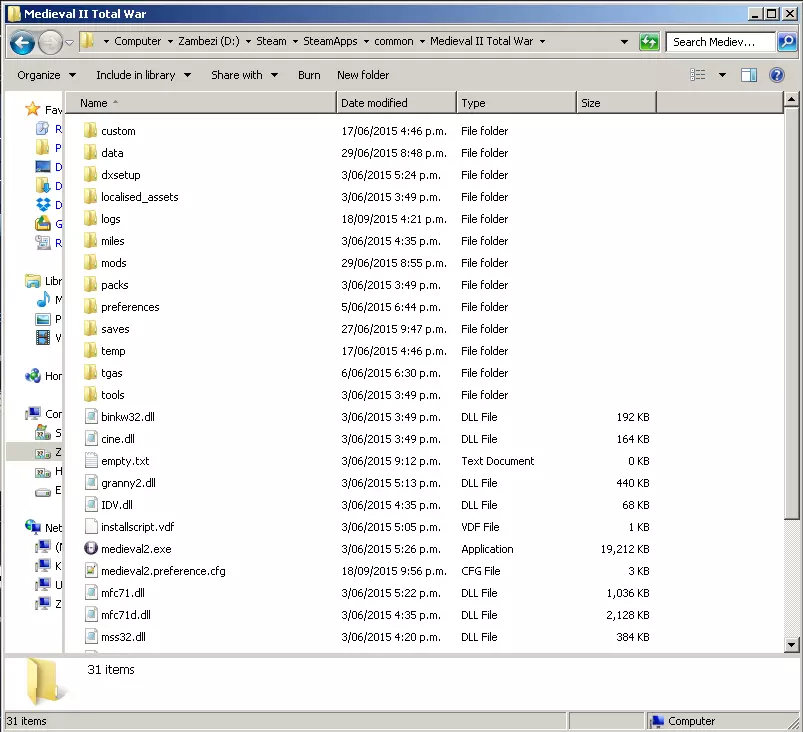
你会看到顶部显示着“中世纪2全面战争”。(赞比西河是我用来存储的驱动器,就这样吧:P)所以如果你想让它进入这个文件夹,你可以输入类似这样的内容:
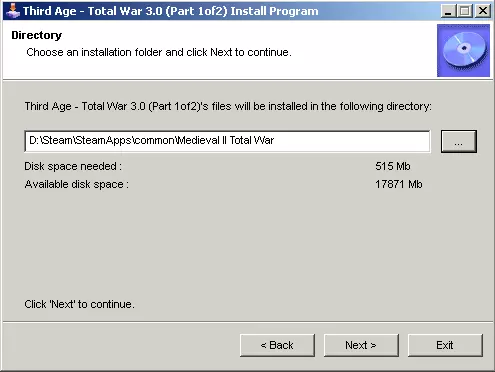
如果弹出提示“此文件夹不存在。是否要创建目录”,**不要点击“是”**:这说明你操作有误。 **不要将其安装到“mods”文件夹中**。绝对不要。那样会创建另一个名为“mods”的子文件夹,之后你将不得不进行大量额外操作来解决这个问题。 当安装最终完成后(如果程序停止响应,不要管它:它会自行恢复。除非已经持续了三天,那你才是遇到了问题。:P),猜猜接下来要做什么? **对3.0第二部分安装程序执行相同操作**。 **对3.2补丁安装程序也执行相同操作**。 请按此顺序操作。 下一部分的内容可能会导致多人游戏功能异常。此时,你最好的做法是复制你的TATW文件夹并粘贴,这样你就有两个副本了。一个可用于多人游戏,另一个将提供更好的单人战役体验。 留下你指定用于多人游戏的那个。 如果你想将其中一个作为单人战役地图,需要为其安装3.2补丁以及那些必要的错误修复。 将它们从烦人的.rar格式中解压出来(真不知道为什么大家不用.zip格式……),然后打开“Readme.txt”或其他类似名称的文件。 按照文件中第一点和第二点的说明操作。至于第三点,首先找到Map.rwm并删除它。对于“*strings.bin”,指的是“任何以blahblahblahwhateveryoulikegoeshere__strings.bin结尾的文件”(例如battle.text.strings.bin这类文件)。但是,不要删除所有以strings结尾的文件。bin文件会破坏DaC的安装,但对于《魔戒:全面战争》3.2版本来说仍然是个不错的主意。你最好再次复制你的《魔戒:全面战争》文件夹,并且只编辑其中一个。在一个文件夹中放入一个小文本文件,注明【所有以strings.bin结尾的文件已删除】,在另一个文件夹中注明【此文件夹仍保留strings.bin文件】,如果你愿意的话,可以在保留strings.bin的那个文件夹上安装DaC。 完成安装并开始游戏:如果你已经按照上述视频中提到的方法运行安装程序并安装了游戏,那么你只需运行mod文件夹中的.bat文件和/或桌面上提供的快捷方式即可。 正如Arachir在他的安装视频中所提到的,使用重命名的方法已经过时了。这是启动Steam模组的原始方法,效果不太理想。如今我们已不再需要这种方法。它虽然仍能运行,但存在自身问题。 具体来说,Steam会将这些文件识别为“正确文件”,当你尝试重新安装时,它会重新安装你的模组。如果你的模组运行良好,这没问题。但如果模组出现问题——通常是你想要重新安装的时候——它会阻止你实际运行《中世纪2:全面战争》。解决方法是将《中世纪2:全面战争》卸载30天,届时Steam才会开始重新下载“正确”的文件。 不过,如果你确实想重命名文件夹,请按照他关于该部分的说明操作。 运行《魔戒:第三纪元》的高级方法 你可以通过上述列出的文件夹重命名方法来运行游戏。本节内容涉及《中世纪2:全面战争》(TATW)的一些技术性运行方法,适合对此感兴趣的玩家。 如果你只是想让TATW正常运行,不建议使用此方法。 鸣谢:某位用户及其指南,以及经常提及相关内容的Inardesco。不过该方法几乎不涉及版权问题(他的方法1比较繁琐,我采用的是方法2)。 操作步骤如下: 1. 将你的“Third Age”文件夹重命名为容易记住的名称,例如“Third_Age_3”。本示例中,我将文件夹命名为“ThirdAgeTW”。 2. 打开你的Steam库,右键点击《中世纪2:全面战争》,然后选择“属性”。
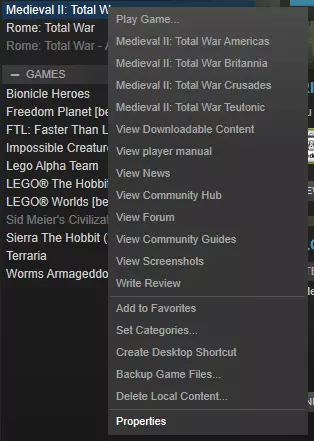
3) 进入“常规”选项,点击“设置启动选项”。此时会弹出一个小窗口,提示“这些选项仅适用于高级用户”。嗯,我之前就说过…… 4) 添加以下内容: --features.mod=mods/你为第三纪元文件夹命名的名称 以我为例,我添加的是 --features.mod=mods/ThirdAgeTW 然后点击确定。 或者,你可以为Medieval2.exe创建一个桌面快捷方式,并在其后粘贴启动选项,例如:“G: Games Steam steamapps common Medieval II Total War medieval2.exe” --features.mod=mods/Third_Age_3 通过Steam设置启动选项和通过桌面快捷方式设置的主要区别在于,通过Steam设置后,无论你是否想启动模组,它都会始终启动该模组。使用桌面快捷方式启动游戏时,你将进入原版游戏而非模组版本。这其实取决于你个人希望如何启动游戏。
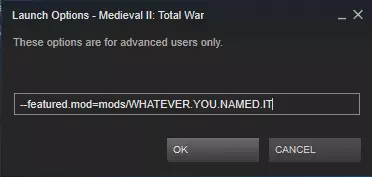
^ That says "featured." It should say "features" - with an S. (Thank you TotalWarHero) 5) Now, run Medieval II. Don't run an expansion - just run the main game, the original. Launching an expanion appears to crash the game. 6) Of course, if you want vanilla back, or want to launch another mod, just get rid of the launch option / change the folder name. Installing Divide and Conquer (currently v2.2) NOTE: I highly reccomend you play original TATW 3.2 first, before you play Divide and Conquer. This section is in the same guide for ease of reference - I hope for this to be your one-stop solution to if not all, most of your Third Age problems. NOTE: DaC v2.2 is the latest version of the Divide and Conquer mod. All OLDER versions are no longer available for download on either TWCenter.com and Moddb.com. To install Divide and Conquer you will need: - Medieval II - Kingdoms expansion - A fully functional Third Age 3.2 installation - you MUST check this first. Download your DaC files off TWCenter.com or moddb.com - get them over here:www.twcenter.net/forums/showthread.php?778983-DaC-Download-amp-Installation You will need DaC Parts 1 AND part 2 and then follow the video. https://www.youtube.com/watch?v=zZthZHjq7qE&t=54s Frequently Asked Questions / Common Bugfixes 0a) Before you do absolutely any troubleshooting whatsoever, stop using that desktop shortcut. THEN read the rest of the FAQ. 0b) Also try running the installers as admin. In severe cases you may need to temporarily turn off your antivirus, although this is rare. 0c) Also try redownloading the installers if the game is simply just breaking. This isn't often an issue, especially if you just quietly left them downloading overnight (by far the best option). 1) Multiplayer games are incompatible! To play multiplayer you need: Same OS. No crossplay between Mac and Windows, I'm afraid. I can, however, point you to this group, which is a collection of Mac M2 players, some of which play TATW. http://steamcommunity.com/groups/MTW2mac Same method of M2. As far as I know, if you have the retail version you can't play with Steam owners. What you can do with the retail version is shove your product key in Steam and install everything via Steam. Same version of M2. That is, patch 1.0.06.1 or whatever the number is (it's not big). This is very rarely a problem and only if you haven't touched your M2 game in yonks. Same mod. This shouldn't be a problem. However, if you're running TATW 3.2 you can't play with people running TATW 3.0 or with the Divide and Conquer submod (remind me, I need to put a section up on that Same method of launching it. This is almost certainly your problem. If you use the americas campaign your other players must be using the americas campaign to launch. If you use a custom shortcut, so must they. 2) Axethrowers crash the game when they fire! AXETHROWER CRASH FIX: http://www.twcenter.net/forums/showthread.php?667436-Divide-and-Conquer-Version-0-52-Released&p=14826170&viewfull=1#post14826170 I'll write up a nice section on it... sometime :P It works for both DaC and TATW, and probably also MOS too. 3) The game says "M2 has encountered an unspecified error and will now exit!" Chances are you didn't install it properly. Or you're using the .bat shortcut. Which you shouldn't be. Either way, follow the guide to the letter. 4) I'm on a Mac, what should I do? I can't give you much advice, as I run a Windows, but have a look at this guide: http://steamcommunity.com/sharedfiles/filedetails/?id=601721028 5) Can I overwrite the Grand Campaign (GC) instead of the mods? Yes, but it will screw everything else up and: 1) It's fussy to install. 2) It's fussy to uninstall. 3) It's fussy to run. 4) It's fussy and will overwrite the main data for other campaigns; the Teutonic campaign, for example, uses game settings, files, and STUFF from the main game... which is now TATW. (All my Castles look like Minas Morgul now, and my cities look like those of the Galadhrim (Lothlorien)). 6) Anyone wanna play / you wanna play with me? As for me, I'm a solitary SP AI-basher who generall is AFK far too often to play online. I can, however, say that there are plenty of others who will happily play with you. To list them all would take ages, but just search up "Third Age Total War" on Steam groups and see what you find. 7) Can I have lots of mods installed at the same time? Using the --features.mods=mod/modname as your way of launching mods you can install as many mods as you want. Do note that using the rename method can break those campaigns so simply instl all mods in their own folder and use either the aforementioned launch options or the launcher that came with the mod upon install. 8) When I try to run the files Windows just complains "What do you want to open this with?" This is an odd bug, but the solution is usually rather simple. Get your files, rename them, and stuff a .exe on the end. So you end up with TATW_part1of3_whateverthefilenamesays_you-can-rename-this-for-all-I-care.exe and then run as per usual.