换一换
换一换 




AI脚本使用参考以及用于自动化繁琐任务的实用脚本。 脚本程序 创建脚本有两种方法。 第一种是使用游戏内编辑器。
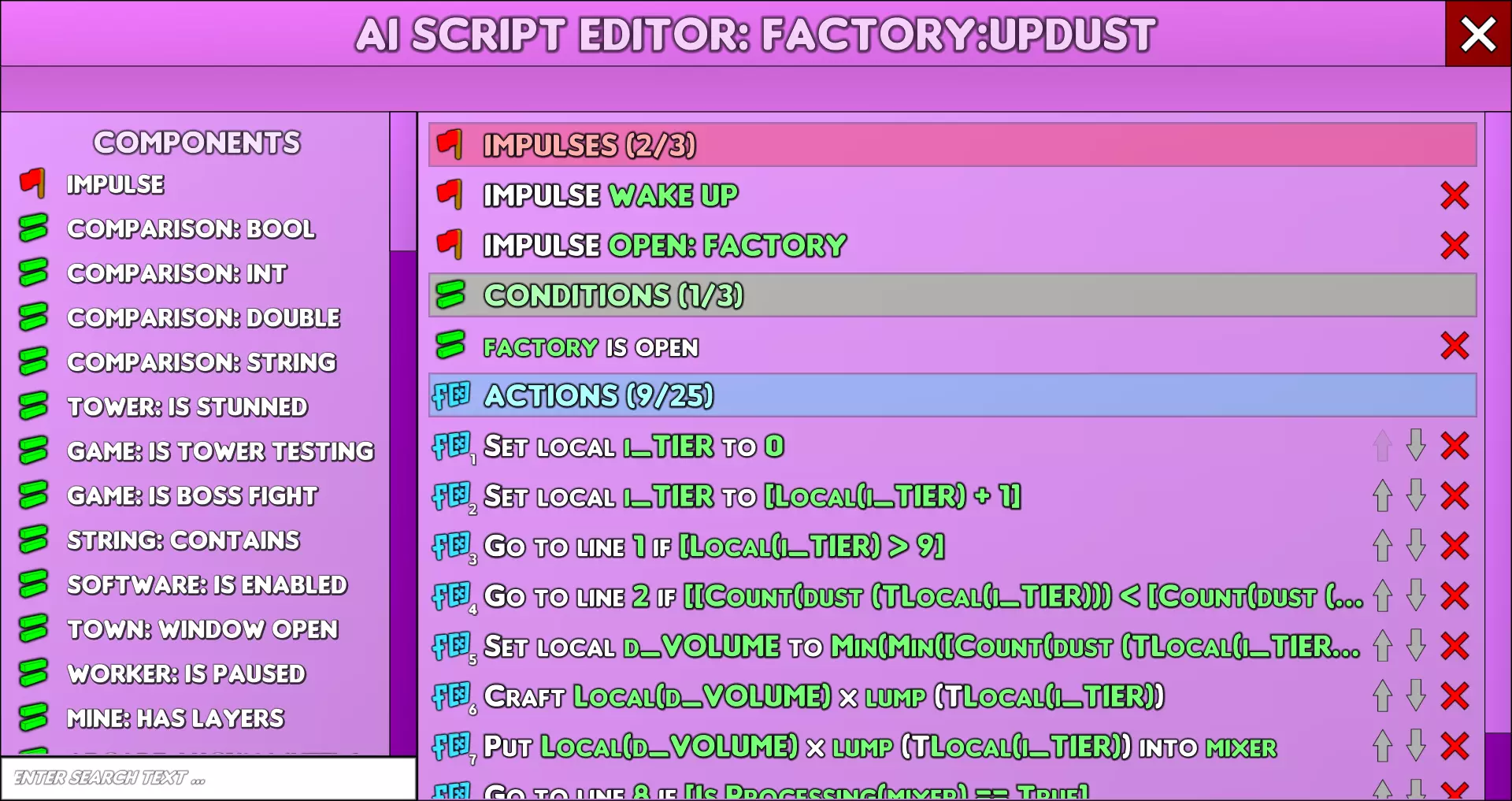
这一功能可在总部->设施AI标签页编辑脚本时找到。这种编辑脚本的方式较为笨拙,进行修改既困难又繁琐。我建议仅使用它来初步勾勒脚本框架,以便进行功能参考。 第二种是外部编辑器:
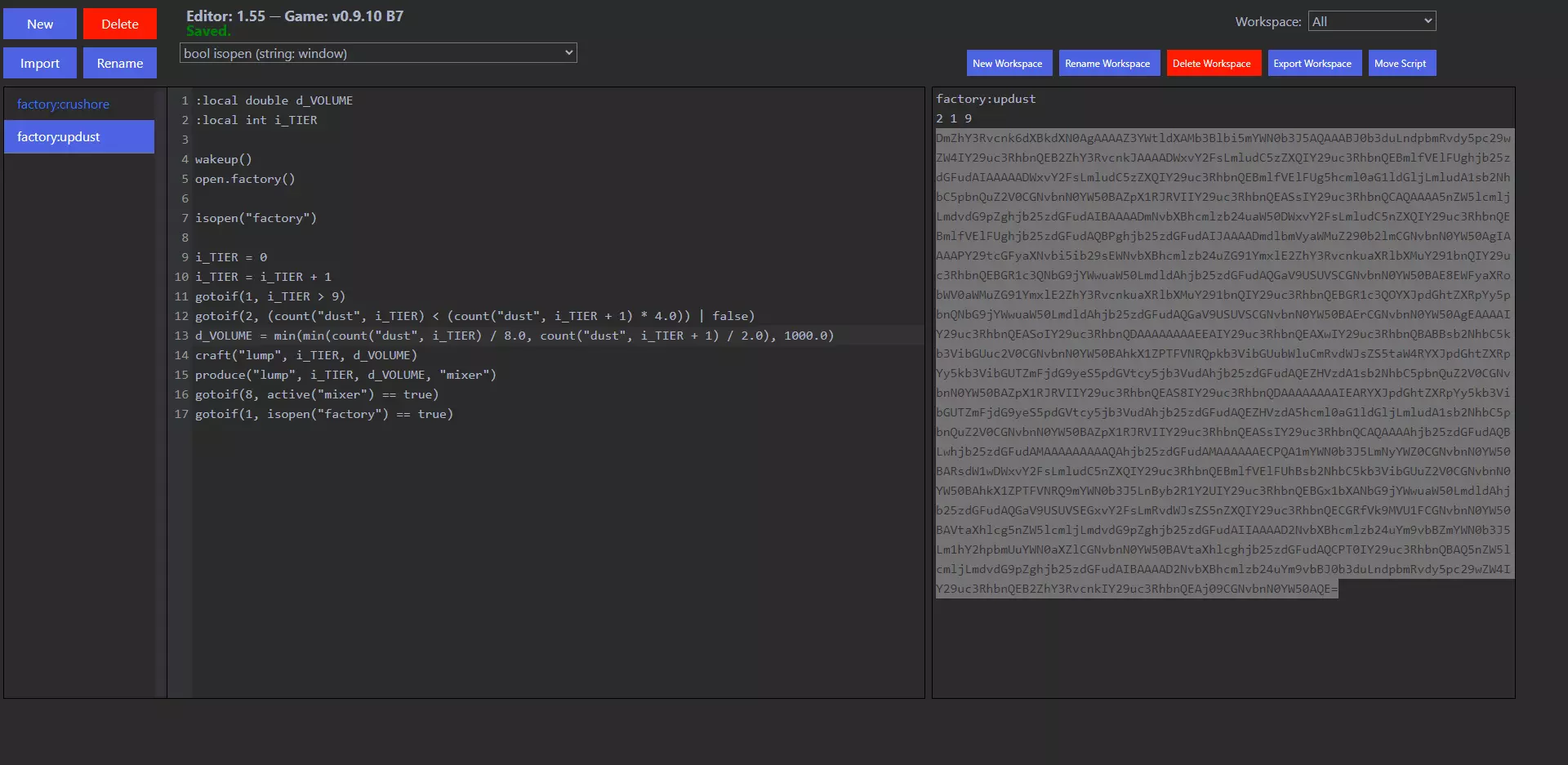
可以在基础版本中找到更简单的编辑器,在这里编辑脚本更加容易,只需输入更改,无需替换整个嵌入式函数树来进行微小修改。如果您需要更多功能和复杂性,可以找到另一个版本,它支持创建可重复使用的宏等更高级的操作。使用游戏内编辑器
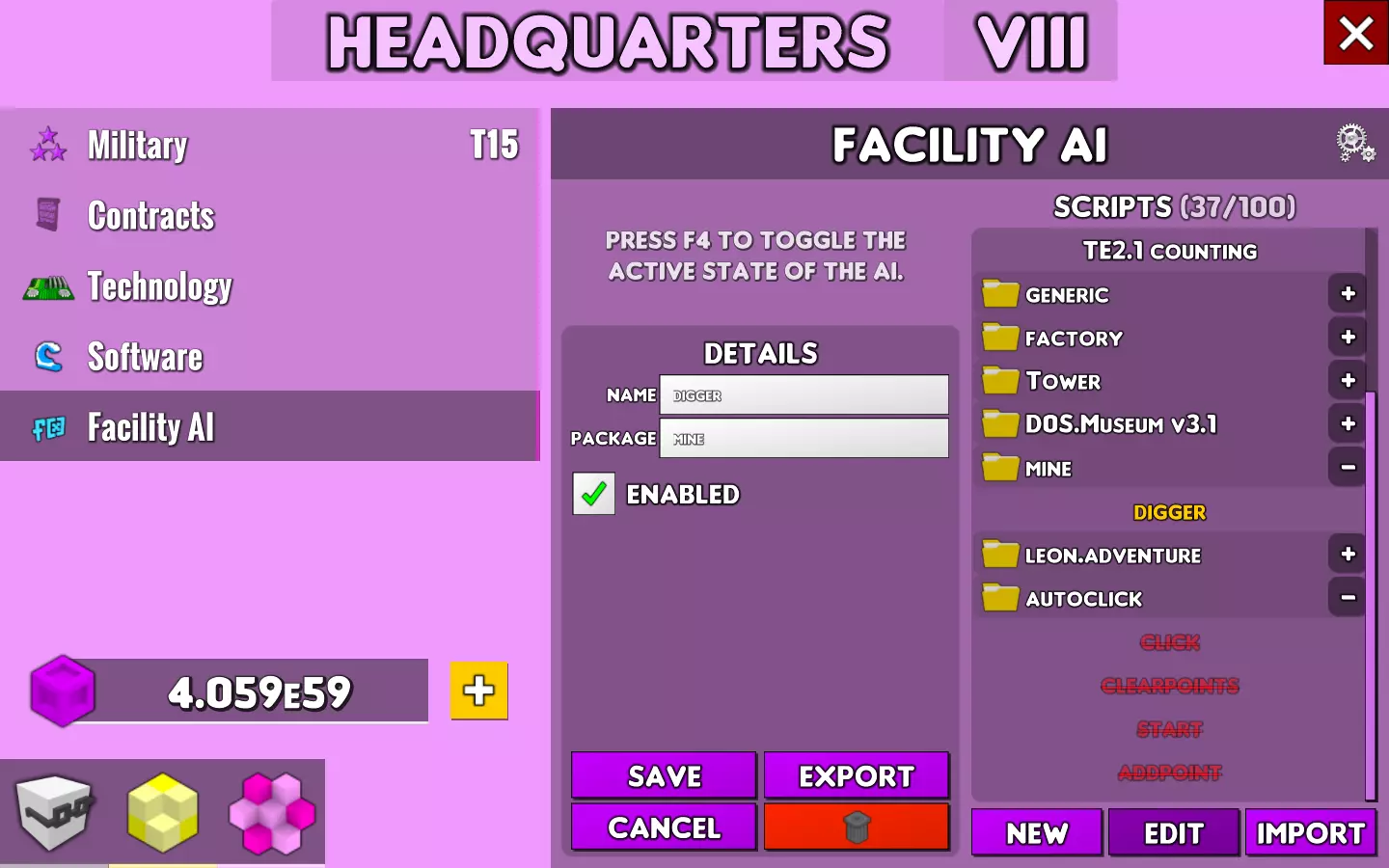
设施AI 你可以通过总部窗口的【设施AI】选项卡创建和编辑脚本。它包含两个部分: 【脚本】 【详情】 脚本 脚本部分显示软件包列表及其包含的脚本。你可以使用软件包上的+和-切换按钮来显示和隐藏其内容。点击其中一个脚本或软件包,将在详情部分打开其详细信息。 该部分还有三个按钮。【新建】按钮将打开一个空白详情,以便你创建新脚本。【编辑】按钮将在游戏内编辑器中打开所选脚本。【导入脚本】按钮允许你导入外部编辑器制作的脚本或他人创建的脚本。 你可以右键点击脚本以启用和禁用它。右键点击一个包,会切换该包内的所有脚本。 详情 详情部分有一到两个文本框。第一个是脚本名称,当选中一个包时此选项不可用。第二个是包名称。你可以使用这些文本框来更改脚本的名称和所属包。 底部有四个按钮。保存按钮用于保存对脚本名称或包所做的更改。导出按钮会提供分享脚本或导出到外部编辑器所需的文本。取消按钮会关闭详情而不更改名称或包。垃圾桶按钮用于删除脚本。
Script Editor The script editor is the in-game method of editing scripts. It has 4 sections: Components Impulses Conditions ActionsClosing the script editor will automatically save any changes. ComponentsThe components section lists all the available impulses, conditions and actions for the script editor. The impulses are at the top, conditions in the middle and actions at the bottom. A red flag indicates an impulse. A green equals indicates a condition. a red A [x ] indicated an action that manipulates a variable. A blue f [x ] indicates an action that manipulates the game. If you double click on one of these it will be added to the appropriate section on the right side of the screen. At the bottom is a search box that will filter the components and only show ones that contain the string in the search box. Each component has various parameters that alter how they function. These values can be selected from popup menus that are provided when editing the component. ImpulsesImpulses are what cause the script to be run. They are all contained under a single impulse component that contains all the impulses. Clicking the red X will delete the impulse. ConditionsConditions are any statement that resolves to true or false. They must all evaluate to true for the script to run. Left clicking on a condition will allow you to edit its parameters. Clicking the red X will delete the condition. ActionsActions are the meat of your script. They define what your scripts do. Left clicking on an action will allow you to edit its parameters. Right clicking on an action will duplicate it. Clicking the red X will delete the action. Clicking the down arrow will move the action down one line in the script. Clicking the up arrow will move the action up one line in the script. Dragging the action will allow you to move it to another location in the script. Using the External Editor (No Content Added Yet) Script Reference Scripts are made up of three parts: Impulses Conditions Actions Impulses are what causes your script to run. For example, a script with the "wakeup()" impulse would run whenever the ai was started with the F4 key. Conditions limit when your scripts can run. For example, a script with the "isopen("mine")" would only run if the Mine window was open and would not run if the Workshop window was open. Actions are what your scripts do and the possibilities of this are as many and as varied as you can imagine. Impulse Reference Impulses are triggered events that cause you script to run automatically. You may have between 0 and 3 impulses in any script. If you want more impulses than are available, you can use the [Basic: Execute] action to run it from another script which has different impulses. While there is no limit on the order and placement of Impulses, it is recommended that you place them as the first items in your script. AI Impulse Reference AI impulses will cause the script to activate when specific AI actions occur. Wake Up Syntax: void wakeup() Triggers whenever the AI switches from inactive to active wakeup() Tower Testing Impulse Reference Tower Testing Impulses will cause the script to activate when specific Tower Testing actions occur. New Round Syntax: void game.newround() Triggers whenever a new Tower Testing round starts game.newround() Window Open Impulse Reference Window Open impulses will cause the script to activate when specific windows are opened. Open: Arcade Syntax: void open.arcade() Triggers whenever the window of the Arcade is opened open.arcade() Open: Construction Firm Syntax: void open.constructionFirm() Triggers whenever the window of the Construction Firm is opened open.constructionFirm() Open: Factory Syntax: void open.factory() Triggers whenever the window of the Factory is opened open.factory() Open: Headquarters Syntax: void open.headquarters() Triggers whenever the window of the Headquarters is opened open.headquarters() Open: Laboratory Syntax: void open.laboratory() Triggers whenever the window of the Laboratory is opened open.laboratory() Open: Mine Syntax: void open.mine() Triggers whenever the window of the Mine is opened open.mine() Open: Museum Syntax: void open.museum() Triggers whenever the window of the Museum is opened open.museum() Open: Power Plant Syntax: void open.powerplant() Triggers whenever the window of the Power Plant is opened open.powerplant() Open: Shipyard Syntax: void open.shipyard() Triggers whenever the window of the Shipyard is opened open.shipyard() Open: Statue of Cubos Syntax: void open.statueofcubos() Triggers whenever the window of the Statue of Cubos is opened open.statueofcubos() Open: Trading Post Syntax: void open.tradingpost() Triggers whenever the window of the Trading Post is opened open.tradingpost() Open: Workshop Syntax: void open.workshop() Triggers whenever the window of the Workshop is opened open.workshop() Window Close Impulse Reference Window Close impulses will cause the script to activate when specific windows are closed. Close: Arcade Syntax: void close.arcade() Triggers whenever the window of the Arcade is fully closed close.arcade() Close: Construction Firm Syntax: void close.constructionFirm() Triggers whenever the window of the Construction Firm is fully closed close.constructionFirm() Close: Factory Syntax: void close.factory() Triggers whenever the window of the Factory is fully closed close.factory() Close: Headquarters Syntax: void close.headquarters() Triggers whenever the window of the Headquarters is fully closed close.headquarters() Close: Laboratory Syntax: void close.laboratory() Triggers whenever the window of the Laboratory is fully closed close.laboratory() Close: Mine Syntax: void close.mine() Triggers whenever the window of the Mine is fully closed close.mine() Close: Museum Syntax: void close.museum() Triggers whenever the window of the Museum is fully closed close.museum() Close: Power Plant Syntax: void close.powerplant() Triggers whenever the window of the Power Plant is fully closed close.powerplant() Close: Shipyard Syntax: void close.shipyard() Triggers whenever the window of the Shipyard is fully closed close.shipyard Close: Statue of Cubos Syntax: void close.statueofcubos() Triggers whenever the window of the Statue of Cubos is fully closed close.statueofcubos() Close: Trading Post Syntax: void close.tradingpost() Triggers whenever the window of the Trading Post is fully closed close.tradingpost() Close: Workshop Syntax: void close.workshop() Triggers whenever the window of the Workshop is fully closed close.workshop() Number Key Impulse Reference Number key impulses will cause the script to activate when specific numeric row keys are pressed. Key: 0 Syntax: void key.0() Triggers whenever the '0' key in the numeric key row is being pressed key.0() Key: 1 Syntax: void key.1() Triggers whenever the '1' key in the numeric key row is being pressed key.1() Key: 2 Syntax: void key.2() Triggers whenever the '2' key in the numeric key row is being pressed key.2() Key: 3 Syntax: void key.3() Triggers whenever the '3' key in the numeric key row is being pressed key.3() Key: 4 Syntax: void key.4() Triggers whenever the '4' key in the numeric key row is being pressed key.4() Key: 5 Syntax: void key.5() Triggers whenever the '5' key in the numeric key row is being pressed key.5() Key: 6 Syntax: void key.6() Triggers whenever the '6' key in the numeric key row is being pressed key.6() Key: 7 Syntax: void key.7() Triggers whenever the '7' key in the numeric key row is being pressed key.7() Key: 8 Syntax: void key.8() Triggers whenever the '8' key in the numeric key row is being pressed key.8() Key: 9 Syntax: void key.9() Triggers whenever the '9' key in the numeric key row is being pressed key.9() Letter Key Impulse Reference Letter key impulses will cause the script to activate when specific letter keys are pressed. Key: A Syntax: void key.a() Triggers whenever the 'A' key is being pressed key.a() Key: B Syntax: void key.b() Triggers whenever the 'B' key is being pressed key.b() Key: C Syntax: void key.c() Triggers whenever the 'C' key is being pressed key.c() Key: D Syntax: void key.d() Triggers whenever the 'D' key is being pressed key.d() Key: E Syntax: void key.e() Triggers whenever the 'E' key is being pressed key.e() Key: F Syntax: void key.f() Triggers whenever the 'F' key is being pressed key.f() Key: G Syntax: void key.g() Triggers whenever the 'G' key is being pressed key.g() Key: H Syntax: void key.h() Triggers whenever the 'H' key is being pressed key.h() Key: I Syntax: void key.i() Triggers whenever the 'I' key is being pressed key.i() Key: J Syntax: void key.j() Triggers whenever the 'J' key is being pressed key.j() Key: K Syntax: void key.k() Triggers whenever the 'K' key is being pressed key.k() Key: L Syntax: void key.l() Triggers whenever the 'L' key is being pressed key.l() Key: M Syntax: void key.m() Triggers whenever the 'M' key is being pressed key.m() Key: N Syntax: void key.n() Triggers whenever the 'N' key is being pressed key.n() Key: O Syntax: void key.o() Triggers whenever the 'O' key is being pressed key.o() Key: P Syntax: void key.p() Triggers whenever the 'P' key is being pressed key.p() Key: Q Syntax: void key.q() Triggers whenever the 'Q' key is being pressed key.q() Key: R Syntax: void key.r() Triggers whenever the 'R' key is being pressed key.r() Key: S Syntax: void key.s() Triggers whenever the 'S' key is being pressed key.s() Key: T Syntax: void key.t() Triggers whenever the 'T' key is being pressed key.t() Key: U Syntax: void key.u() Triggers whenever the 'U' key is being pressed key.u() Key: V Syntax: void key.v() Triggers whenever the 'V' key is being pressed key.v() Key: W Syntax: void key.w() Triggers whenever the 'W' key is being pressed key.w() Key: X Syntax: void key.x() Triggers whenever the 'X' key is being pressed key.x() Key: Y Syntax: void key.y() Triggers whenever the 'Y' key is being pressed key.y() Key: Z Syntax: void key.z() Triggers whenever the 'Z' key is being pressed key.z() Condition Reference Conditions are any statement that evaluates to a boolean value (true or false). A script will only run if all conditions evaluate to true. You may have zero to three condition in any script. Arcade Condition Reference Arcade conditions check the status of games in the Arcade Adventure: Is Bomb Syntax: boolean adventure.isBomb(vector_GridPosition) Returns True if the tile in the Adventure game has a Bomb. adventure.isBomb(vec(1.0, 1.0)) Adventure: Is Enemy Syntax: boolean adventure.isEnemy(vector_GridPosition) Returns True if the tile in the Adventure game has an Enemy. adventure.isEnemy(vec(d_VectorX, d_VectorY)) Adventure: Is Room Completed Syntax: boolean adventure.isCompleted(vector_GridPosition) Returns true if the Room at the target grid position in the Adventure game is completed. Requires Map and Compass. adventure.isCompleted(vec(d_VectorX, d_VectorY)) Adventure: Is Wall Syntax: boolean adventure.isWall(vector_GridPosition) Returns True if the tile in the Adventure game is a Wall. adventure.isWall(vec(d_VectorX, d_VectorY)) Arcade: Jumble is Active Syntax: boolean jumble.isActive() Returns True if there is an Active game of Jumble in the Arcade. jumble.isActive() Arcade: Lucky Wheel Is Spinning Syntax: boolean wheel.isSpinning() Returns True if the Lucky Wheel is currently spinning in the Arcade. jumble.isActive() Comparison Condition Reference Compare conditions compare two values Comparison: Bool Syntax: boolean boolean_FirstArgument operator_Operator boolean_SecondArgument Returns True if the comparison between two Boolean values is True. ==: The Equals operator compares if two Boolean values are the same true == true !=: The Not Equals operator compares if two Boolean values are different true != false &: The And operator compares if both Boolean values are True true & true |: The Or operator compares if either Boolean value is True false | true Comparison: Double Syntax: boolean double_FirstArgument operator_Operator double_SecondArgument Returns True if the comparison between two double(decimal) number values is True. == The Equals operator compares if two double values are the same 1.0 == 1.0 != The Not Equals operator compares if two double values are different 1.0 != 2.0 < The Less Than operator compares if the value of the first double value is lower than the second double value 1.0 < 2.0 <= The Less Than or Equal To operator compares if the value of the first double value is lower than or equal to the second double value 1.0 <= 2.0 > The Greater Than operator compares if the value of the first double value is higher than the second double value 1.0 < 2.0 >= The Greater Than or Equal To operator compares if the value of the first double value is higher than or equal to the second double value 2.0 >= 2.0 Comparison: Int Syntax: boolean integer_FirstArgument operator_Operator integer_SecondArgument Returns True if the comparison between two Integer(whole) number values is True. ==The Equals operator compares if two integer values are the same 1 == 1 != The Not Equals operator compares if two integer values are different 1 != 2 < The Less Than operator compares if the value of the first integer value is lower than the second integer value 1 < 2 <= The Less Than or Equal To operator compares if the value of the first integer value is lower than or equal to the second integer value 1 <= 2 > The Greater Than operator compares if the value of the first integer value is higher than the second integer value 1 < 2 >= The Greater Than or Equal To operator compares if the value of the first integer value is higher than or equal to the second integer value 2 >= 2 Comparison: String Syntax: boolean string_FirstArgument operator_Operator string_SecondArgument Returns True if the comparison between two String(Text) values is True. == The Equals operator compares if two string values are the same "foo" == "foo" != The Not Equals operator compares if two string values are different "foo" != "bar" Factory Condition Reference Factory Conditions check the status of Factory Equipment Factory: Is Processing Syntax: boolean active(string_FactoryMachine) Returns True if the specified machine is currently processing items. Valid FactoryMachine strings are "oven", "assembly", "refiner", "crusher", "cutter", "presser". "mixer", "shaper", and "boiler" active("oven") Museum Condition Reference Museum Conditions check the status of the Museum Museum: Fill Inventory Syntax: boolean isfill() Returns True if the "Fill Inventory" option is enabled in the power stone store. isfill() Mine Condition Reference Mine Conditions check the status of the Mine Mine: Has Layers Syntax: boolean hasLayers() Returns True if a the active mining tab can generate at least 1 mining layer. hasLayers() Statue of Cubos Condition Reference Statue of Cubos Conditions check the status of the Statue of Cubos Game: Is Boss Fight Syntax: boolean isBossFight() Returns True if a Boss Fight is currently Active. isBossFight() String Condition Reference String Conditions check the status of String(Text) Values String: Contains Syntax: boolean contains(string_haystack, string_needle) Returns True if the needle string is found in the haystack string. contains("foobar", "foo") Tower Testing Condition Reference Tower Testing Conditions check the status of Tower Testing Game: Is Tower Testing Syntax: boolean isTowerTesting() Returns True if Tower Testing is active, regardless of pause or survival of the tower. isTowerTesting() Software: Is Enabled Syntax: boolean software.enabled(string_software) Returns True if the indicated Wave Streaming Software is enabled. Valid wave software strings are: "software.autoskip", "software.wavestreaming", "software.wavesurge", software.criticalWavejump", "software.wavemomentum", "software.wavestorm", "software.wavepersistence", "software.waveinstability", "software.wavevortex", "software.wavecatalyst", "software.waveendurance", "software.newbounds", "software.wavemarathon", "software.wavecompression", "software.erasurge", "software.eraburst", "software.eraswirl", "software.wavehorizon", software.nobounds", "software.wavefloor", "software.erafloor", and "software.erahorizon". software.enabled("software.autoskip") Tower: Is Stunned Syntax: boolean stunned() Returns True if the Tower exists and is affected by the stun condition. stunned() Town Condition Reference Town Conditions check the status of your Town Town: Window Open Syntax: boolean isopen(string_BuildingWindow) Returns True if the indicated Building screen is open. Valid Building Window strings are: "towertesting", "tradingpost", "powerplant", "factory", "laboratory", "shipyard", "workshop", "arcade", "museum", "headquarters", "constructionfirm", "statueofcubos", and "mine" isopen("towertesting") Worker: Is Paused Syntax: boolean worker.paused(string_WorkerName) Returns True if the first worker with the specified name is paused or does not exist. worker.paused("Bob the Builder") Action Reference (No Content Added Yet) Function Reference (No Content Added Yet) Tower Testing Scripts (No Content Added Yet) Power Plant Scripts (No Content Added Yet) Mine Scripts Mine scripts are used in the mine. Mine Script: Digger This script will rapidly mine every tile of every layer of the mine and convert the collected ore into resources. It takes 10-15 seconds to mine the maximum 40 layers of the mine. Note: This script requires turbo. :local int miney :local int minex :local int mineshaft wakeup() open.mine() isopen("mine") executesync("turbo start") reset:mineshaft = 0;Reset mineshaft selection. nextShaft:mineshaft = mineshaft + 1;Move to first mineshaft. tab(mineshaft) isLayers:gotoif(collection, hasLayers() == false);If no more layers, goto resource collection. nextLayer:newlayer();Start a new layer in the mine. minex = -1;Reset rows nextRow:minex = minex + 1;Start next row miney = -1;reset columns nextColumn:miney = miney + 1;start next column dig(minex, miney);Dig square gotoif(nextColumn, miney < 3);Continue to next column gotoif(nextRow, minex < 3);Continue to next row goto(isLayers);Check for a new layer. collection:click(vec(1360.0, 65.0));Collect mined resources gotoif(nextShaft, mineshaft < 12) executesync("turbo stop") wait(0.0) ; This is a no-op, because "executesync("turbo stop")" must never be on the last line Mine Script: Digger: Import C21pbmU6ZGlnZ2VyAgAAAAZ3YWtldXAJb3Blbi5taW5lAQAAABJ0b3duLndpbmRvdy5pc29wZW4IY29uc3RhbnQEBG1pbmUSAAAAE2dlbmVyaWMuZXhlY3V0ZXN5bmMIY29uc3RhbnQEC3R1cmJvIHN0YXJ0DWxvY2FsLmludC5zZXQIY29uc3RhbnQECW1pbmVzaGFmdAhjb25zdGFudAIAAAAADWxvY2FsLmludC5zZXQIY29uc3RhbnQECW1pbmVzaGFmdA5hcml0aG1ldGljLmludA1sb2NhbC5pbnQuZ2V0CGNvbnN0YW50BAltaW5lc2hhZnQIY29uc3RhbnQEASsIY29uc3RhbnQCAQAAAAhtaW5lLnRhYg1sb2NhbC5pbnQuZ2V0CGNvbnN0YW50BAltaW5lc2hhZnQOZ2VuZXJpYy5nb3RvaWYIY29uc3RhbnQCDwAAAA9jb21wYXJpc29uLmJvb2wObWluZS5oYXNMYXllcnMIY29uc3RhbnQEAj09CGNvbnN0YW50AQANbWluZS5uZXdsYXllcg1sb2NhbC5pbnQuc2V0CGNvbnN0YW50BAVtaW5leAhjb25zdGFudAL/////DWxvY2FsLmludC5zZXQIY29uc3RhbnQEBW1pbmV4DmFyaXRobWV0aWMuaW50DWxvY2FsLmludC5nZXQIY29uc3RhbnQEBW1pbmV4CGNvbnN0YW50BAErCGNvbnN0YW50AgEAAAANbG9jYWwuaW50LnNldAhjb25zdGFudAQFbWluZXkIY29uc3RhbnQC/////w1sb2NhbC5pbnQuc2V0CGNvbnN0YW50BAVtaW5leQ5hcml0aG1ldGljLmludA1sb2NhbC5pbnQuZ2V0CGNvbnN0YW50BAVtaW5leQhjb25zdGFudAQBKwhjb25zdGFudAIBAAAACG1pbmUuZGlnDWxvY2FsLmludC5nZXQIY29uc3RhbnQEBW1pbmV4DWxvY2FsLmludC5nZXQIY29uc3RhbnQEBW1pbmV5DmdlbmVyaWMuZ290b2lmCGNvbnN0YW50AgoAAAAOY29tcGFyaXNvbi5pbnQNbG9jYWwuaW50LmdldAhjb25zdGFudAQFbWluZXkIY29uc3RhbnQEATwIY29uc3RhbnQCAwAAAA5nZW5lcmljLmdvdG9pZghjb25zdGFudAIIAAAADmNvbXBhcmlzb24uaW50DWxvY2FsLmludC5nZXQIY29uc3RhbnQEBW1pbmV4CGNvbnN0YW50BAE8CGNvbnN0YW50AgMAAAAMZ2VuZXJpYy5nb3RvCGNvbnN0YW50AgUAAAANZ2VuZXJpYy5jbGljaw52ZWMuZnJvbUNvb3Jkcwhjb25zdGFudAMAAAAAAECVQAhjb25zdGFudAMAAAAAAEBfQA5nZW5lcmljLmdvdG9pZghjb25zdGFudAIDAAAADmNvbXBhcmlzb24uaW50DWxvY2FsLmludC5nZXQIY29uc3RhbnQECW1pbmVzaGFmdAhjb25zdGFudAQBPAhjb25zdGFudAIMAAAAE2dlbmVyaWMuZXhlY3V0ZXN5bmMIY29uc3RhbnQECnR1cmJvIHN0b3AMZ2VuZXJpYy53YWl0CGNvbnN0YW50AwAAAAAAAAAA Factory Scripts Factory:CrushOreThis script will put your ore into the crusher to turn it into dust. It will start with the most expensive ore and work its way down. It will crush a maximum of d_MAX_VOLUME pieces of ore at a time so that it will not stick you with a multi-hour crush. It will also leave you with at least d_RETAIN_ORE ore of each type so that you can feed it to your fabricator or crush it in an emergency. Code: ;Variable declarations :local int i_TIER ;The current tier of ore being crushed :local double d_MAX_VOLUME ;The maximum amount of ores to crush in a single action :local double d_RETAIN_ORE ;The amount of ore to keep and not crush. ;Impulses wakeup() ;Activate when AI starts open.factory() ;Activate when opening factory ;Conditions isopen("factory") ;Only activate if factory is open ;Settings - Change these values to adjust the script. d_MAX_VOLUME = 1000.0 ;Set the maximum amount of ore to crush. d_RETAIN_ORE = 1000.0 ;Set the minimum amount of ore to save. ;Actions reset: ;Select the highest ore tier with excess dust. i_TIER = if((count("ore", 10) > d_RETAIN_ORE ),10, if((count("ore", 9) > d_RETAIN_ORE ),9, if((count("ore", 8) > d_RETAIN_ORE ),8, if((count("ore", 7) > d_RETAIN_ORE ),7, if((count("ore", 6) > d_RETAIN_ORE ),6, if((count("ore", 5) > d_RETAIN_ORE ),5, if((count("ore", 4) > d_RETAIN_ORE ),4, if((count("ore", 3) > d_RETAIN_ORE ),3, if((count("ore", 2) > d_RETAIN_ORE ),2, if((count("ore", 1) > d_RETAIN_ORE ),1, 0)))))))))) ;Skip if no dust to convert gotoif(end, isopen("factory") == false | i_TIER == 0) crushOre: ;Crush as much ore as possible within limits. produce("ore", i_TIER, min(count("ore", i_TIER) - d_RETAIN_ORE, d_MAX_VOLUME), "crusher") waitForCrusher: ;Wait for crusher to finish. gotoif(waitForCrusher, active("crusher") == true) end: gotoif(reset, isopen("factory") == true) ;Restart script if factory is still open. Factory:UpDustThis script will convert your dist into higher tiers, prioritizing higher tiers of dust. Code: ;Variable Declarations :local double d_MAX_VOLUME ;The maximum amount of ore lumps to be refined at once. :local double d_RETAIN_PERCENTAGE ;The minimum amount of the lower ore to keep. :local int i_TIER ;Impulses wakeup() ;Activate when AI starts open.factory() ;Activate when opening factory ;Conditions isopen("factory") ;Only activate if factory is open ;Settings - Change these values to adjust the script. ;Set the maximum amount of ore lumps to process at once d_MAX_VOLUME = 1000.0 ;Set the percentage of the lower level dust to keep. (0.00 = 0%, 0.5 = 50%, 1.00 = 100%) d_RETAIN_PERCENTAGE = 0.25 reset: ;Select dust tier to convert. Must have a minimum of 5 units of dust and be at least 4 times the volume of the tier to be converted to. i_TIER = if(((count("dust", 9) > 5.0) & ((count("dust", 9) / 4.0) > count("dust", 10))),9, if(((count("dust", 8) > 5.0) & ((count("dust", 8) / 4.0) > count("dust", 9))),8, if(((count("dust", 7) > 5.0) & ((count("dust", 7) / 4.0) > count("dust", 8))),7, if(((count("dust", 6) > 5.0) & ((count("dust", 6) / 4.0) > count("dust", 7))),6, if(((count("dust", 5) > 5.0) & ((count("dust", 5) / 4.0) > count("dust", 6))),5, if(((count("dust", 4) > 5.0) & ((count("dust", 4) / 4.0) > count("dust", 5))),4, if(((count("dust", 3) > 5.0) & ((count("dust", 3) / 4.0) > count("dust", 4))),3, if(((count("dust", 2) > 5.0) & ((count("dust", 2) / 4.0) > count("dust", 3))),2, if(((count("dust", 1) > 5.0) & ((count("dust", 1) / 4.0) > count("dust", 2))),1, 0))))))))) ;Do Nothing if no dust to convert gotoif(end, isopen("factory") != true | i_TIER == 0) processDust: ;Craft up to d_MAX_VOLUME ore lumps leaving at least d_RETAIN_PERCENTAGE of the lower tier dust. craft("lump", i_TIER,min(min(((count("dust", i_TIER) - (count("dust", i_TIER) * d_RETAIN_PERCENTAGE)) / 4.0), count("dust", i_TIER + 1)), d_MAX_VOLUME)) ;Put ore lumps into mixer produce("lump", i_TIER, count("lump", i_TIER), "mixer") waitForMixer: ;Wait until mixer finishes producing dust. gotoif(waitForMixer, active("mixer") == true) end: ;If the factory window is still open, restart script. gotoif(reset, isopen("factory") == true) Headquarters Scripts (No Content Added Yet) Arcade Scripts (No Content Added Yet) Laboratory Scripts (No Content Added Yet) Shipyard (No Content Added Yet) Trading Post Scripts (No Content Added Yet) Workshop Scripts (No Content Added Yet) Museum Scripts Museum scripts are used in the museum. Construction Firm Scripts (No Content Added Yet) Statue of Cubos Scripts (No Content Added Yet) Generic Scripts Scripts in the generic script section have no restriction on where they should be used. Generic Script: Auto Clicker The auto clicker clicks a series of designated points repeatedly. [c]Toggle Autoclicker scripts Add a point to click [x]Clear points [k]Toggle clicking autoclick:click;Activate on click of key [c] key.c() ;Disable autoclick if it is on. gotoif(on, gbg("autoclick:enabled") == false) off: gu("autoclick:enabled") gu("autoclick:instructions") gu("autoclick:points") gu("autoclick:clicking") stop("autoclick:start") stop("autoclick:click") goto(end) ;Enable autoclick if it is off on: gbs("autoclick:enabled", true) ;Display instructions gss("autoclick:instructions", "[<color=#fb3>c</color>] turn off script [<color=#fb3>p</color>] add point [<color=#fb3>x</color>] clear points [<color=#fb3>k</color>] click") waituntil(false) end: wait(0.0) autoclick:addpoint;Activate on click of key key.p() ;Only run if autoclick is active gbg("autoclick:enabled") ;Add x and y mouse coordinates to points string gss("autoclick:points", gsg("autoclick:points") . ("x" . d2s(x(position()))) . ("y" . d2s(y(position()))))[/code] autoclick:clearpoints;Activate on click of key [x] key.x() ;Only run if autoclick is active gbg("autoclick:enabled") ;Clear point list gu("autoclick:points") autoclick:start:local vector nextpoint :local int nextx :local int lasty :local int lastx ;Activate on click of key [k] key.k() ;Only run if autoclick is active gbg("autoclick:enabled") ;If clicking, stop clicking gotoif(stop, gbg("autoclick:clicking")) gotoif(stop, len(gsg("autoclick:points")) < 4) ;Start clicking gbs("autoclick:clicking", true) ;reset to first point reset: lastx = 0;xstart lasty = 0;ystart ;get next point incrementpoint: lastx = index(gsg("autoclick:points"), "x", lasty);Get location of next x gotoif(reset, lastx < 0);If there is no next x, reset to first point lasty = index(gsg("autoclick:points"), "y", lastx);Get location of next y nextx = if(index(gsg("autoclick:points"), "x", lasty) > 0, index(gsg("autoclick:points"), "x", lasty), len(gsg("autoclick:points")) + 1);get the end of next y nextpoint = vec(s2d(sub(gsg("autoclick:points"), lastx + 1, lasty - lastx - 1), -1.0), s2d(sub(gsg("autoclick:points"), lasty + 1, nextx - lasty - 1), -1.0));Get point coordinates doclick: click(nextpoint) ;go to next point in list goto(incrementpoint); stop: gu("autoclick:clicking") stop("autoclick:start") Generic Script: Auto Clicker: Import EmF1dG9jbGljazphZGRwb2ludAEAAAAFa2V5LnABAAAAD2dsb2JhbC5ib29sLmdldAhjb25zdGFudAQRYXV0b2NsaWNrOmVuYWJsZWQBAAAAEWdsb2JhbC5zdHJpbmcuc2V0CGNvbnN0YW50BBBhdXRvY2xpY2s6cG9pbnRzBmNvbmNhdAZjb25jYXQRZ2xvYmFsLnN0cmluZy5nZXQIY29uc3RhbnQEEGF1dG9jbGljazpwb2ludHMGY29uY2F0CGNvbnN0YW50BAF4A2QycwZ2ZWMyLngObW91c2UucG9zaXRpb24GY29uY2F0CGNvbnN0YW50BAF5A2QycwZ2ZWMyLnkObW91c2UucG9zaXRpb24=;D2F1dG9jbGljazpzdGFydAEAAAAFa2V5LmsBAAAAD2dsb2JhbC5ib29sLmdldAhjb25zdGFudAQRYXV0b2NsaWNrOmVuYWJsZWQOAAAADmdlbmVyaWMuZ290b2lmCGNvbnN0YW50Ag0AAAAPZ2xvYmFsLmJvb2wuZ2V0CGNvbnN0YW50BBJhdXRvY2xpY2s6Y2xpY2tpbmcOZ2VuZXJpYy5nb3RvaWYIY29uc3RhbnQCDQAAAA5jb21wYXJpc29uLmludA1zdHJpbmcubGVuZ3RoEWdsb2JhbC5zdHJpbmcuZ2V0CGNvbnN0YW50BBBhdXRvY2xpY2s6cG9pbnRzCGNvbnN0YW50BAE8CGNvbnN0YW50AgQAAAAPZ2xvYmFsLmJvb2wuc2V0CGNvbnN0YW50BBJhdXRvY2xpY2s6Y2xpY2tpbmcIY29uc3RhbnQBAQ1sb2NhbC5pbnQuc2V0CGNvbnN0YW50BAVsYXN0eAhjb25zdGFudAIAAAAADWxvY2FsLmludC5zZXQIY29uc3RhbnQEBWxhc3R5CGNvbnN0YW50AgAAAAANbG9jYWwuaW50LnNldAhjb25zdGFudAQFbGFzdHgOc3RyaW5nLmluZGV4T2YRZ2xvYmFsLnN0cmluZy5nZXQIY29uc3RhbnQEEGF1dG9jbGljazpwb2ludHMIY29uc3RhbnQEAXgNbG9jYWwuaW50LmdldAhjb25zdGFudAQFbGFzdHkOZ2VuZXJpYy5nb3RvaWYIY29uc3RhbnQCBAAAAA5jb21wYXJpc29uLmludA1sb2NhbC5pbnQuZ2V0CGNvbnN0YW50BAVsYXN0eAhjb25zdGFudAQBPAhjb25zdGFudAIAAAAADWxvY2FsLmludC5zZXQIY29uc3RhbnQEBWxhc3R5DnN0cmluZy5pbmRleE9mEWdsb2JhbC5zdHJpbmcuZ2V0CGNvbnN0YW50BBBhdXRvY2xpY2s6cG9pbnRzCGNvbnN0YW50BAF5DWxvY2FsLmludC5nZXQIY29uc3RhbnQEBWxhc3R4DWxvY2FsLmludC5zZXQIY29uc3RhbnQEBW5leHR4C3Rlcm5hcnkuaW50DmNvbXBhcmlzb24uaW50DnN0cmluZy5pbmRleE9mEWdsb2JhbC5zdHJpbmcuZ2V0CGNvbnN0YW50BBBhdXRvY2xpY2s6cG9pbnRzCGNvbnN0YW50BAF4DWxvY2FsLmludC5nZXQIY29uc3RhbnQEBWxhc3R5CGNvbnN0YW50BAE+CGNvbnN0YW50AgAAAAAOc3RyaW5nLmluZGV4T2YRZ2xvYmFsLnN0cmluZy5nZXQIY29uc3RhbnQEEGF1dG9jbGljazpwb2ludHMIY29uc3RhbnQEAXgNbG9jYWwuaW50LmdldAhjb25zdGFudAQFbGFzdHkOYXJpdGhtZXRpYy5pbnQNc3RyaW5nLmxlbmd0aBFnbG9iYWwuc3RyaW5nLmdldAhjb25zdGFudAQQYXV0b2NsaWNrOnBvaW50cwhjb25zdGFudAQBKwhjb25zdGFudAIBAAAADmxvY2FsLnZlYzIuc2V0CGNvbnN0YW50BAluZXh0cG9pbnQOdmVjLmZyb21Db29yZHMDczJkCXN1YnN0cmluZxFnbG9iYWwuc3RyaW5nLmdldAhjb25zdGFudAQQYXV0b2NsaWNrOnBvaW50cw5hcml0aG1ldGljLmludA1sb2NhbC5pbnQuZ2V0CGNvbnN0YW50BAVsYXN0eAhjb25zdGFudAQBKwhjb25zdGFudAIBAAAADmFyaXRobWV0aWMuaW50DmFyaXRobWV0aWMuaW50DWxvY2FsLmludC5nZXQIY29uc3RhbnQEBWxhc3R5CGNvbnN0YW50BAEtDWxvY2FsLmludC5nZXQIY29uc3RhbnQEBWxhc3R4CGNvbnN0YW50BAEtCGNvbnN0YW50AgEAAAAIY29uc3RhbnQDAAAAAAAA8L8DczJkCXN1YnN0cmluZxFnbG9iYWwuc3RyaW5nLmdldAhjb25zdGFudAQQYXV0b2NsaWNrOnBvaW50cw5hcml0aG1ldGljLmludA1sb2NhbC5pbnQuZ2V0CGNvbnN0YW50BAVsYXN0eQhjb25zdGFudAQBKwhjb25zdGFudAIBAAAADmFyaXRobWV0aWMuaW50DmFyaXRobWV0aWMuaW50DWxvY2FsLmludC5nZXQIY29uc3RhbnQEBW5leHR4CGNvbnN0YW50BAEtDWxvY2FsLmludC5nZXQIY29uc3RhbnQEBWxhc3R5CGNvbnN0YW50BAEtCGNvbnN0YW50AgEAAAAIY29uc3RhbnQDAAAAAAAA8L8NZ2VuZXJpYy5jbGljaw5sb2NhbC52ZWMyLmdldAhjb25zdGFudAQJbmV4dHBvaW50DGdlbmVyaWMuZ290bwhjb25zdGFudAIGAAAADGdsb2JhbC51bnNldAhjb25zdGFudAQSYXV0b2NsaWNrOmNsaWNraW5nDGdlbmVyaWMuc3RvcAhjb25zdGFudAQPYXV0b2NsaWNrOnN0YXJ0;FWF1dG9jbGljazpjbGVhcnBvaW50cwEAAAAFa2V5LngBAAAAD2dsb2JhbC5ib29sLmdldAhjb25zdGFudAQRYXV0b2NsaWNrOmVuYWJsZWQBAAAADGdsb2JhbC51bnNldAhjb25zdGFudAQQYXV0b2NsaWNrOnBvaW50cw==;D2F1dG9jbGljazpjbGljawEAAAAFa2V5LmMAAAAADAAAAA5nZW5lcmljLmdvdG9pZghjb25zdGFudAIJAAAAD2NvbXBhcmlzb24uYm9vbA9nbG9iYWwuYm9vbC5nZXQIY29uc3RhbnQEEWF1dG9jbGljazplbmFibGVkCGNvbnN0YW50BAI9PQhjb25zdGFudAEADGdsb2JhbC51bnNldAhjb25zdGFudAQRYXV0b2NsaWNrOmVuYWJsZWQMZ2xvYmFsLnVuc2V0CGNvbnN0YW50BBZhdXRvY2xpY2s6aW5zdHJ1Y3Rpb25zDGdsb2JhbC51bnNldAhjb25zdGFudAQQYXV0b2NsaWNrOnBvaW50cwxnbG9iYWwudW5zZXQIY29uc3RhbnQEEmF1dG9jbGljazpjbGlja2luZwxnZW5lcmljLnN0b3AIY29uc3RhbnQED2F1dG9jbGljazpzdGFydAxnZW5lcmljLnN0b3AIY29uc3RhbnQED2F1dG9jbGljazpjbGljawxnZW5lcmljLmdvdG8IY29uc3RhbnQCDAAAAA9nbG9iYWwuYm9vbC5zZXQIY29uc3RhbnQEEWF1dG9jbGljazplbmFibGVkCGNvbnN0YW50AQERZ2xvYmFsLnN0cmluZy5zZXQIY29uc3RhbnQEFmF1dG9jbGljazppbnN0cnVjdGlvbnMIY29uc3RhbnQEjAFbPGNvbG9yPSNmYjM+YzwvY29sb3I+XSB0dXJuIG9mZiBzY3JpcHQgWzxjb2xvcj0jZmIzPnA8L2NvbG9yPl0gYWRkIHBvaW50IFs8Y29sb3I9I2ZiMz54PC9jb2xvcj5dIGNsZWFyIHBvaW50cyBbPGNvbG9yPSNmYjM+azwvY29sb3I+XSBjbGljaxFnZW5lcmljLndhaXR1bnRpbAhjb25zdGFudAEADGdlbmVyaWMud2FpdAhjb25zdGFudAMAAAAAAAAAAA== Generic Script: Single Point Auto Clicker Auto ClickerThis script will rapidly click at the location of the mouse cursor. It is toggled on and off with the use of the C key. It is much faster than the general auto-clicker, but is limited to a single point. Code: :global int B_AutoClick key.c() ;Toggle autoclick activation if activated by pressing the C key. B_AutoClick = if(impulse() == "key.c", if(B_AutoClick == 0, 1, 0), B_AutoClick) ;If AutoClick is not active, stop clicking. gotoif(4, B_AutoClick == 1) stop("Generic:AutoClick") ;Click at the position of the mouse cursor. click(position()) ;Run the script again to continue clicking execute("Generic:AutoClick") Generic Script: Single Point Auto Clicker: Import EWdlbmVyaWM6QXV0b0NsaWNrAQAAAAVrZXkuYwAAAAAFAAAADmdsb2JhbC5pbnQuc2V0CGNvbnN0YW50BAtCX0F1dG9DbGljawt0ZXJuYXJ5LmludBFjb21wYXJpc29uLnN0cmluZw5zY3JpcHQuaW1wdWxzZQhjb25zdGFudAQCPT0IY29uc3RhbnQEBWtleS5jC3Rlcm5hcnkuaW50DmNvbXBhcmlzb24uaW50Dmdsb2JhbC5pbnQuZ2V0CGNvbnN0YW50BAtCX0F1dG9DbGljawhjb25zdGFudAQCPT0IY29uc3RhbnQCAAAAAAhjb25zdGFudAIBAAAACGNvbnN0YW50AgAAAAAOZ2xvYmFsLmludC5nZXQIY29uc3RhbnQEC0JfQXV0b0NsaWNrDmdlbmVyaWMuZ290b2lmCGNvbnN0YW50AgQAAAAOY29tcGFyaXNvbi5pbnQOZ2xvYmFsLmludC5nZXQIY29uc3RhbnQEC0JfQXV0b0NsaWNrCGNvbnN0YW50BAI9PQhjb25zdGFudAIBAAAADGdlbmVyaWMuc3RvcAhjb25zdGFudAQRR2VuZXJpYzpBdXRvQ2xpY2sNZ2VuZXJpYy5jbGljaw5tb3VzZS5wb3NpdGlvbg9nZW5lcmljLmV4ZWN1dGUIY29uc3RhbnQEEUdlbmVyaWM6QXV0b0NsaWNr Comments If you have A suggestion for a possible script A suggestion for an improvement to the available scripts Noticed an error in the scripts Noticed an error in this guide Have a request for content to be added to this guide Please leave your comments below.