换一换
换一换 



将以下代码内容保存为.ahk文件,并安装AutoHotkey即可使用。 #SingleInstance, Force #MaxThreadsPerHotkey 2 #UseHook On !F4:: WinGetActiveTitle, active_id_name WinGet, active_id, PID, A WinClose, %active_id_name% Process, Close, %active_id% return F12:: WinGet, WindowID, ID, A WinSet, Style, -0xC40000, ahk_id %WindowID% WinMove, ahk_id %WindowID%, , 0, 0, A_ScreenWidth, A_ScreenHeight Return :*:w::{Blind}{Up down} :*:s::{Blind}{Down down} :*:a::{Blind}{Left down} :*:d::{Blind}{Right down} :*:e::{Blind}{Enter down} *~w up:: If !GetKeyState("w","p") Send {Blind}{Up up} *~a up:: If !GetKeyState("a","p") Send {Blind}{Left up} *~s up:: If !GetKeyState("s","p") Send {Blind}{Down up} *~d up:: If !GetKeyState("d","p") Send {Blind}{Right up} *~e up:: If !GetKeyState("e","p") Send {Blind}{Enter up} 功能说明: Alt + F4 关闭当前活动窗口 F12 将窗口拉伸至屏幕边缘(无边框全屏) WASD 键现在对应方向键 E 键对应回车键 预编译.exe文件 若不想安装autohotkey,这里提供独立版本。 运行脚本时,图标将显示在下方。
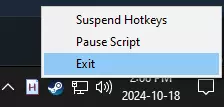
右键点击它,然后点击退出以停止运行。