换一换
换一换 




无论你是新手还是老手,本指南都是你掌握《火箭联盟》排位系统、理解MMR(匹配评分)以及充分发挥BakkesMod功能的一站式资源。

《火箭联盟》段位机制解析
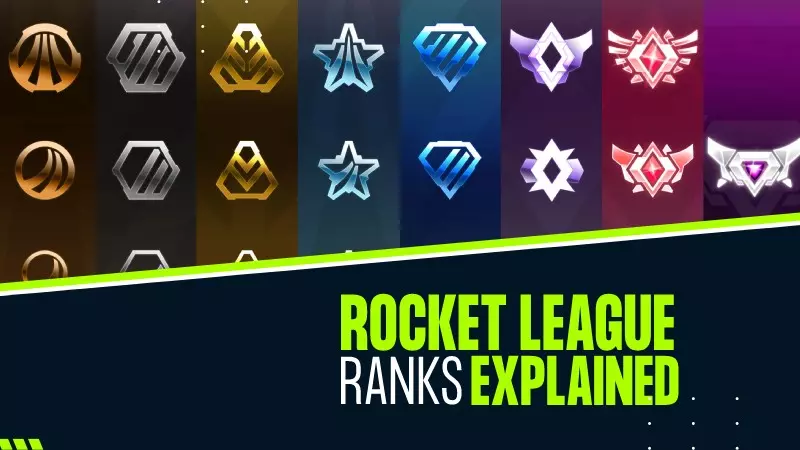
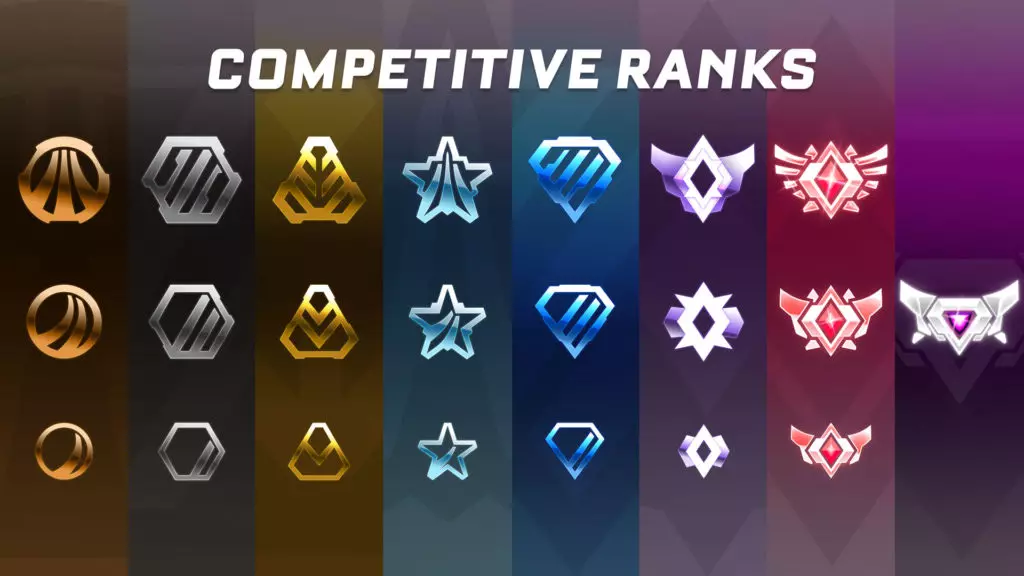
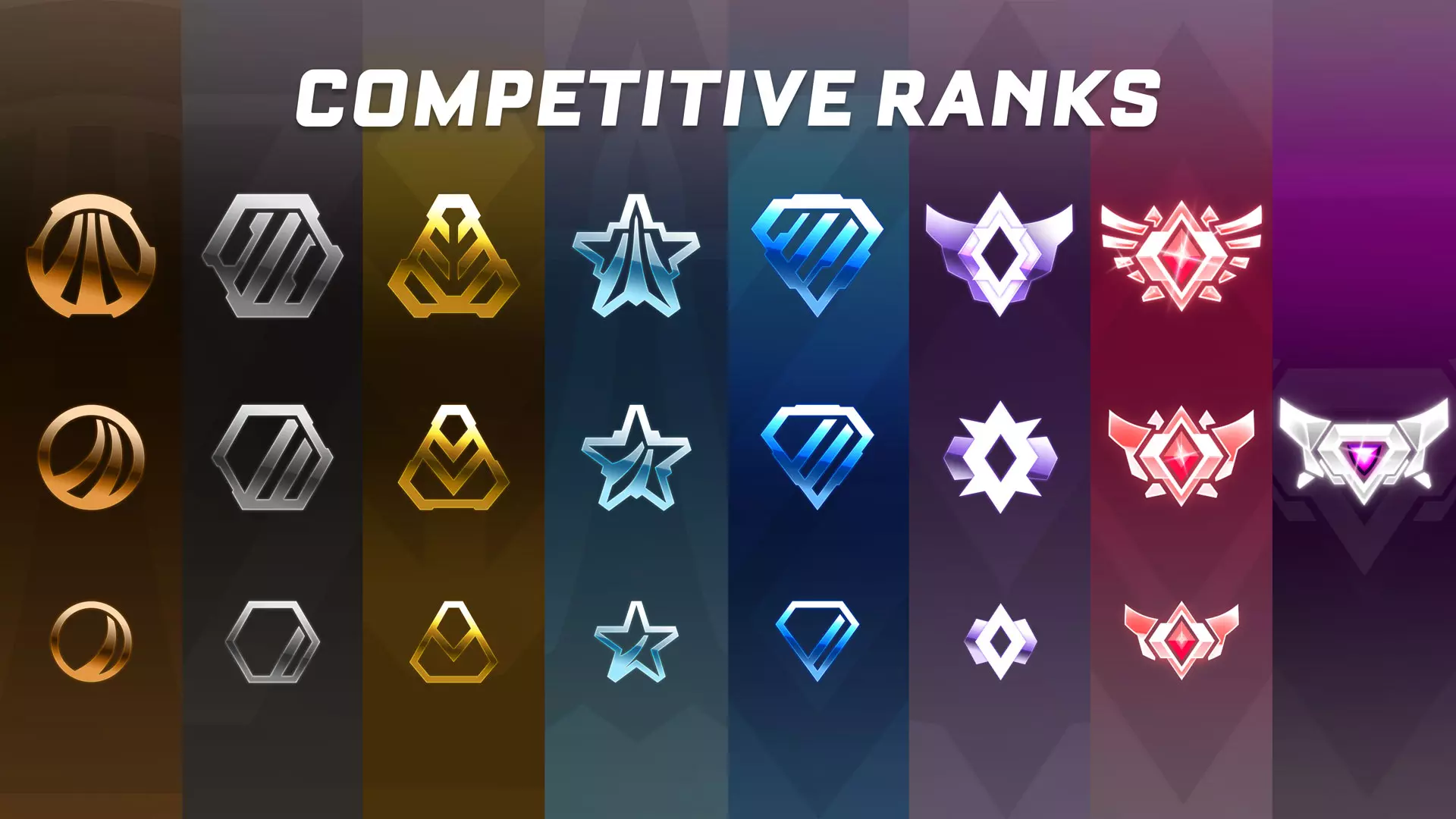
《火箭联盟》段位 段位分为多个等级,除超级 sonic 传奇(Supersonic Legend)外,每个段位都有三个小分段(I、II、III)。玩家通过赢得比赛并获取 MMR 来提升分段。 赛季奖励 每个赛季结束时,玩家将根据其在任意竞技 playlist 中达到的最高段位获得奖励。玩家必须在该段位赢得一定数量的胜利才有资格获得奖励。从低到高的段位如下: 未排位(定级赛之前) 青铜(Ⅰ、Ⅱ、Ⅲ) 白银(Ⅰ、Ⅱ、Ⅲ) 黄金(Ⅰ、Ⅱ、Ⅲ) 铂金(Ⅰ、Ⅱ、Ⅲ) 钻石(Ⅰ、Ⅱ、Ⅲ) 冠军(Ⅰ、Ⅱ、Ⅲ) 传奇冠军(Ⅰ、Ⅱ、Ⅲ) 超音速传奇(最高段位,无细分等级) 【匹配评分(MMR)】是决定你段位的隐藏数值。 获胜会增加MMR,失败则会降低。 MMR增减的幅度取决于两队的技能差距。 每个游戏模式(如1v1、2v2、3v3)都有独立的MMR。段位MMR范围(近似值) 各段位所需的确切MMR在不同赛季间可能略有差异,但以下是近期赛季的大致范围: 段位 - 2v2 MMR范围 青铜I - 0-199 青铜II - 200-299 青铜III - 300-399 白银I - 400-499 白银II - 500-599 白银III - 600-699 黄金I - 700-799 黄金II - 700-799 黄金III - 800-899 铂金I - 900-999 铂金II - 1000-1099 铂金III - 1200-1299 钻石I - 1300-1399 钻石II - 1400-1499 钻石III - 1500-1599 冠军I - 1600-1699 冠军II - 1700-1799 冠军III - 1800-1899 传奇冠军I - 1900-1999 传奇冠军II - 2000-2099 传奇冠军III - 2100+ 超音速传奇 - 玩家中的前0.1% 提升段位的技巧 练习机械操作:专注练习空中技巧、带球和射门。保持稳定游玩:专注于长期提升而非追求快速胜利。 团队沟通:在团队模式中,沟通和轮转是关键。 观看回放:分析自己的失误并从中学习。 如果您想了解特定段位或游戏列表的更多细节,请告诉我! 如何查看你的MMR MMR在游戏中是隐藏的,但你可以使用第三方工具(如仅适用于PC的BakkesMod)或网站来查看你的MMR和段位进度。 如何安装BakkesMod

Step 1: Check System Requirements Platform: BakkesMod is only available for PC (Windows). It does not work on consoles (PlayStation, Xbox, or Nintendo Switch) or macOS. Game Version: Ensure you have Rocket League installed via Steam or Epic Games Store. Step 2: Download BakkesMod Go to the official BakkesMod website: https://bakkesmod.com/. Click on the Download button to get the latest version of BakkesMod. Save the installer file to your computer. Step 3: Install BakkesMod Locate the downloaded installer file (usually in your Downloads folder). Double-click the installer to launch it. Follow the on-screen instructions: Accept the terms and conditions. Choose the installation location (default is usually fine). Once the installation is complete, click Finish. Step 4: Inject BakkesMod into Rocket League Launch Rocket League via Steam or Epic Games Store. Open the BakkesMod application (search for "BakkesMod" in your Start menu if needed). In the BakkesMod window, click the Inject button. If successful, you’ll see a message saying "Injected successfully!". Minimize BakkesMod (do not close it) and return to Rocket League. Step 5: Verify BakkesMod is Working In Rocket League, press F2 on your keyboard to open the BakkesMod menu. If the menu appears, BakkesMod is working correctly. You can now customize settings, use training tools, and view your MMR. Troubleshooting BakkesMod Not Injecting: Make sure Rocket League is running before injecting. Run BakkesMod as an administrator (right-click the BakkesMod icon and select Run as Administrator). Ensure your antivirus or firewall isn’t blocking BakkesMod. Epic Games Store Issues: If you’re using the Epic Games Store version, make sure you’ve enabled Allow BakkesMod on Epic in the settings (found in the BakkesMod application). Optional: Customizing BakkesModPress F2 in-game to access the BakkesMod menu. Explore features like: MMR Tracking: View your MMR and rank progress. Custom Training: Enhance training packs with additional tools. Cosmetic Customization: Use custom decals, colors, and items (client-side only). Gameplay Plugins: Install plugins for additional functionality. That’s it! You’ve successfully installed BakkesMod and are ready to enhance your Rocket League experience. Let me know if you need help with specific features or settings! Rocket League Resources Useful Websites: RLTracker[rocketleague.tracker.network]: For tracking MMR and stats. Ballchasing[ballchasing.com]: For replay analysis. Rocket League Garage[rocket-league.com]: For trading and finding teammates. BakkesMod[bakkesmod.com] MMR Ranges 1v1 For 1v1 (Duel) in Rocket League, the MMR ranges are slightly different compared to 2v2 or 3v3 playlists. This is because 1v1 is generally considered more challenging, and players tend to have lower MMR in this mode compared to team-based playlists. Below is the up-to-date MMR range for 1v1 ranks as of recent seasons: Key Notes Lower MMR in 1v1: Players typically have lower MMR in 1v1 compared to 2v2 or 3v3 because the mode is more mechanically demanding and less forgiving. Placement Matches: New players or those who haven't played 1v1 in a while will start with an MMR around 500-700 after placement matches. Supersonic Legend: As with other playlists, this rank is reserved for the top 0.1% of players, and the MMR threshold can vary depending on the season. Tips for Ranking Up in 1v1 Focus on Mechanics: Improve your dribbling, flicks, and shadow defense. Play Patiently: Avoid overcommitting and wait for your opponent to make mistakes. Practice Consistency: Work on hitting accurate shots and saves consistently. Review Replays: Analyze your gameplay to identify weaknesses and areas for improvement. MMR Ranges for Ranks (Approximate)The exact MMR required for each rank can vary slightly between seasons, but here are the general ranges (as of recent seasons): Rank MMR Range (2v2) Bronze I 0 - 149 Bronze II 150 - 249 Bronze III 250 - 349 Silver I 450 - 449 Silver II 550 - 549 Silver III 650 - 649 Gold I 750 - 749 Gold II 750 - 749 Gold III 850 - 849 Platinum I 950 - 949 Platinum II 1050 - 1049 Platinum III 1150 - 1249 Diamond I 1250 - 1349 Diamond II 1350 - 1449 Diamond III 1450 - 1549 Champion I 1550 - 1649 Champion II 1650 - 1749 Champion III 1750 - 1849 Grand Champion I 1850 - 1949 Grand Champion II 1950 - 2049 Grand Champion III 2050+ Supersonic Legend Top 0.1% of players MMR Ranges 2v2 For 2v2 (Standard Doubles) in Rocket League, the MMR ranges are the most commonly referenced because it’s one of the most popular playlists. Below is the up-to-date MMR range for 2v2 ranks as of recent seasons (Season 12 and beyond): Key Notes Placement Matches: New players or those who haven’t played ranked in a while will start with an MMR around 600-800 after completing their 10 placement matches. Supersonic Legend: This rank is reserved for the top 0.1% of players, and the MMR threshold can vary slightly depending on the season and player distribution. MMR Gains/Losses: The amount of MMR you gain or lose depends on the skill difference between teams. Beating a higher-ranked team will reward more MMR, while losing to a lower-ranked team will cost more MMR. Tips for Ranking Up in 2v2 Teamwork and Rotation: Communicate with your teammate and maintain proper rotation to avoid double commits. Mechanical Skills: Practice aerials, dribbling, and power shots to outplay opponents. Game Sense: Learn to read the game, anticipate your opponent’s moves, and position yourself effectively. Consistency: Focus on playing consistently rather than going for risky plays. Review Replays: Analyze your gameplay to identify mistakes and areas for improvement. MMR Ranges for Ranks (Approximate)The exact MMR required for each rank can vary slightly between seasons, but here are the general ranges (as of recent seasons): Rank MMR Range (2v2) Bronze I 0 - 199 Bronze II 200 - 299 Bronze III 300 - 399 Silver I 400 - 499 Silver II 500 - 599 Silver III 600 - 699 Gold I 700 - 799 Gold II 700 - 799 Gold III 800 - 899 Platinum I 900 - 999 Platinum II 1000 - 1099 Platinum III 1200 - 1299 Diamond I 1300 - 1399 Diamond II 1400 - 1499 Diamond III 1500 - 1599 Champion I 1600 - 1699 Champion II 1700 - 1799 Champion III 1800 - 1899 Grand Champion I 1900 - 1999 Grand Champion II 2000 - 2099 Grand Champion III 2100+ Supersonic Legend Top 0.1% of players MMR Ranges 3v3 For 3v3 (Standard) in Rocket League, the MMR ranges are similar to 2v2 but can feel slightly different due to the faster pace and increased complexity of team play. Below is the up-to-date MMR range for 3v3 ranks as of recent seasons (Season 12 and beyond): Key Notes Placement Matches: New players or those who haven’t played ranked in a while will start with an MMR around 600-800 after completing their 10 placement matches. Supersonic Legend: This rank is reserved for the top 0.1% of players, and the MMR threshold can vary slightly depending on the season and player distribution. MMR Gains/Losses: The amount of MMR you gain or lose depends on the skill difference between teams. Beating a higher-ranked team will reward more MMR, while losing to a lower-ranked team will cost more MMR. Tips for Ranking Up in 3v3 Teamwork and Rotation: Communication and proper rotation are crucial in 3v3. Avoid ball-chasing and trust your teammates. Positioning: Stay aware of your position on the field. Always be ready to support your teammates on offense or defense. Mechanical Skills: Practice aerials, clears, and power shots to make impactful plays. Game Sense: Learn to read the game and anticipate your opponent’s moves. This is especially important in the faster-paced 3v3 mode. Consistency: Focus on playing consistently and avoid risky plays that could leave your team vulnerable. Review Replays: Analyze your gameplay to identify mistakes and areas for improvement. MMR Ranges for Ranks (Approximate)The exact MMR required for each rank can vary slightly between seasons, but here are the general ranges (as of recent seasons): Rank MMR Range (2v2) Bronze I 0 - 199 Bronze II 200 - 299 Bronze III 300 - 399 Silver I 400 - 499 Silver II 500 - 599 Silver III 600 - 699 Gold I 700 - 799 Gold II 700 - 799 Gold III 800 - 899 Platinum I 900 - 999 Platinum II 1000 - 1099 Platinum III 1200 - 1299 Diamond I 1300 - 1399 Diamond II 1400 - 1499 Diamond III 1500 - 1599 Champion I 1600 - 1699 Champion II 1700 - 1799 Champion III 1800 - 1899 Grand Champion I 1900 - 1999 Grand Champion II 2000 - 2099 Grand Champion III 2100+ Supersonic Legend Top 0.1% of players Bronze Rank
段位 匹配分 段位图标 青铜I 0-199

ééII 200-299

ééII 300 - 399

白银段位 段位 匹配评分 段位图标 白银一 400 - 499

ç˝éśII 500 - 599

白银III 600-699

黄金段位 段位 匹配评分 段位图标 黄金Ⅰ 700 - 799

éťéII 800-899

黄金 III 900 - 999

铂金段位 段位 匹配评分 段位图标 铂金Ⅰ 1000 - 1099

ééII 1100 - 1199

铂金 III 1200 - 1299

钻石段位 段位 匹配评分 段位图标 钻石一 1300 - 1399

éťçłII 1400 - 1499

钻石III 1500 - 1599

冠军段位 段位 MMR 段位图标 冠军I 1600 - 1699

冠军 II 1700 - 1799

冠军 III 1800 - 1899

大冠军段位 段位 MMR 段位图标 大冠军 I 1900 - 1999

大冠军 II 2000 - 2099

大冠军 III 2100+

超音速传奇