换一换
换一换 




BATTLETECH is a complex turn-based strategy game. This guide focuses on the tactics and strategy of the Combat game. The information within applies to both the single player campaign and multiplayer skirmish. Credits Special thanks to Laurie, Ryan, and Prussian Havoc for editing and strategic advice. A very short BattleTech History BattleTech has been around for over 30 years. It started out as a tabletop strategy game released in 1984 where players filled out record sheets and moved robotic miniatures on a hex-grid. Those miniatures represented ten meter tall humanoid war machines called BattleMechs, powered by fusion engines, and equipped with all manner of cool sci-fi weaponry. Since then, BattleTech has existed as multiple video games across multiple platforms, over 100 novels, multiple rpg's, a card game, different board games, MUX/MUSE's, and even a Saturday morning cartoon. For more info about real-world BattleTech history, go here: https://en.wikipedia.org/wiki/BattleTech For comprehensive coverage of in-universe BattleTech lore, head to Sarna: http://www.sarna.net/wiki/Main_Page Terminology Alpha Strike - When a mech fires ALL its weapons, this is called an Alpha Strike. Beta Strike - When an Orion gets its head caved in by an AC/20. This is known as a Beta Strike. #neverforget Battlemech - The huge humanoid, multi-ton war machines powered by fusion reactors. Also known simply as 'Mechs Campaign - The single player campaign where you move around the map in your dropship, Not covered in this guide. Dropship - Spaceships that carry mechs through space, traveling from Jumpships and capable of landing on planets. Evasive Pips - The white chevrons ">>>" that appear beside a unit's nameplate. The more evasive pips a unit has, the harder it is to be shot. Initiative Phase - A round is made up of five initiative phases. Units are designated to move on specific phases depending on several factors such as: size, type of unit, skills, and some status effects. Initiative Track - The ui element in the top middle of the screen displays the current phase and which units have acted or need to act. Interleaved Mode - When there are enemy units in sensor range, the combat game forces you to take turns moving a single unit at a time. See also Initiative Track. Heat - When most weapons fire, they will generate heat. Generate too much and your mech can take damage or even shutdown. Jumpship - Spaceships that carry dropships and jump (teleport) between star systems. Lance - For this game a lance usually means just a group of units, usually around 4. Consider this like a squad in other games. LOS/Line of Sight - Can a line be drawn from one mech to another without being blocked by obstacles. Non-Interleaved Mode - When there are no enemies on radar, the combat game allows you to move all of your units at once. Mech - See Battlemech Mech Class/Size - Light 20-35 tons, Medium 40 - 55 tons, Heavy 60 - 75 tons, Assault 80-100 tons. This classification applies to vehicles as well. Mechwarrior - The human pilots of Mechs. Merc/Mercenary Unit - Soldiers for hire that accept contracts. Round - The time it takes for everyone to activate their units. Five initiative phases long. Combat 101 (the Basics) One thing to note about BattleTech is that it's a very information dense game. The UI does a great job of communicating all the info, often in layers, allowing the player to drill down into more specific information. However, due to the sheer volume of information, there is a slight learning curve. Fortunately, there is almost always a tool tip that explains pretty much anything. So if you aren't familiar with a symbol or a button, simply hover the mouse over the item you're interested in and a short description should pop up. The tutorial does a good job of covering the absolute basics, but for completeness sake I'll review them in a little more detail. Camera ControlsTo move the camera around the map you can use the keys W,A,S,D keys to pan the camera or Q and E to rotate. Alternatively, you can use the mouse by holding the right mouse button to change which way the camera is facing. Move ActionsThis is a turn-based game so opponents take turns activating units. When there are no visible enemy units on radar, teams move all their units at the same time. Once radar contact is made with the enemy, teams begin taking turns with individual units. I'll go into the Initiative System later, but for now just know that lighter units have the option of acting early in the turn order or reserving down to a later Initiative Phase. To select a unit for activation, you can either click the Mech you wish to move, click on the pilot portraits in the bottom middle of the screen, or use the Tab key to cycle through the units you control. Personally, I much prefer the tab key because it's fast and only selects the units who can still act in this round. A normal activation consists of a Move Action and a Fire Action. Here's the action hotbar in the bottom middle of the screen.

基础移动动作及其快捷键: 2. 移动 - 移动单位。移动结束后,你可以选择执行攻击、防御姿态或其他主动技能等动作。 3. 冲刺 - 专注于移动和躲避攻击。移动距离更远,可获得更多闪避值,但会消耗你的射击动作。 4. 跳跃 - 部分机甲配备了跳跃喷射器,使其能够越过障碍物并移动一定距离。此动作过程中可能会获得大量闪避点数,但会产生一定热量。如果机甲无法跳跃,该按钮将被禁用。 - 防御姿态 - 消耗你的动作来专注于防御。获得守护状态(受到的伤害减少50%)和固守状态(受到的稳定性伤害减少50%)。在非回合制移动(自由移动)模式下,默认移动动作是冲刺。在回合制战斗模式下,默认移动动作仅为移动。处于非回合制模式时,建议将冲刺切换为移动,这样你的单位在战斗的第一回合开始时会处于戒备状态。跳跃也能达到此效果。 要移动选中的单位,将鼠标光标放在你希望移动到的区域,你会看到由目标点组成的六边形网格。纯白色的点表示没有特殊地形修正,而有颜色或特殊标记的点则表示存在某种地形效果,例如森林或崎岖地形。 点击你想要移动到的点,会出现一个射击范围指示。圆锥的中心是你的机甲移动结束时将要面对的方向,只要机甲拥有视野且武器能够打到目标单位,它就可以向该圆锥范围内的目标开火。如果你对选择满意,再次点击即可确认朝向。你可以按ESC键取消此操作流程。
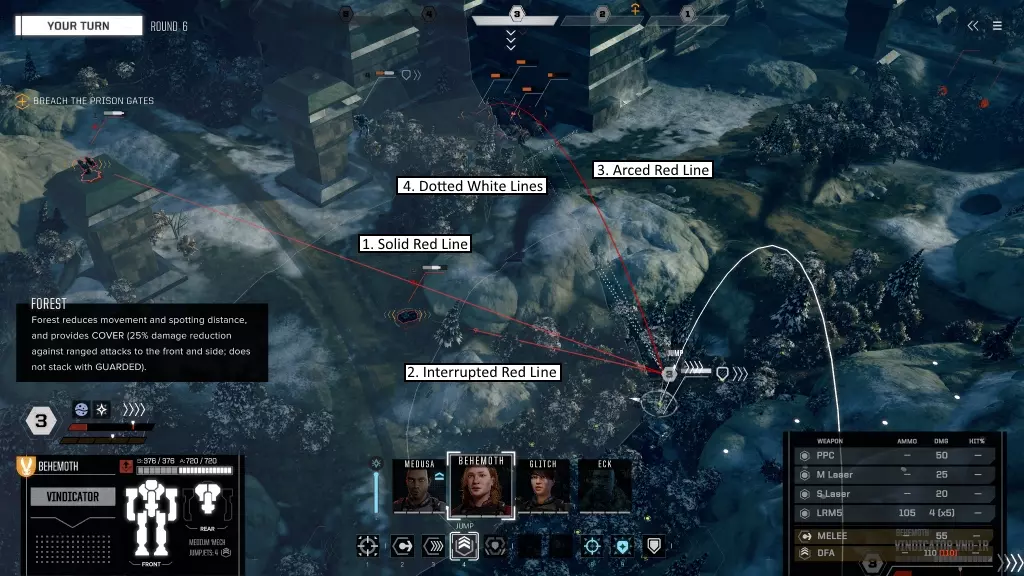
(1)红色实线表示有清晰的射击线,可以向目标开火。 (2)带小眼球的红色间断线表示射击线部分受阻,目标获得掩护加成。 (3)红色弧线表示没有直接射击线,但可以使用任何间接火力武器(LRMs)越过障碍物向目标开火。 (4)白色虚线表示虽然有清晰的射击线,但无法攻击该特定敌人(可能是因为敌人在你的射击弧线外、超出射程或你正在冲刺)。 如果你喜欢当前所在的位置,仍可以通过选择移动动作,然后点击你站立的位置来改变朝向。之后,你可以像往常一样通过第二次点击来确认朝向变化。或者你也可以选择完全不移动,直接点击开火按钮:1. 攻击——如果你尚未移动,那么你将从当前位置进行攻击。请记住,若没有【王牌飞行员】这一特殊技能,开火后你将无法移动。 近战:当选择移动位置时,如果你看到敌方单位周围有黄色边框,你可以选择与他们进行近战攻击。点击带有黄色边框的单位后,根据剩余移动点数和地形,你可以移动到最近的3个点位。这会将你的单位移动到该点位,面向敌人,并进行近战攻击。你还将使用所有【支援型】武器(火焰喷射器、机枪或小型激光)进行射击。如果你装备了支援武器,将移除两个闪避点。一个用于近战攻击,一个用于支援武器。近战不会产生任何热量,因此是造成伤害并在一回合内冷却的好方法。 如果你在跳跃时看到敌方单位周围出现黄色边框,这是使用名为【天降正义】(DFA)的特殊物理攻击的机会。这是指你的机甲跳跃并尝试着陆在敌人身上。【天降正义】攻击通常命中率较低,会对你的机甲腿部造成伤害,并对自身造成稳定性伤害。但如果成功,也会对目标造成大量伤害和稳定性伤害。这是一种高风险战术,通常在危急时刻使用,所以请谨慎使用。射击:完成上述移动动作之一(冲刺除外)后,该单位可以进行射击。点击带有红线指向的单位来选择目标,或使用Tab键在可能的目标之间切换。确定目标后,可在屏幕右下角的武器面板中选择要使用的武器。如果武器超出射程或无法命中目标,即使已启用也不会开火。武器选择会保留上一轮的设置,因此在射击前请花时间检查武器面板。

开火会消耗弹药(如适用)并产生热量。热量过高可能会损坏机甲甚至导致停机。无论哪种情况,在你发起攻击前都会有警告闪烁。
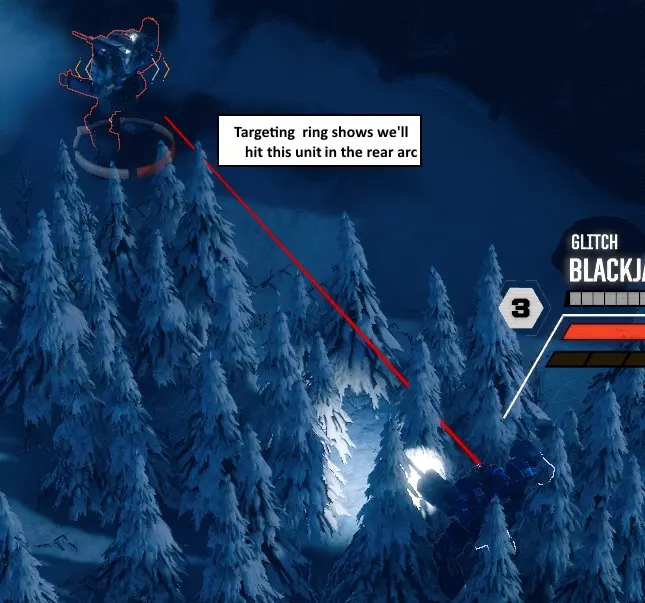
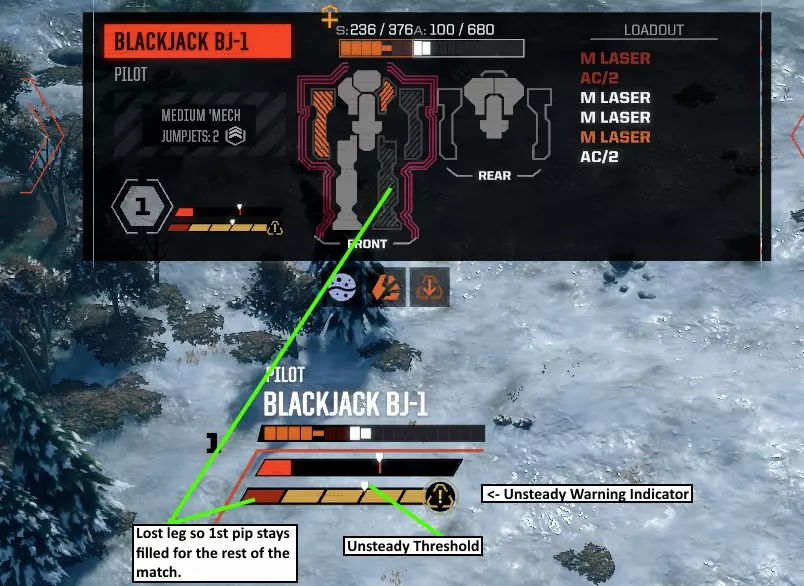
There is a circle around the feet of the target unit that indicates which side of the enemy your weapons will hit. This is also reflected in the target readout in the upper center of the HUD that highlights which locations could be randomly hit. ReserveIf you have no units selected, you'll see the "Reserve" button. Clicking this will delay the units in this initiative phase to the next initiative phase. If you’ve selected a unit, you can hit Escape to clear the selection and back out to the Reserve button option. DoneIf you try to reserve on the last Initiative Phase, instead you will just end your action and this will Brace all the units that haven't acted yet. Game Mechanics SensorsUntil a unit makes visual contact, you will have limited or no information about that contact. As it gets closer to visual range, you will receive more information. At first, you will see a sensor blip with no info. As it approaches, it will resolve into a type (mech, vehicle, turret). Once it is almost to visual range, you will see the tonnage of the unit, and then finally you will make visual contact. Sensor range is represented by a large blue circle centered on your mech. You likely won't notice the sensor ring until you're seeing contacts at extreme sensor range. To make sure a unit remains hidden, be certain the enemy blips remain outside the circle. Ending a non-interleaved round with an enemy unit in sensor range will trigger the turn-based interleaved combat mode. Firing Weapons & DamageFiring weapons follows tabletop rules (roughly), but there are some slight differences. Roll to see if the weapon hits. You'll see the percentage chance to hit from the weapon's panel in the bottom right. If you succeed, we roll a random location. The hit location chart differs depending on which direction you are attacking from. For instance, attacks made from the the right side can't hit any locations on the left. Rear shots can hit the weaker rear armor, etc. Damage is applied to the hit location. Damage is first applied to the Armor of that location. If any damage is left over, it is then applied to the Internal Structure of that location. Once a shot goes internal, it can begin damaging or destroying components. If a location's internal structure is destroyed, it will destroy every component in that location. And then any extra damage is transferred towards the Center Torso. As before, this damage is first applied to armor, then to structure. Once the firing sequence is done for ALL weapons, we roll for a critical hit on any location that took Internal Structure damage but was not destroyed. If a crit is rolled successfully, we damage a random component in that location. One hit damages the component and makes it less effective, two hits destroys it completely. If anything generates a pilot injury (side torso destruction, head hit, ammo explosion) then the pilot takes a single injury. Finally we apply the Stability Damage to the target. If the unit falls down, it drops to a lower initiative phase and the pilot takes an injury, (which can result in a second injury). One major difference from tabletop rules is the game rolls for each missile in the volley instead of once for each rack. Another difference is the single crit roll per penetrated location (instead of 1 per damage application). Same goes for pilot hits. Note, whether or not an attack hits, simply attacking a unit will remove one pip of Evasion from the Target. Called ShotsThere are a few cases when you get to choose which location you're aiming for: when a target is prone, when a target is shutdown, or when an attacker uses a Morale/Fury ability. This works exactly the same as Firing Weapons above, except for two differences. First you choose the location to aim for. This will be limited by which side of the enemy is facing you. Your chance to hit is still displayed down in the bottom right weapons panel. If a weapon hits, the percentage shown in the location targeting window is the percentage that it will hit each location. Aiming for the head is the toughest shot to make, but it can also be the most rewarding. Sometimes one more pilot hit is all you need to eliminate them and claim some sweet salvage. In the Campaign mode, choosing whether to disable or destroy a Mech can be tough. Do you aim for the arm with the AC/20 to possibly remove it from the field early? Or do you try and disable the Mech a different way so you can possibly salvage the AC/20? I leave that decision to the reader. Shot DifficultyShot difficulty is affected by a number of things. Evasive charges (white chevrons >>>) make it more difficult to hit, weapon range, intervening forest, cover, high ground, weapon location (arms get a bonus), weapon accuracy (lasers get a bonus), Autocannon refire penalty, certain terrain effects, indirect fire penalty, minimum range (on some weapons). A MechWarrior's Gunnery skill can offset any kind of penalty they might encounter - the higher the skill, the more penalties can be offset. Weapon Types - There are 4 weapon slot types in the game: Ballistic, Energy, Missiles, and Support. Ballistic Weapons - These weapons are giant Autocannons (AC's) that fire solid slug projectiles. Very heavy, take up a lot of space, inflict some Stability Damage, have decent to amazing damage (depending on the class), require ammo, but don't generate much heat. The bigger the number, the more damage but the shorter the range. AC/2's are the longest ranged weapons in the game, but don't do much damage. AC/20's do the most damage in the game, but have very short range. Energy Weapons - These weapons shoot beams of energy. The Medium Laser, Large Laser, and Particle Projection Cannon (PPC) fall into this category. These weapons generate quite a bit of heat, but don't require any ammo. Laser weapons also receive an accuracy bonus, but don't generate any Stability Damage. The PPC deals decent Stability Damage and inflicts a penalty on the target's next round of shots from the system interference it deals. The more powerful the energy weapon, the longer it's Range, the higher it's Damage and the more heat it generates. Missile Weapons - These weapons launch explosive projectiles with propulsion systems. Missile Weapons are a great source of consistent damage (since they roll a separate to hit roll for each missile), the damage is spread out over the target. This can be a good thing if you're "fishing" for a head hit or a chance to damage and Crit Seek an exposed location. Long Range Missiles (LRMs) are guided missiles that can cover long distances and, if you have a spotter, be fired indirectly - arcing over intervening terrain. However, they have a significant minimum range which makes them much less effective at close range. Short Range Missiles (SRMs) inflict greater damage as well as Stability Damage, but have a much shorter range and are incapable of indirect fire. Support Weapons - This is a new class of weapon for BATTLETECH consisting of very short range weapons: Machine Guns (MGs), Small Lasers, and Flamers. Prior to this game, these weapons were lumped in with Ballistic and Energy weapons. The interesting thing about support weapons is not only do they ignore enemy Evasive pips they are also the only weapons that can fire during Melee Attacks. Small Lasers do decent damage for their weight. Flamers have a limited number of charges, but they do damage to the enemy AND add some heat to the target as well. In addition to a bonus to crit, Machine Guns roll five separate hit locations for each MG that hits, doing a small amount of damage. MGs are superb for trying to hit exposed locations and damage components. Game Mechanics (Continued) Apparently the steam guide "section" has a text limit. So here's the rest of the Game Mechanics. Stability DamageStability Damage is a measure of how much an attack will knock the target off balance. Melee Attacks and most weapons are capable of inflicting Stability Damage. The larger the mech, the greater the damage. You have 5 pips on your stability bar and an indicator to show a threshold of how many pips you can sustain before your mech is Unsteady. While Unsteady, a Mech cannot sprint. Higher piloting skill will increase this threshold. If the bar fills completely once your mech is Unsteady, it will fall over and your pilot will take an injury. Your mech can't go from steady to prone even if your bar fills up after a single massive Enemy attack. In this situation your now unstable Mech will get knocked down on the next attack that causes any Stability Damage. Stability Damage is removed by the following: Activating your unit will remove one pip Standing still will remove one pip Bracing will remove all Instability If your pilot is a Master Tactician, reserving will remove 1 pip If a mech loses a leg for any reason, it will automatically fall prone regardless of how steady it was before the attack. Additionally, one of its stability pips will turn “Red” and remain permanently filled for the remainder of the match.
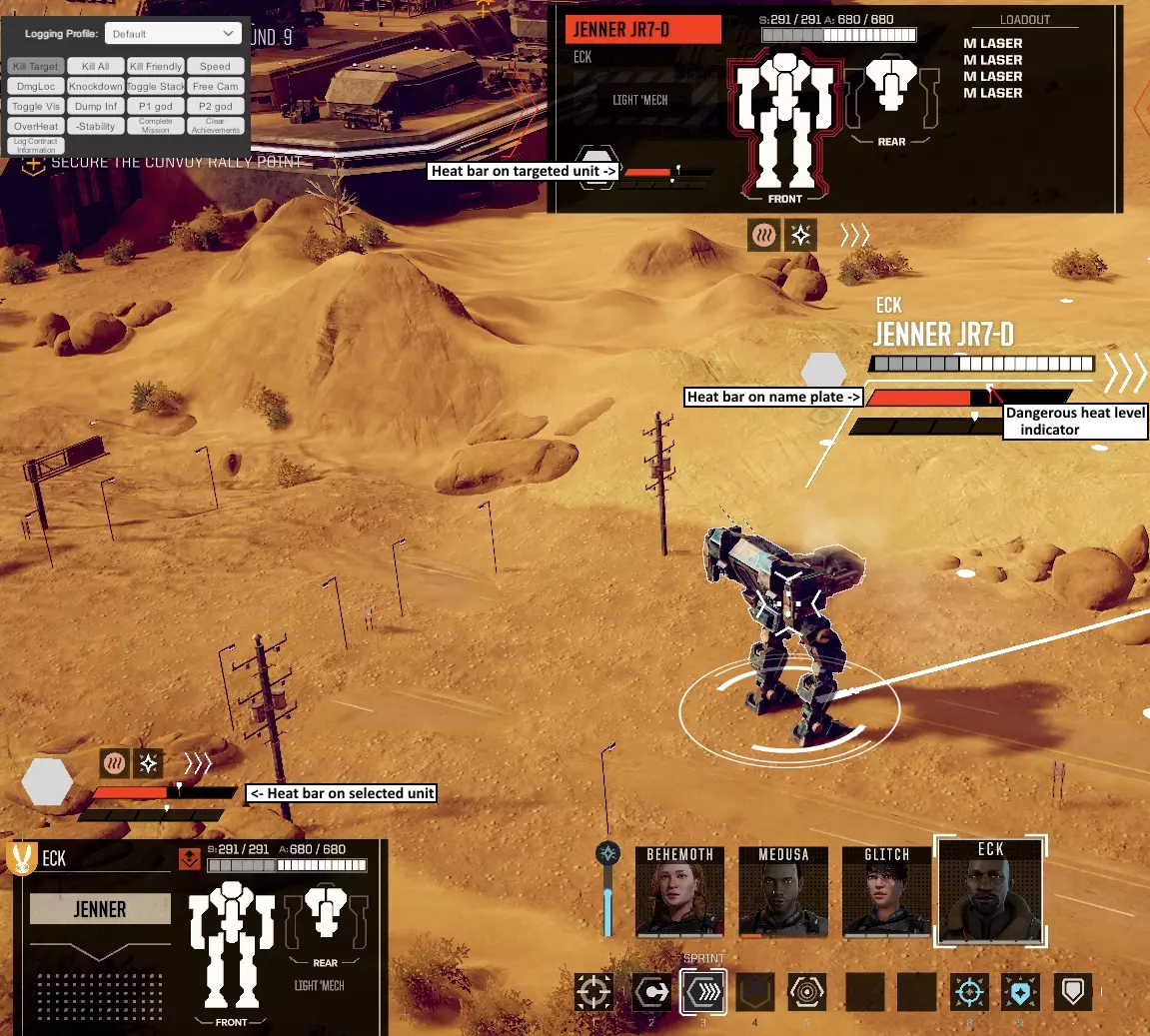
热量 当你开火时,武器会产生一定量的热量。能量武器在这方面是“罪魁祸首”。冲刺或跳跃时也会产生一些热量,其中跳跃产生的热量取决于跳跃的距离。 你散发的热量由机甲的散热器决定。所有机甲默认散热30点,但如果安装了额外的散热器,散热能力可以提升。 散热器的效率会受到当前地图生物群系的影响,因此在沙漠和月球等星球上要密切关注热量表。热量条上有一个指示器,超过该指示器就会达到临界热量水平。如果飞行员的勇气技能较高,这个临界值可以提高。当机甲的热量超过此阈值时,其内部结构将受到少量伤害。 若热量条完全充满,机甲将关闭,成为活靶子,敌人可通过【精准射击】瞄准特定部位。不仅如此,即便能撑到下一回合,机甲也只能进行启动操作,无法执行其他任何指令。通常情况下,应尽可能避免机甲关闭。但凡事皆有例外,有时关闭机甲可能是一个明智(尽管有风险)的选择。例如,对于即将被摧毁的机甲,使用【阿尔法打击】或许能消灭高优先级目标。
initiative phase system 这是决定行动顺序以及各单位在哪个阶段行动的游戏机制。虽然乍看有些复杂,但实际上相当直观。每个单位会根据其重量等级和单位类型被分配到相应的行动阶段。对于机甲,轻型机甲在阶段4行动,中型机甲在阶段3,重型机甲在阶段2,突击型机甲在阶段1。载具的灵活性不如机甲,因此比同重量等级的机甲晚一个阶段行动。当一个回合开始时,我们从行动阶段5开始,然后依次向下倒数。 游戏会始终尝试让双方队伍交替行动。例如,如果当前阶段双方都有单位,且你是上一阶段最后行动的人,那么本阶段将由对手先移动或保留其单位。与AI对战时也是如此。 其他会影响 initiative phase【行动阶段】的因素:被击倒会使你落后一个行动阶段。士气/狂怒技能可以提升你的行动阶段或降低目标的行动阶段1级。【战术大师】是机甲战士的技能,能让你提前一个行动阶段行动。让中型机甲在轻型机甲阶段行动,或让重型机甲在中型机甲阶段行动,都能带来强大的优势。许多这类行动阶段修正效果可以叠加,无论是正面还是负面效果。保留指令会将本阶段尚未行动的所有单位延迟至下一阶段行动。乍看之下这似乎没什么用,但可以参考以下例子:你有一台轻型机甲在第4阶段行动,通过保留指令将其延迟至突击阶段最后行动。如果战场上没有其他轻型单位,你的轻型机甲实际上会连续行动两次——它会在本回合的第1阶段行动,而到了下一回合,其行动阶段会重置回第4阶段,从而再次获得行动机会。 利用行动阶段系统为自己创造优势是胜利的关键。通过正确的战术行动,你可以在本回合击倒已激活的单位,并在下一回合它们再次行动前将其彻底消灭。

MoraleThe single player campaign uses a blue Morale Bar that begins each battle already filled to your company's morale level. During combat you'll gain additional morale by completing objectives, destroying enemy units, and even gain a small amount each round. Increased salary levels can slowly raise your morale over time and there are also Argo upgrades that can permanently increase morale. This morale can then be spent on two special abilities, Precision Strike and Vigilance. Precision Strike gives you a +4 “To Hit” bonus and lets you target a specific location. Additionally it will knock the target back into a later Initiative Phase for its next activation. Let's say you use this ability to target and blow the leg off of a medium mech. If it already acted this round, it won't get another activation until next round's Assault phase (having moved back two Phases, one for the Knock Down and a second for your use of Precision Strike.) Poor dead bastard. Vigilance clears all Stability Damage, gives you Guarded and Entrenched, and lets this unit act in one sooner initiative phase next round. So if normally the unit acts in the Medium Phase, next round the unit will act in the Light Phase. In the Solo-Campaign, the Morale Bar regenerates pretty quickly. I recommend spending it when it gets close to max unless you have specific plans for a particular ability. Using Morale abilities is a key to surviving more difficult missions. FuryIn Multiplayer Mode, the Morale Bar is instead called the Fury Bar. However, while similar to Morale, you only get the Precision Strike ability. Vigilance is not available in Multiplayer Mode. Also instead of your bar filling up for accomplishing good things(like killing an enemy), it fills up because bad stuff happens to you (like losing an Arm, a Side Torso or even an entire Mech). It fills slower than a Morale Bar and also costs a full Fury Bar to get a single Precision Strike. Make it count! Effects Biome EffectsThere are several different biomes and many of them affect the performance of your mech's Heat Sinks. Don't feel like you have to memorize these details, simply mouse over the icons or the movement dot to get tooltip information. Lunar - Heat Sinks are 65% effective. Martian - Heat Sinks are 75% effective. Badlands - Heat Sinks 85% effective. Desert - Heat Sinks are 85% effective. Verdant/Lowlands/Highlands - No effect. Tundra - Heat Sinks are 110% effective. Polar - Heat Sinks are 120% effective. Terrain EffectsThese effects apply when standing in various types of terrain. Clear - No effect Destroyed Building - Movement reduced by 50%, Damage received reduced by 25%. Available on any biome with buildings. Note, this is only for larger, targetable buildings. If you smash your mech through a farm house, you won't be slowed down a bit or gain any cover. Although you can see through Destroyed Buildings, it does reduce your vision range. Forest - 25% reduced movement, 50% visibility reduced, 25% damage reduction. Available in every biome but Lunar. Martian biomes have dust storms that effectively do the same thing. Although you can see through Forests, it does reduce your vision range. Ice - Cooling increased by 50%, Movement reduced by 50%, Stability Damage received increased by 20%. Available in cold biomes or biomes without an atmosphere. Marshland - Reduces Stability Damage received by 50% while standing in it. Available in Verdant/Highland/Lowland biomes. Mineral Field - 10% movement reduction. You'll receive a 2 “To Hit” penalty when making attacks from crystals, but there's a 4 “To Hit” penalty when targeting someone inside a Mineral Field. Available in Badlands and Desert Biomes. Radioactive Zone - 10% movement reduction, You'll receive a 4 “To Hit” penalty when targeting someone inside a Radioactive zone and you will receive +10 heat/round for 2 rounds. Available in Lunar and Martian biomes. Road - Available on every biome. 5% movement increase. Rough - 4 “To Hit” Melee defense bonus, 25% movement reduction, and received Stability Damage is increased by 50%. This effect persists until your next activation. The Rough debuff is also applied if you walk through Rough terrain. Rough Terrain exists in every biome. Steam Vents/Geothermal - 10% movement reduction, cooling reduced by 50% for 1 activation. Available in Tundra and Polar biomes. Water - Cooling increased by 50% (regardless if Heat Sinks are positioned in a Mech’s Legs or not), Movement reduced by 50%. Available on warm biomes with an atmosphere. Unit Status EffectsThese effects can be gained/lost through combat actions. Cover - 25% reduction in damage received. Attacks hitting the rear arc will ignore Cover and do full damage. Granted by Forests and Dust Storms. Entrenched - Receive 50% less Stability Damage. Granted when Bracing (sacrificing your firing action). Guarded - Receive 50% less damage. Attacks hitting the rear arc will ignore guarded and do full damage. Received by Bracing (sacrificing your firing action). Prone - Your mech is lying down on the job. Stand up and look respectable! Falling prone knocks that unit down an Initiative Phase and injures the pilot. Also, when a mech is prone enemy units can target specific locations. After standing from prone, the unit also has a penalty to hit targets. Sensors Impaired - When a Mech has been hit with a PPC it suffers a an increase to its shot difficulty until its next activation. Shutdown - Your mech has overheated and automatic safeties have turned off your Mech’s fusion engine. Enemy units can target specific locations and receive a bonus to hit you. The only thing you'll be able to do next activation is restart your fusion reactor. Unsteady - When a Mech takes enough Stability Damage, it will become Unsteady. When a Mech is Unsteady, it can't sprint and if the Stability Damage bar fills up from a subsequent Enemy Hit it will be knocked Prone. Vehicle - Not really a status but vehicles do have some special rules. For one, they don't have a Stability bar because they can't be knocked over. They also don't generate any heat. However they do take double damage from Melee Attacks. And stepping on them is VERY satisfying. :) Another thing to know about vehicles is they have a much smaller number of hit locations so they are much easier to take out than a mech. However, some vehicles pack a serious punch. The SRM Carrier has ten SRM6's. A demolisher is a tank that has two AC/20's... DO NOT GET CLOSE TO THESE! They will ruin your day. Mechwarrior Skills and Abilities Thanks to HonorKnight for his awesome post on this. Made my research easy peasy. :) There are four skills you level up from rank 1-10. At rank 5 and rank 8 you receive a special ability, but you only have two rank 5 slots and one rank 8 slot so choose wisely. These Abilities will appear on the Action Bar in the 5, 6, and 7 slots. Gunnery - all ranks: +2.5% base ranged weapon hit chance per point Rank 5: Multi-Target - Action: Fire weapons at up to three targets. Rank 8: Breaching Shot - Passive: Attacks with a single weapon ignore Cover and Guarded on the target. Piloting - all ranks: +2.5% base melee hit chance per point Rank 4: +1 Unsteady Threshold Rank 5: Evasive Movement - Passive: The unit generates an extra Evasive charge from movement actions. Rank 6: +1 max Evasion Rank 7: +20% sprint distance Rank 8: Ace Pilot - Passive: This unit can move after shooting if it has not moved yet. Rank 9: +1 Unsteady Threshold (+2 total) Rank 10: +1 max Evasion (+2 total) Guts - all ranks: +5% bonus on survival rolls. Incapacitated Death Chance (90% - 5%*Guts), Lethal Death Chance (140% - 5% * Guts). Rank 4: +1 Health Rank 5: -1 Recoil Penalty, Bulwark - Passive: Gain Guarded when remaining stationary. (you can still shoot) Rank 6: +15 Overheat Threshold (redesigned, used to be 5 for every guts skill point) Rank 7: +1 more Health (+2 total) Rank 8: -1 Recoil Penalty, for a total of -2, Juggernaut - Passive: Successful Melee attacks knock your target back one Initiative Phase Rank 9: +15 Overheat Threshold, for a total of +30 Rank 10: +1 more Health (+3 total) Tactics Rank 4: -1 Indirect Fire Penalty Rank 5: -45 Minimum Range, Sensor Lock - Action: Select a target within sensor range to reveal it until the end of the current round and remove two evasive charges. Consumes your firing action. Rank 6: "Called Shot Bonus" Rank 7: -1 more Indirect Fire Penalty (-2 total) Rank 8: -45 Minimum Range, (-90 total), Master Tactician - Passive: Mechs piloted by this MechWarrior gain +1 Initiative, and remove one bar of Stability Damage when Reserving Rank 9: "Called Shot Mastery" Rank 10: Eliminates Indirect Fire Penalty Strategic Advice Kill Units - The fundamental goal of combat is to kill the Opposing Units. The fastest way to kill most enemy mechs (in general) is to destroy their Center Torso. Ergo, we can say that your fundamental goal in BattleTech is really to kill hostile CTs. A mech can also be eliminated by destroying its head, destroying both of its legs, or incapacitating the MechWarrior. Destroying the head is heavily luck dependent so don't count on it. Destroying both legs is sometimes tough. Usually you have to wait for a couple of lucky side shots breaching one of the legs. Knocking out the MechWarrior is something you can do by inflicting Stability damage and firing at the mech's side arcs to destroy the side torsos. Focus Fire - The more of your Mechs that can range and fire on a single enemy unit, the quicker you are likely to take it and its Weapon Systems out of the Match. The use of terrain is essential to both maximizing your ability to Focus your fire against enemy Mechs while at the same time limiting your opponents opportunities to Focus Fire against your most vulnerable/damaged Mechs. Target enemies which have already activated this round to ensure maximum opportunity for Stability Damage (possibly even achieving a Knockdown) before the enemy has an opportunity to activate that Mech and lessen/eliminate its Stability Damage. The same principle applies to removing evasive pips. Crit Seeking - The sequencing of attacks can pay high tactical dividends. High Damage Attacks can punch holes in Enemy Armor, permitting low damage, multiple hit location attacks from Support Weapons and Missiles to then “Crit Seek.” Crit Seeking is made possible by attacks that damage Internal Structure.The first successful Crit damages the component, while a second successful Crit destroys the component. Machine Guns are especially effective since they roll 5 separate locations and have a bonus to crit chance. Line of Sight - Use Line of Sight to your advantage. If you use terrain and other obstacles to block LOS to your units, you restrict the enemy's options. If they don't have LRMs, they won't be able to shoot at you. If they do have LRMs, they will be able to use Indirect Fire to target you at a penalty. A popular tactic is to use Sensor Lock to reveal a unit, and then use your long range units to engage before the enemy can see you. Defensive Positioning - Offer your front to the enemy until one side is more damaged than the other. Then turn the other cheek and show your undamaged side to him. Alternately a Mech can be built with no weapons or components in an Arm or an Arm/Torso-Side. From the very beginning of the match this side can be presented toward the Enemy, soaking Damage and serving effectively as a Shield. Whenever employing Defensive Positioning, care must be shown toward that side’s Leg or risk its loss. Also be mindful of quicker enemies that may be able to move fast enough to get a rear shot. Wingman / Mutual Support - Try to position your Mechs so their Rear Armor can't be exploited. And if your opponent does maneuver to achieve Rear shots, try to make them pay for it as they have likely overextended their own lines and are themselves vulnerable to Melee or Ranged Attacks. Lance Composition - Take advantage of useful Combat Roles when choosing Mechs for your Lance. A fast Light Scout Mech can permit you to make the most of Indirect Fires from any LRMs your remaining three Mechs may carry. A dedicated LRM Mech may permit you to sacrifice some Armor or other Weapon Systems from this Mech with the understanding it would need to be safeguarded while in combat. A Brawler Mech may max out its Armor and focus on short range weapons (AC20, SRMs, etc) in order to Tank and deal as much damage as possible. A Scout, 2 Brawlers and a dedicated LRM Mech can make for a very well rounded Lance Composition. Alternately, risk can be assumed and all 4 Mechs may be of a single type, for example four Brawling Hunchback-4G’s (AC/20) with the player looking toward Sprint and Brace to best close the distance to Enemy Mechs before pummeling them to scrap. Of course, if the Enemy manages to keep out of AC/20 range, it is going to be a lost effort. Location, Location, Location - While planning to move, you can see your hit chances before confirming your move’s facing by mousing over enemies. Sometimes even moving a single dot closer to or further away (and out of Minimum Range) from a target can bring a significant amount of firepower to bare. Taking the time to plan for the best Move/Fire combination can realize decisive tactical advantage. References/Further Research Campaign Mode - Talk to Yang in the Mechbay. He has much to offer those willing to take the time and discuss it with him. PartyElite's Beginner Tips - https://www.youtube.com/watch?time_continue=1&v=TCBGZeiNAB0 - A video covering 10 great tips. Skill Points: https://forum.paradoxplaza.com/forum/index.php?threads/lesser-known-effects-of-skill-points-i-e-other-than-the-big-8-abilities.1086290/ Tips to think about: https://forum.paradoxplaza.com/forum/index.php?threads/tips-to-think-about.1087389/ Weapon Stats: https://forum.paradoxplaza.com/forum/index.php?threads/weapon-stats-overview.1083542/ Strategy Chat on the steam forums: https://steamcommunity.com/app/637090/discussions/0/1696043806553694857/ Some questions and answers: https://forum.paradoxplaza.com/forum/index.php?threads/teach-me-senpai.1088446/ HBS-Internal PVP Tournament Writeups: https://forum.paradoxplaza.com/forum/index.php?threads/hbs-internal-pvp-tournament.1084491/ Paradox BattleTech Forums: https://forum.paradoxplaza.com/forum/index.php?forums/battletech.994/ Some discords you can ask questions on: https://forum.paradoxplaza.com/forum/index.php?threads/setting-up-comms-for-BattleTech.1088466/#post-24092492 Eck vs Carlos https://www.youtube.com/watch?v=MDf0Nzn-5yc
关于作者