换一换
换一换 



A guide to understanding the Compositable Loadouds mod and mastering it. Introduction Hi folks! it came to my attention that a lot of people seem to struggle understanding how to use the Compositable Loadouts mod. Thus I decided to write a small guide to explain its features and use. Overview VanillaLet's first look at how loadouts are handled in vanilla. In vanilla you have the option of defining 'Outfits'. In addition you can tell people to carry up to 3 of a medicine type of your choice with them. Outfits work by defining a list of items that are either allowed or forbidden for pawns with that outfit to wear. Pawns will only be able to wear items that conform to that list. That said, if a pawn has multiple options to choose from, then they make that choice based on things like current temperature, protection granted, quality and %durability remaining. They then try to cover as much of their body as possible, though without planning ahead. That means that they simply put on the most desirable item first, then look for what else to wear with it. Then repeat that process until there can no longer find anything else that they can put on. Compositable LoadoutsNow how does Compositable Loadouts change this? It doesn't. Pawns are still unable to wear items forbidden by their outfit. Pawns will still carry medicine if told to do so. What it does is add a layer on top of that, affecting how pawns choose which items of those allowed to actually put on. In order to do so you define one or more Tags, then assign these Tags to your pawns. The collection of Tags a pawn has is called a Loadout. These tags, and the order they are in, then determine how the pawn chooses what to pick to wear. This does not, however, define what a pawn will take off. In order for a pawn to remove an item they need a reason. The easiest way is to have more than one vanilla outfit, then switch between these to force pawns to take off certain items. The other method is to go into the mod options of Compositable Loadouts and enable the "Only wear items found in loadout" option. With that option you can force pawns to take off/drop all items not part of any of their currently active Tags. Warning: that mod option can cause conflicts with other inventory managing mods, e.g. with CE. With CE this can lead to pawns being 'stuck' as they drop then pick up the same item over and over. I assume it can lead to similar issues with other inventory managing mods. (Warning: The following is complex ... ignore for now, I'll explain in detail later.) On top of that, you can define States. Tags assigned to a Pawn can be set to either be disabled or enabled during certain States. Thus one can simply change the State of a pawn to toggle which Tags are active in that pawn's Loadout. Tags A Tag is a set of items that can and should be worn together. Thus, only items that can actually be worn together can be assigned to a Tag. If a location+layer is already covered by an item in the Tag, then you can't add another item that would cover the same location+layer. Consequently it makes sense to think of Tags as 'item sets', then define a Tag for each 'item set' you want your pawns to wear. E.g. I usually define the following Tags: Clothing (optionally with male/female versions) Child Clothing Work Clothes (e.g. if you have a mod that adds work-type specific apparel) Armor Sets (one for each set of armor, e.g. each tech level) Psicaster Noble (optionally with male/female versions) Mechanitor (one for each 'level' of mech tech) This is a lot of work. Luckily, you can go into the Mod Options and save/load your Tags. Thus once you have defined them in one game, save them. You can then re-use those Tags in all future games. Loadouts We then assign the Tags to individual pawns. The collection of Tags assigned to a specific pawn is their Loadout. The order in which the Tags are listed in the Loadout of a pawn matters. The higher up a Tag is, the more important it is - aka the ones up top overwrite the ones further down if possible. You can essentially treat it as the pawn putting on everything they can find for the first Tag, then filling gaps with the next Tag down the list, and repeating for each Tag as they go down the list of Tags in their Loadout. Once all Tags have been satisfied (or as much as possible given the vanilla outfit restrictions and available gear), the pawn then fills any spots left via the vanilla behavior. In my own games I have a lot of Tags, but here a (simplified) list of the order in which I assign them: Mechanitor Tags (if applicable) Armor Tags (from highest to lowest tech) Psicaster (if applicable) Noble (if applicable) Work Tags (as applicable) Clothing Child Clothing This allows me to assign the Tags to a pawn once, even if the pawn is just a new-born child, and then forget about them. Of cause in the case of Children i might have to update their Tags as they gain passions, adding and/or removing Work Tags as appropriate. States Since apparel decays slowly simply from being worn one might not want to wear all items at all items. In addition, certain apparel choices only make sense during certain situations (e.g. gas masks during toxic fallout). Luckily Compositable Loadouts has us covered. States allow you to control when a Tag is considered 'active'. After assigning Tags to a Pawn you can then click on that [any] button to define when that Tag should be active. You can either choose States during which it should be active, or States during which the Tag should be inactive. The most common State is likely the 'Panic State', though you'd probably refer to it as 'Combat State' or something similar. Panic StateWhen you create a new State, right at the top of the window in which you can do so, there is the option to define a State as 'Panic State'.
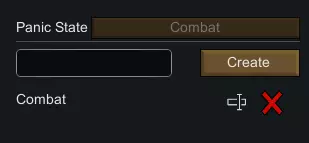
当你按下紧急按钮时,该状态将自动激活(右下角所有覆盖层切换按钮处应有一个图标可用于此操作,并且如果你安装了“更好的 pawn 控制”模组,此功能可与该模组的警报按钮配合使用,实际上会整合到其中)。 你可以自行决定要使用哪些状态。 在我自己的游戏中,我只设置了一个状态——“紧急状态”,正如你在上面的片段中看到的,我将其命名为“战斗”。 我将该状态分配给所有的护甲标签,因此我的护甲只在紧急情况下才会被穿戴。(不过,如果我没有安装能提前预警袭击的模组,也就是《环世界:战争》,我会让他们一直穿着较便宜的护甲,只将最珍贵的护甲留到紧急情况下专用。)其余时间我只依赖设置为【任意】的标签,因此它们始终处于激活状态。 战斗扩展 官方表示,可组合装备配置与战斗扩展不兼容。 不过我还是成功让它们很好地协同工作了,方法如下。 访问用户界面 首先你会注意到, pawns装备选项卡上的编辑装备配置和创建标签按钮不见了。 别慌。 你仍然可以访问标签和装备配置的用户界面。你可以通过屏幕底部的分配选项卡,在状态选择后点击【编辑】,或者在可组合装备配置的模组设置中为此分配一个热键。然后你需要使用“下一个”/“上一个”殖民者按钮来切换殖民者,以便为他们分配标签——或者在进入界面时直接选择想要的殖民者。 是的,这虽然不太方便,但仍然很容易操作。 让它们和谐共存:Combat Extended 有自己的装备配置系统。该系统涵盖武器和库存物品,但不包括服装。 因此,让 Compositable Loadouts 与 Combat Extended 和谐共存的最简单方法是确保它们不会尝试做相同的事情。 使用 Combat Extended 分配武器和库存物品。 仅使用 Compositable Loadouts 来选择服装。 这就是你需要做的全部。 是的,就是这么简单。结束语 希望这份小小的指南能帮助你更好地理解【可组合装备配置】的作用,以及如何利用它让你自己的游戏体验更加愉快。 感谢你抽出时间阅读! 顺祝商祺 ——拉苏尔