换一换
换一换 


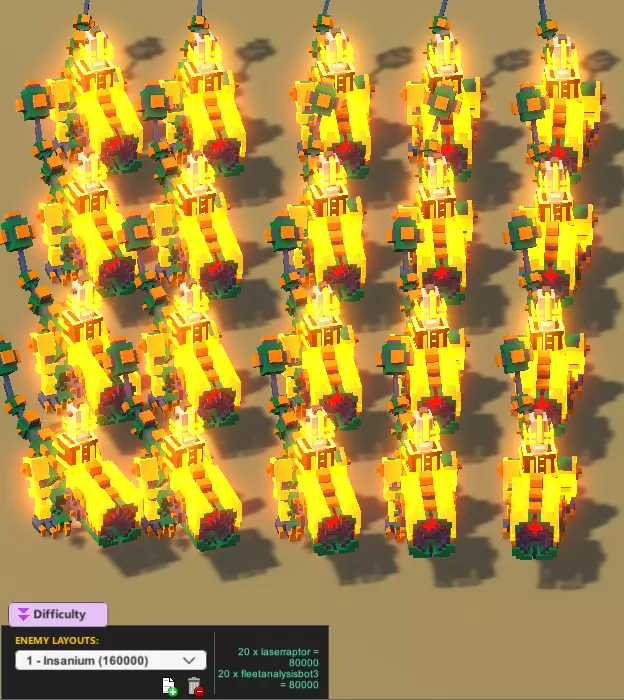
本指南将为你介绍一些在CDDZ编辑器中进行特定操作以及改进你的竞技场的实用技巧。 前言 如果你只想学习编辑器的基础知识,我推荐以下优质指南: Crilly撰写的一篇非常出色且内容深入的最新指南 Captain Thore撰写的另一篇内容深入的指南(虽有些过时,但仍然十分有用) 那么,让我们开始吧!难度范围 由于其他指南中的相关信息已略有过时,以下为最新内容: 等级 最低值 最高值 青铜 0 600 白银 650 1500 黄金 1550 2800 钻石 2850 4000 钛金 4050 7000 铀金 7050 20000 疯狂 20050 - 敌人最大数量 可能出现的敌人最大数量为20个。这包括迅猛龙骑手,但存在以下情况:若放置19个敌人和1只迅猛龙,你可以给这只迅猛龙配备骑手,从而得到21个敌人。 同样地,若放置20只迅猛龙,然后给它们全部配备骑手,最终将得到40个敌人。另外需要注意的是,黄色舰队分析机器人会生成敌人(至少1个),并且被算作1个敌人单位。因此,部署20个迅猛龙机甲并在它们身上放置黄色舰队分析机器人,战斗开始后会产生60个敌人。再加上护甲,总难度点数可达160000,而帧率最多只能达到10帧左右。
Arena and challenge files All of your arenas are saved as separate .json files (you can open them with any text editor), and your challenges are saved all in one .json file. Arenas are saved on this path (on Windows): "C: Users <your_username> AppData LocalLow Doborog Clone Drone in the Danger Zone LevelEditorLevels" Challenges are saved in this file: "C: Users <your_username> AppData LocalLow Doborog Clone Drone in the Danger Zone LevelEditorData ChallengeEditorData.json" In the end of these files you can find workshop info. Why this can be useful see in the next paragraph. Duplicating arenas So, let's say you've created an arena and want to expand on it, but as a separate arena. To do that, first thing you need to do is select it in the menu inside the editor and press Ctrl+D (or find the arena file and copy-paste it). If you haven't published your arena before doing this - congrats, that's it. But if you did publish your arena before duplicating it, keep in mind that the game will think that the duplicate arena is connected to the same workshop item as the original. This means that not only it will be recognized as already published, but also that updating it will update the workshop item that should be connected to the original. To avoid that and make the game think it's a new arena, do the following: Duplicate your arena if you haven't done so yet; Go to arena files path and open duplicate's file; Find the "WorkshopUploadID" key. If you have, in fact, published the arena, the value after this key will be a long number, like 2248356035. Change it to 0 instead.That's it, you're good to go! Duplicating challenges You can also duplicate challenges by copying them in the ChallengeEditorData.json file as specified in the "Arena and challenge files" paragraph. After duplicating, remember to change "UniqueChallengeID" key slightly. That's it, apparently Ctrl+D simply doesn't work on them (or I'm missing something obvious here). Duplicating animations As of right now, the duplication of animations is pretty strange. Hopefully it'll get fixed with the release. So, to copy an animation, all you need to do is select it in the animation list and press Ctrl + D. If you'll open the animation list after this, you'll see that the animation has been successfully duplicated. WARNING! This might not work if: the animation you're trying to duplicate is on the top of the animation list, so if it doesn't duplicate for you - try creating another animation, then select the one you're trying to duplicate and do it; the animation is empty (duplicating it can crash the game).Again, these are bugs and will probably get fixed in the future. Making unbeatable arenas Long ago, the editor was very harsh on creators in that even a slight change in a decoration's position required you to completely re-beat all difficulties in order to update the workshop item. Nowadays the system is so easy on you, that you can even move enemies without having to beat any difficulty again. Which is why you can make a beatable level, beat it, and then move the enemy somewhere impossible to reach, or surround the enemy with walls and a ceiling. Now you can publish it, but please don't do that. Hopefully this will somehow get fixed with the final release. Camera issues If your editor camera is glitched or all you can see is a blue void, resetting the camera might fix the issue. There's a lot of info about resetting the camera and the functionality of the F, Ctrl+F and Shift+F shortcuts in this guide by Enderspoons (checkout comments by Sheldor415 and HattyHattington5 there for more info): https://steamcommunity.com/sharedfiles/filedetails/?id=1332130514 Backups Made a huge irreversible change and want to go back, or accidentally deleted your arena? The editor automatically creates backup (.bak) files for every arena file in the folders I mentioned in the Arena and challenge files paragraph. Just remove the .bal part from their names and that's it! I'm not entirely sure, but I believe the editor creates a backup every time you save your changes. Tips on a good arena These are just some tips on how to improve your arena. Difficulties. It's nice to have as much difficulty sets as possible to make the arena more interesting to the player, but keep in mind that mindlessly placing enemies everywhere just to create as many difficulty sets as possible is not a good idea. It's much better to have less difficulty sets, but the ones that were thought through thoroughly. In the best case scenario each difficulty set should feel as if the arena was made specifically for this set. Hazards. Keep in mind that using hazards and moving platforms can make the arena either easier or harder depending on how you use them. For example - if you randomly place lava or spikes all over the place - it will make the arena much easier because unlike the player, enemies are not that careful about them. So, here are ideas for smart hazard placement: stationary archers on moving platforms - makes it harder for the player to reach or shoot them. Keep in mind that spidertrons don't do well with moving platforms; spidertrons on spikes - if you're careful enough, you can place spikes under a spidertron in a way that won't hurt it; hazards in enemy-unreachable spots - feel free to place as many hazards as you'd like in places, where enemies are not supposed to be - this way you'll only make it more difficult for the player to navigate; conveyors - enemies perform pretty well on them, so using them with a reasonable speed will mostly make it harder for the player, especially with enemy archers around. deadly jump pads - try to place them in a way that won't make enemies run straight on them for some reason and you'll be fine; firepits in front of archers - placing a fire source in front of a stationary archer can give you crazy results like 6 fire archers in a bronze level; fleet analysis bots and spikes - if all of your non-stationary enemies are fleet analysis bots, fell free to use as much spikes as you want. Length. Try to keep your arenas reasonably short. If it takes 5 or more minutes to complete your arena - you should probably cut some corners. Use LevelPreviewCamera or CommentatorCamera to give your arena a nice preview on the monitors. Keep in mind that CommentatorCamera persists after the battle has started. Both LevelPreviewCamera an CommentatorCamera are located in the Commentators section in the Library. Doors and triggers. Always a nice addition if they fit your idea and style of the arena. For example, doors and AI triggers can be used in arenas with multiple sections. Twitch spawn points and areas. Once again, it's always nice to have them in any endless arena for a better controlled experience in twitch mode. Arena and light settings. Small details and nice touches to improve the overall feel of your arena, don't forget to use these. No arms challenge. Imagine that somehow a player lost both of their arms (from a grenade or an arrow for example). It's a good idea to make your arena give a player a chance with an addition of spikes to push enemies into or any other way to beat the arena. Of course, if the player can't fight or breathe fire or even kick, then there's not much you can do there, so it's not always possible to make an arena completely 100% beatable. Something special. It is unnecessary but always nice to have some gimmick to your arena that makes it stand out. It can be something simple, that will make the player remember this arena. A lava fountain, or walls, that are closing in on you, or a firebreathing statue, or buttons that trigger something, or even a secret room - let your imagination run wild. Workshop thumbnail. Every time you publish or update your work, the game makes a screenshot of the editor (excluding the UI) and makes it the thumbnail. So, before clicking the Publish button, try to position the camera in a way that will make for a good thumbnail. A small checkbox at the top of the editor can hide stuff like triggers and entity names, so use it to your advantage. Screenshots. While in battle, pressing the "~" button freezes time and allows you to fly around. Make some screenshots so people can see how your arena looks up close before subscribing. Conclusion That is all I can share with you on this topic. I might expand it if I find/learn more about it. Please let me know if I'm incorrect about anything. Thank you for reading!