换一换
换一换 


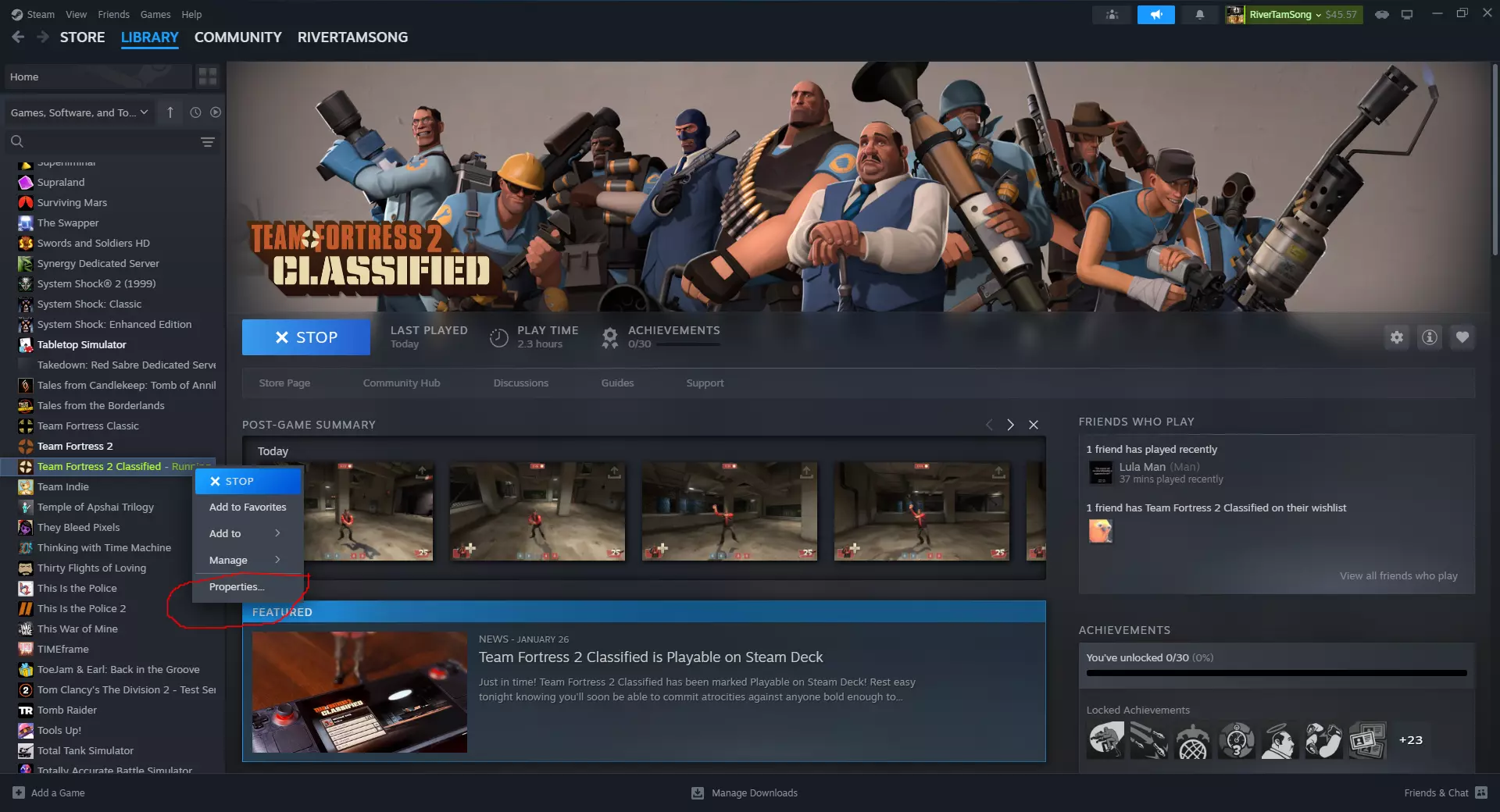
想要击杀音效?想要江南Style?想要自定义HUD?朋友,别再找了!这份指南能帮你获取自定义内容,就像在原版《军团要塞2》中一样! 如何找到TF2C文件夹? 其实很简单。右键点击TF2C,点击属性,点击已安装文件,点击浏览,这样就可以了!大多数内容会保存在/tf2classified文件夹中,记住这一点!
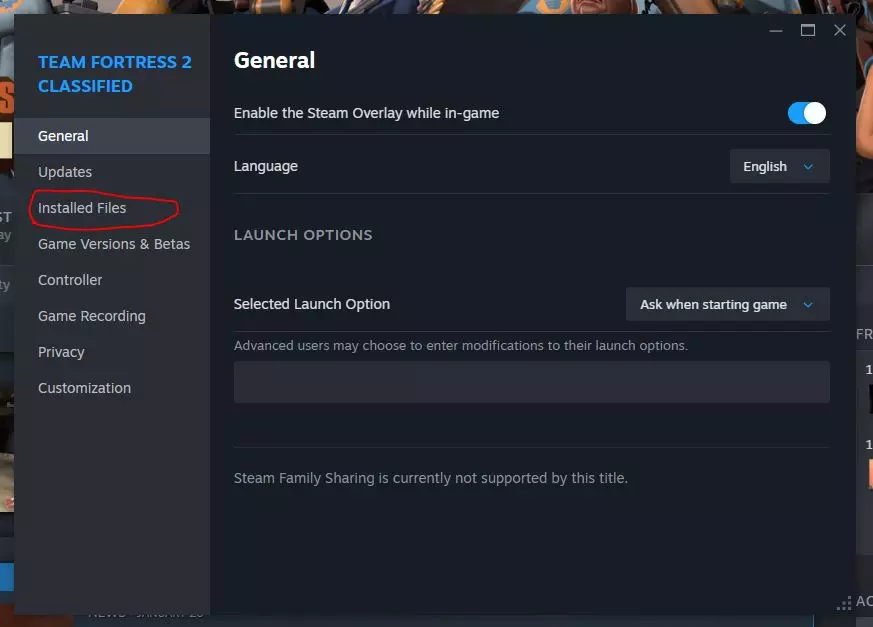
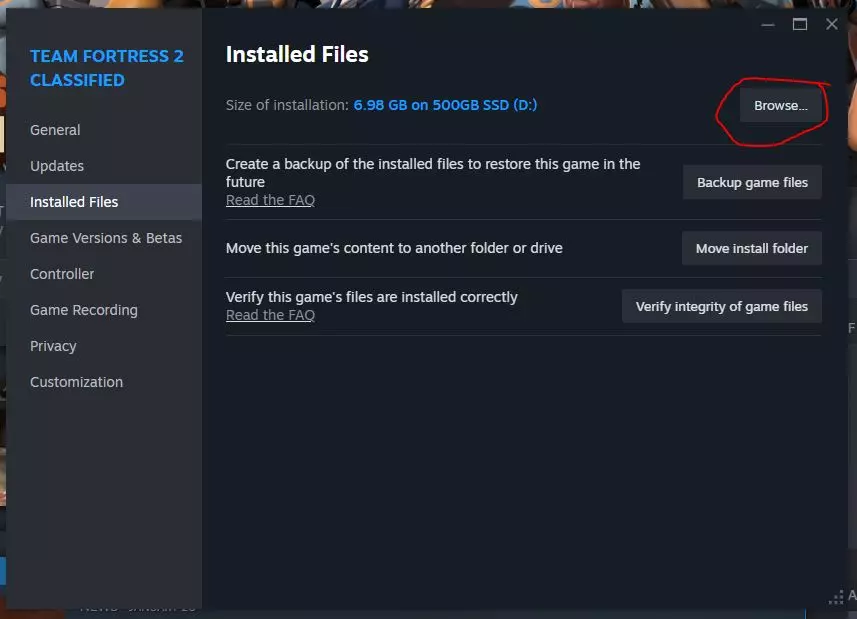
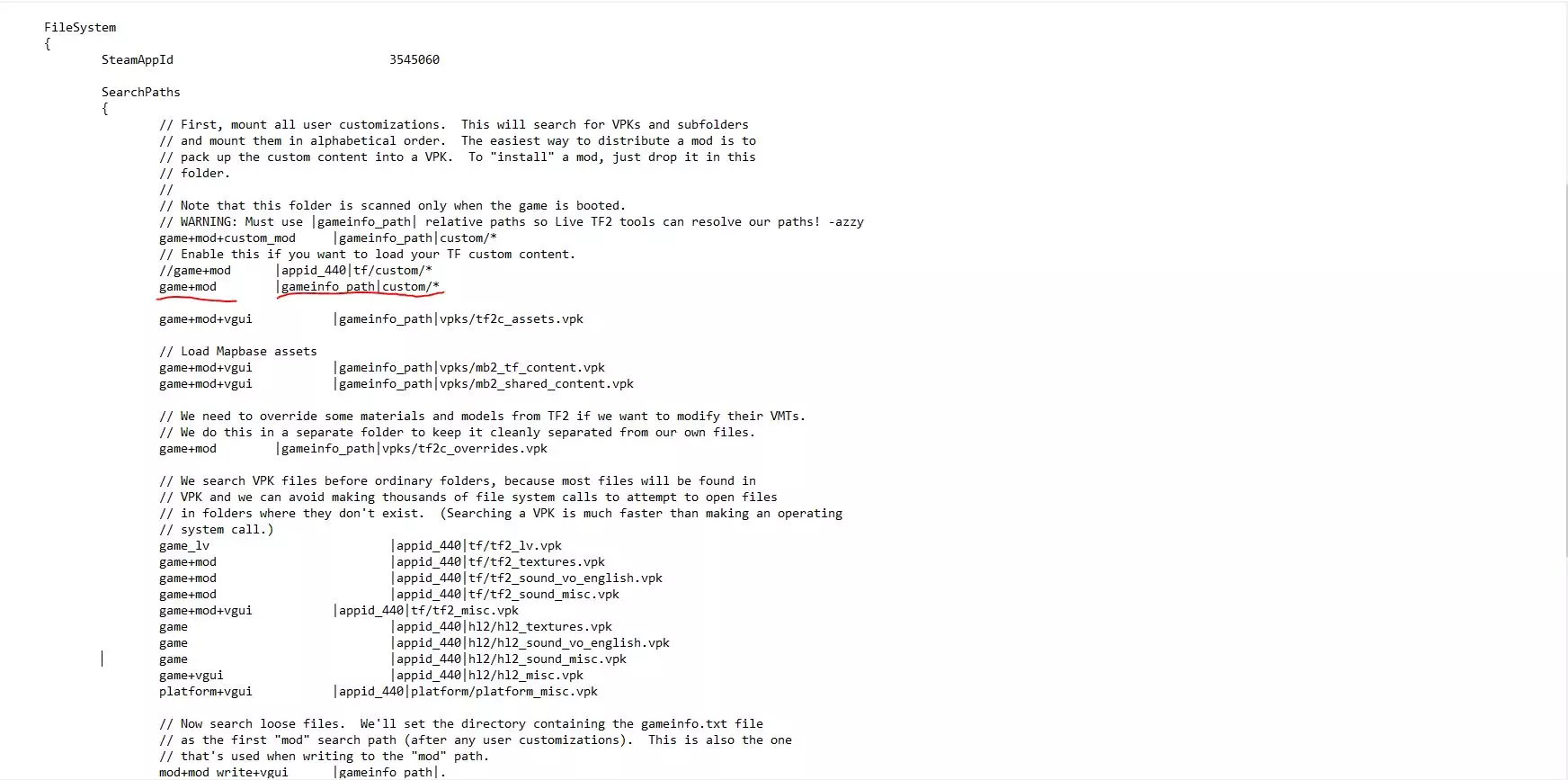
使两者内容同步(不推荐) 如果你不想费心创建任何新文件夹或进行其他操作,那么本节内容适合你!简单来说,你放入《军团要塞2》custom文件夹中的任何内容都会与TF2C的自定义内容同步。 如何设置呢?这非常简单,只需删除gameinfo.txt中的两个字符即可。

看到那两个//了吗?删除我高亮区域中“game+mod”旁边的那两个//,应该就能正常运行了。 温馨提示:军团要塞2经典版(TF2C)的部分内容格式不同,因此有些内容无法直接正常使用(例如:动画替换文件需要重命名)。对于这些情况,建议进一步阅读本指南,了解如何专门为军团要塞2经典版设置一个文件夹! 军团要塞2经典版的专属自定义文件夹。 下一部分将介绍如何为军团要塞2经典版创建专属的自定义文件夹。这样你就可以同时为两个游戏安装模组,而不会相互影响。 开始设置(文件夹配置) 在开始放置自定义内容之前,我们需要完成几件事。 首先要做的就是设置自定义文件夹。标题可以随便起:自定义、我的东西、随便什么都行!反正之后我们会重新定义它!只需在你的TF2C文件夹中的任意位置创建它即可。
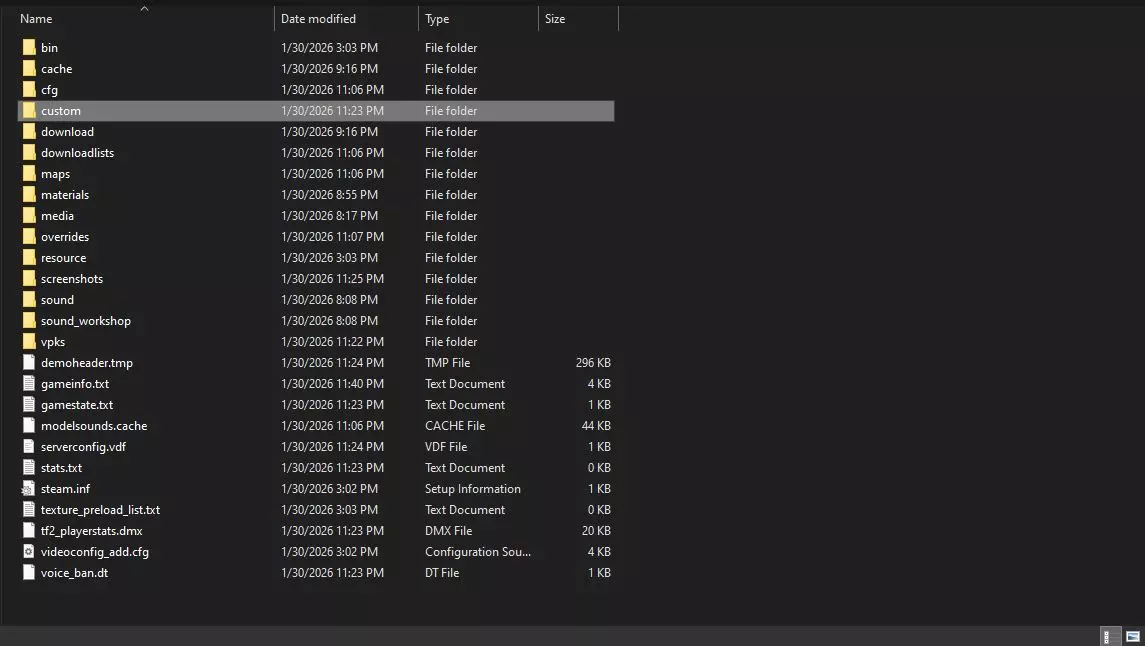
如果你从未使用过《军团要塞2》的自定义文件夹,请务必先阅读该文件夹内的README.TXT文件,然后再尝试使用本文件夹,避免在评论区抱怨无法使用。谢谢! 将自定义文件夹添加到游戏信息中 现在我们已经设置好自定义文件夹,接下来需要进行定义,让《军团要塞2:经典版》能够识别它。 找到并打开tf2classified文件夹内的gameinfo.txt文件,然后找到//game+mod|appid_440|tf/custom/*这一行。
在其正下方,我们要添加自己的行来定义自定义文件夹。请输入(或粘贴)game+mod|gameinfo_path|[你的自定义文件夹名称]/*。完成后,你的gameinfo文件应与我的一致。
Go ahead and test it out by adding a hitsound! If you don't know how to do that then why are you even reading this guide in the first place!If everything worked properly you should hear you hitsound once you enable the default hitsound in the settings. My gameinfo (for lazy people) So you dont even wanna take a tiny peek to find the spot? ok well then here's my entire gameinfo.txt for you to copy. Enjoy! (Results may vary and I am not responsible for you breaking your game. Always backup your gameinfo.txt before making big chances like replacing it with something, especially from a stranger.) "GameInfo" { game"Team Fortress 2 Classified" type multiplayer_only nomodels1 nohimodel 1 nocrosshair0 hidden_maps { "test_speakers"1 "test_hardware"1 } nodegraph 0 GameData"tf2c.fgd" InstancePath"maps/instances/" advcrosshair 1 supportsvr0 ReplayRequired 0 gamelogo 1 DependsOnAppID 440 FileSystem { SteamAppId3545060 SearchPaths { // First, mount all user customizations. This will search for VPKs and subfolders // and mount them in alphabetical order. The easiest way to distribute a mod is to // pack up the custom content into a VPK. To "install" a mod, just drop it in this // folder. // // Note that this folder is scanned only when the game is booted. // WARNING: Must use |gameinfo_path| relative paths so Live TF2 tools can resolve our paths! -azzy game+mod+custom_mod|gameinfo_path|custom/* // Enable this if you want to load your TF custom content. //game+mod|appid_440|tf/custom/* game+mod|gameinfo_path|custom/* game+mod+vgui|gameinfo_path|vpks/tf2c_assets.vpk // Load Mapbase assets game+mod+vgui|gameinfo_path|vpks/mb2_tf_content.vpk game+mod+vgui|gameinfo_path|vpks/mb2_shared_content.vpk // We need to override some materials and models from TF2 if we want to modify their VMTs. // We do this in a separate folder to keep it cleanly separated from our own files. game+mod|gameinfo_path|vpks/tf2c_overrides.vpk // We search VPK files before ordinary folders, because most files will be found in // VPK and we can avoid making thousands of file system calls to attempt to open files // in folders where they don't exist. (Searching a VPK is much faster than making an operating // system call.) game_lv|appid_440|tf/tf2_lv.vpk game+mod|appid_440|tf/tf2_textures.vpk game+mod|appid_440|tf/tf2_sound_vo_english.vpk game+mod|appid_440|tf/tf2_sound_misc.vpk game+mod+vgui|appid_440|tf/tf2_misc.vpk game|appid_440|hl2/hl2_textures.vpk game|appid_440|hl2/hl2_sound_vo_english.vpk game|appid_440|hl2/hl2_sound_misc.vpk game+vgui|appid_440|hl2/hl2_misc.vpk platform+vgui|appid_440|platform/platform_misc.vpk // Now search loose files. We'll set the directory containing the gameinfo.txt file // as the first "mod" search path (after any user customizations). This is also the one // that's used when writing to the "mod" path. mod+mod_write+vgui|gameinfo_path|. game+game_write|gameinfo_path|. default_write_path|gameinfo_path|. gamebin|gameinfo_path|bin // Last, mount in shared HL2 files // game|appid_440|tf game|appid_440|hl2 platform|appid_440|platform // Random files downloaded from gameservers go into a seperate directory, so // that it's easy to keep those files segregated from the official game files // or customizations intentially installed by the user. // // This directory is searched LAST. If you visit a server and download // a custom model, etc, we don't want that file to override the default // game file indefinitely (after you have left the server). Servers CAN have // custom content that overrides the default game files, it just needs to be // packed up in the .bsp file so that it will be mounted as a map search pack. // The map search pack is mounted at the top of the search path list, // but only while you are connected that server and on that map. game+download|gameinfo_path|download } } } FAQ (PLEASE READ BEFORE COMMENTING) Q: My mod didn't work! A: It may not be compatible with TF2C, this is especially true for animation mods. Q: Why isn't my content registering? its all setup properly and very simple. A: is it 2 folders deep before reaching the things like materials/ and sounds/? It all can only be one file deep (IE: modname/materials) Q: Guide didn't work you suck >:( A: Please for the love of god tell me what happened and I may be able to help you or just read the whole damn guide instead of just one section for the love of all that it is holy.