换一换
换一换 


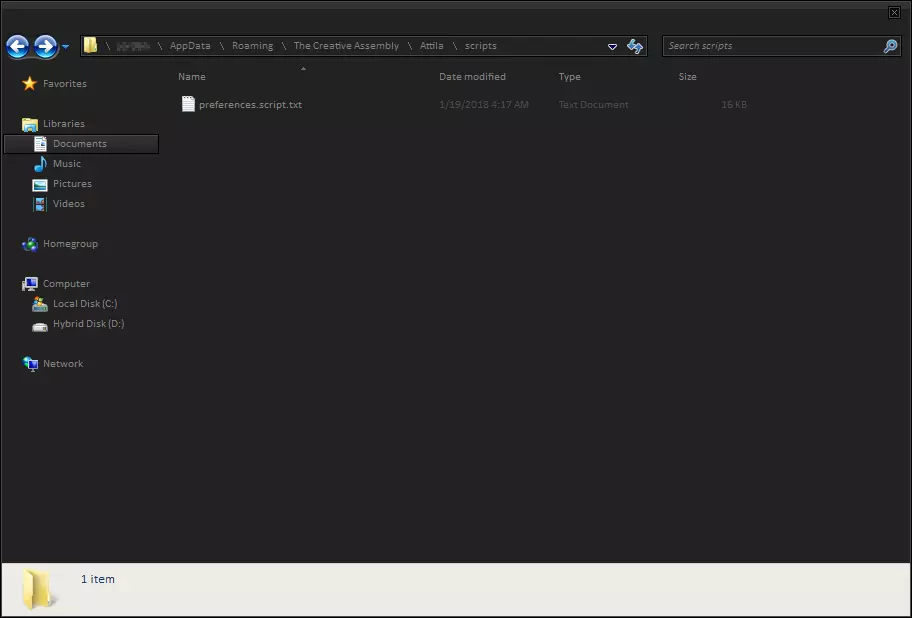
手动设置《全面战争:阿提拉》的CPU线程数,以提升其自动检测下的性能。 操作方法: 1. 在Windows资源管理器中,导航至:C: Users [你的用户名] AppData Roaming The Creative Assembly Attila scripts,或直接输入%appdata% The Creative Assembly Attila scripts 2. 打开preferences.script.txt文件 3. 在文件中找到以下行:number_of_threads 0; # number_of_threads <int>, Set the number of threads <= 0 - automatic, >0 = explicit number # 4. 将0修改为你的CPU可用的线程数或核心数。例如,以我使用的Ryzen 7 5800x为例: number_of_threads 16; # number_of_threads <整数>,设置线程数 <=0为自动,>0为明确数量 # 如果你不知道自己的CPU有多少核心,可以按下CTRL+Shift+Esc,打开“性能”选项卡,然后在CPU选项卡中就能找到你需要的信息。
减少卡顿的简单技巧

2026-02-18 01:00:09
转载

导读
本文介绍了《全面战争:阿提拉》减少卡顿、提升性能的技巧,通过手动设置CPU线程数来优化自动检测下的表现,详细说明了修改配置文件的操作步骤,还教大家查看自身CPU线程数的方法。


评论
共0条评论

全面战争:阿提拉 成就指南(乌克兰语版)
本指南将帮助你在游戏中获得大量成就。但遗憾的是,有部分成就即使满足了相应条件也无法获得。 大型战役
2026-02-17 22:000赞 · 0评论

游戏 【全面战争:阿提拉】超干货!阿提拉引导新手向攻略教程——从入门到老手!序章部分①
第一次做这种功略向视频,但是估计阿提拉现在入坑的并不多,试试看 后续的话会打一个西哥特的小胜档作为收尾 由于太长了分3p发出来
2025-09-12 09:450赞 · 0评论

从平民到贵族:性能指南
《全面战争:阿提拉》性能提升逐步指南:从普通玩家到资深玩家的进阶之路 简介 在我创建本指南之前,我的画面设置为默认推荐选项,这是一种高/中画质选项的错误组合,平…
2026-02-17 22:000赞 · 0评论
通用技巧与匈奴攻略
我将列出一些玩匈奴时适用的技巧,以及一些关于游戏的通用提示和信息。我会谈到军队组成、攻城和野外战斗时使用的战术、作为匈奴的可能 campaign 移动方式,还有…
2026-02-17 22:000赞 · 0评论
阿提拉:全面战争 全面战争阿提拉卡顿闪退怎么办?高效解决游戏运行问题的实用方法
《全面战争:阿提拉》作为Creative Assembly于2015年推出的策略历史大作,凭借宏大的战役地图、高自由度的派系系统与写实残酷的生存机制,持续吸引着…
2025-11-16 22:130赞 · 0评论
技巧 二重螺旋必看游戏画面设置攻略
二重螺旋必看游戏画面设置攻略#二重螺旋 #二重螺旋公测 #二重螺旋攻略
2025-12-18 18:330赞 · 0评论

上古卷轴5卡顿 上古卷轴5突然掉帧怎么解决 上古卷轴5突然掉帧怎么办
当你在天际省里面自由探索,或是深入古老遗迹冒险时,最影响沉浸感的莫过于上古卷轴5突然掉帧卡死,从繁荣的市集到宏伟的宫殿,突如其来的帧率下降,会让每一次转身战斗都…
2025-11-28 00:320赞 · 0评论

巫师2 巫师2掉帧严重怎么办?全面解决卡顿与帧数不稳的优化方法
《巫师2:国王刺客》以高度沉浸的叙事结构与成熟的战斗系统著称,其剧情设计具备显著的危险性多分支特性——玩家的关键抉择将切实改变地图区域的开放状态、任务走向及NP…
2025-10-10 10:560赞 · 0评论
科技 【我的世界Ae自动化教程-番外篇】老是卡顿?如何重视和优化科技包中后期延迟问题
2025-09-05 11:030赞 · 0评论

《全面战争:阿提拉》优化
建议的优化核心在于将《全面战争:阿提拉》中的游戏着色器替换为早期版本《全面战争:不列颠王座》的着色器。此操作能显著提升游戏帧率,尤其是在镜头放大到大型战斗场景时…
2026-02-17 22:000赞 · 0评论

暂无更多
最新更新
- 深入探讨阿提拉在现代电脑上的32位引擎(2026年) — 介绍 本指南是我的《罗马2:全面战争》大师级优化指南的一个专门分支。由于《阿提拉:全面战争》和《罗马2:全面战争》共享相同的32位引擎架构,因此针对性能和稳定性…
- 战役战斗 — ### 军队组成、阵型与战术论述 #### 引言 本指南旨在帮助那些在战役战斗中遇到困难的玩家。内容涉及玩家对抗AI以及AI对各种情况的反应,不一定适用于当前多…
- 移除卡顿和性能问题 — 消除卡顿和性能问题。 步骤 如果遇到卡顿问题,请执行以下操作: 《阿提拉:全面战争》是一款32位游戏(2015年了,CA为什么还要发布32位游戏呢?),这意味着…
- 传奇东罗马帝国攻略 — 更新:高效且经济的东罗马帝国军队 以下是一些在传奇难度下以拜占庭帝国(东罗马帝国)赢得战役的建议和信息。这并非唯一的获胜方法,也可能不是最佳方法,但对我来说已经…
- 1212 Medieval Kingdoms 常见问题解答表 — 这是一份关于1212中世纪王国模组常见问题的解答。本列表并不详尽,如需进一步帮助可在相关社区寻求支持。 简介 首先需要说明的是,本指南不会涵盖:多人游戏问题/平…
- 如何避免在游玩西罗马帝国时陷入沮丧? — 抑郁症(源自拉丁语deprimo,意为“按压(向下)、抑制”)是一种心理障碍,其主要特征为情绪低落——表现为压抑、沮丧、忧伤、焦虑、恐惧或冷漠,以及获取快乐的能…
- 减少卡顿的简单技巧 — 手动设置《全面战争:阿提拉》的CPU线程数,以提升其自动检测下的性能。 操作方法: 1. 在Windows资源管理器中,导航至:C: Users [你的用户名]…
- WRE高级行省管理 第一部分:如何设计行省模板 — 什么建筑组合能满足行省管理的三大支柱(公共秩序、粮食、卫生),同时尽可能榨取收入呢?你需要的是一个行省模板——一种预先确定的建筑组合,它能满足公共秩序、粮食和卫…
- 蛮族的建筑建造与平衡 — 单独的建筑建造平衡计算,目前适用于【蛮族】。包含实用示例和说明。 属于大型指南的一部分。 数学基础 省份首府必建建筑列表: 城市/仓库(生态、食物)/公共用地(…
- 理解《阿提拉:全面战争》中的政治体系 — 《阿提拉:全面战争》的内政系统和《罗马2:全面战争》一样复杂。本指南不会让你成为内政达人,但能帮助你了解其运作方式并掌握最佳控制方法。 内政系统如何运作? 建议…