换一换
换一换 


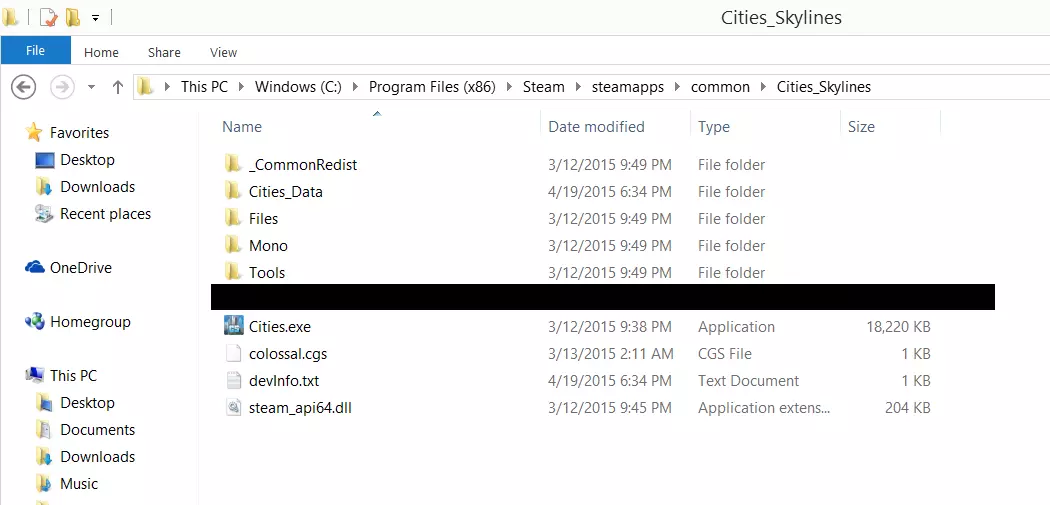
让我们面对现实吧:每个玩过《城市:天际线》的人都曾希望能在使用模组的存档中解锁成就。现在,借助巧妙的代码编写,你可以实现这个愿望了。 简介 本指南旨在修复由bad criminal创建的原版成就启用模组,由于《城市:天际线》近期的更新,很多人在使用该模组时遇到了问题。此模组的原始代码归bad criminal所有,我仅拥有本指南本身的知识产权。在开始之前,我要感谢bad criminal公开源代码并支持本指南。如果您运行的是Windows 7专业版64位系统,请查看指南中标题为【如果您运行的是Windows 7专业版64位系统...】的部分。您很可能无法通过常规方法让模组正常运行,需要按照SmokeDog和Ecktos创建的说明来操作,才能在您的操作系统上使用该模组。(不过不用担心,操作并不复杂。) Windows 7专业版64位系统的修复方法可能也适用于其他Windows版本。已有多位用户反馈,使用此方法在Windows 8.1系统上成功运行;如果您在其他Windows版本上无法正常使用该模组,可以尝试SmokeDog和Ecktos提供的技巧。下载模组 从理论上讲,由于“bad criminal”的模组已公开其代码,实际上无需下载即可使用,你完全可以手动创建文件。不过,本指南仍将基于下载模组的方式进行讲解。通过工坊找到该模组并将其添加到你的游戏中。 现在模组已从工坊安装完成,启动游戏,并仔细检查确保它已列在你的模组菜单中。 文件导航 接下来需要进行一些操作。不知为何,安装过程中创建的文件夹要么为空,要么基本无法使用。退出游戏并导航至你的《城市:天际线》文件夹,该文件夹通常位于“C: Program Files (x86) Steam steamapps common Cities_Skylines”。你应该会看到一个类似这样的界面。
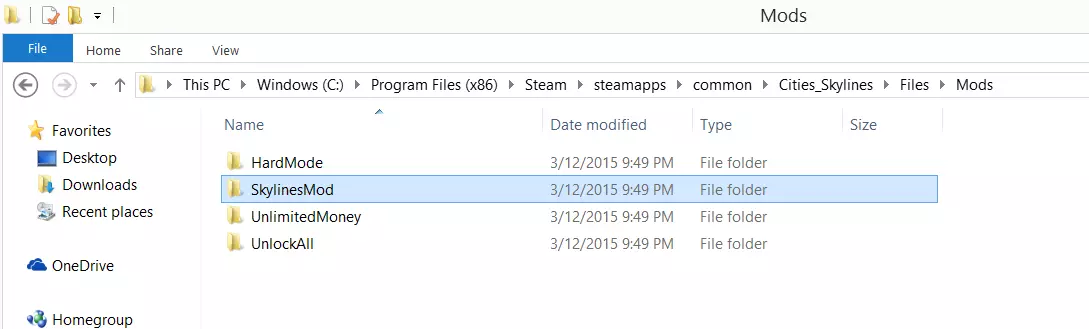
点击“文件”,然后点击“模组”。假设这是你安装的唯一模组,你应该会看到四个文件夹:“HardMode”“UnlimitedMoney”“UnlockAll”,以及第四个包含成就解锁器的文件夹。在我的电脑上,这个文件夹被简单地命名为“SkylinesMod”。
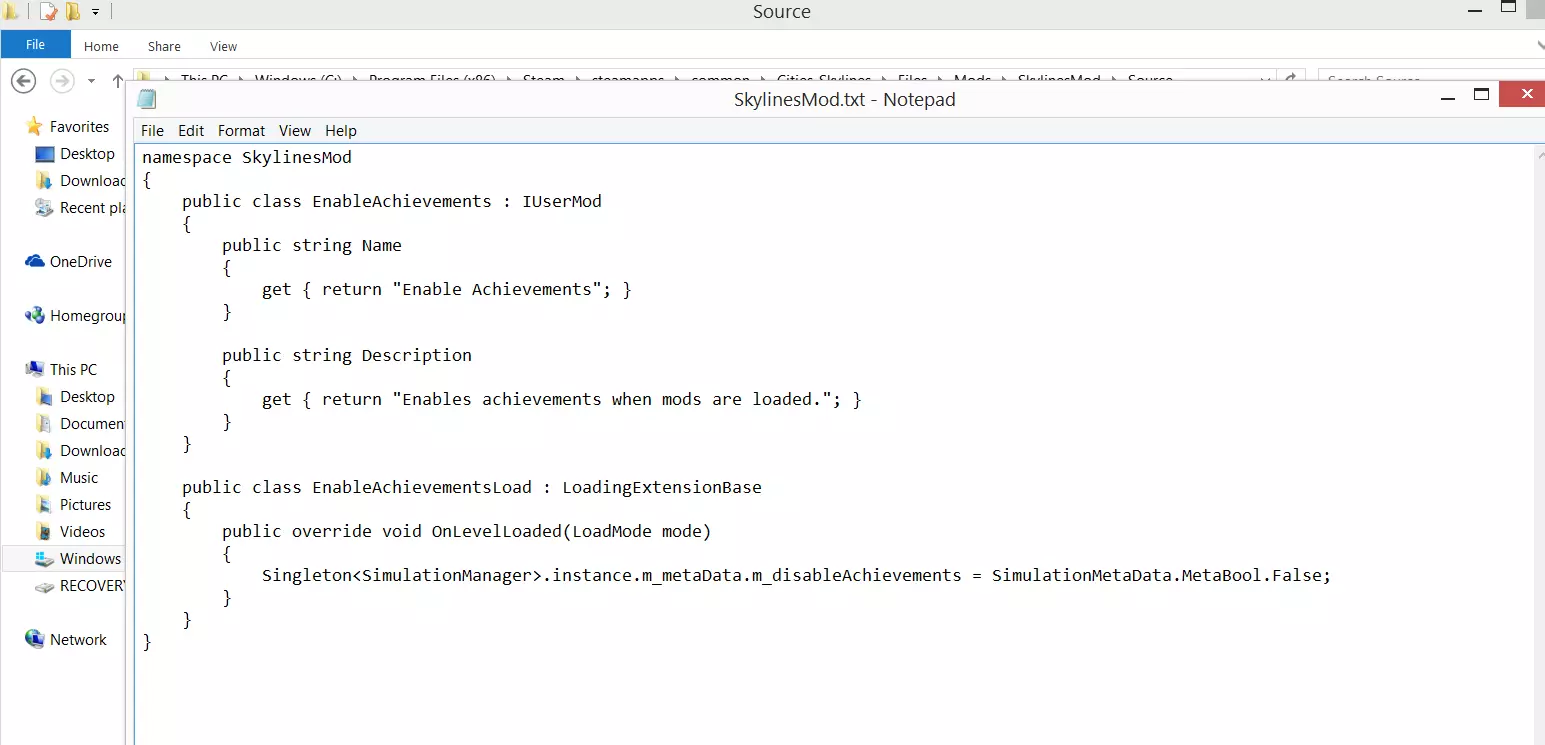
进入此文件夹,然后进入里面的文件夹,该文件夹应命名为【Source】。在这里你会找到一个.cs文件,它应该包含模组的代码;如果你的安装情况和我类似,这个文件应该是完全空白的,这可能是很多人遇到问题的地方。这就是bad criminal的代码发挥作用的地方。 启用解决方法 将.cs文件改为.txt文件并打开;如果里面有任何文本,将其清除,然后输入bad criminal的代码。再次说明,这不是我的代码,我不声称拥有其任何部分,但bad criminal已在其模组的创意工坊页面声明该代码可公开使用。 你的.txt文件现在应该看起来像这样:
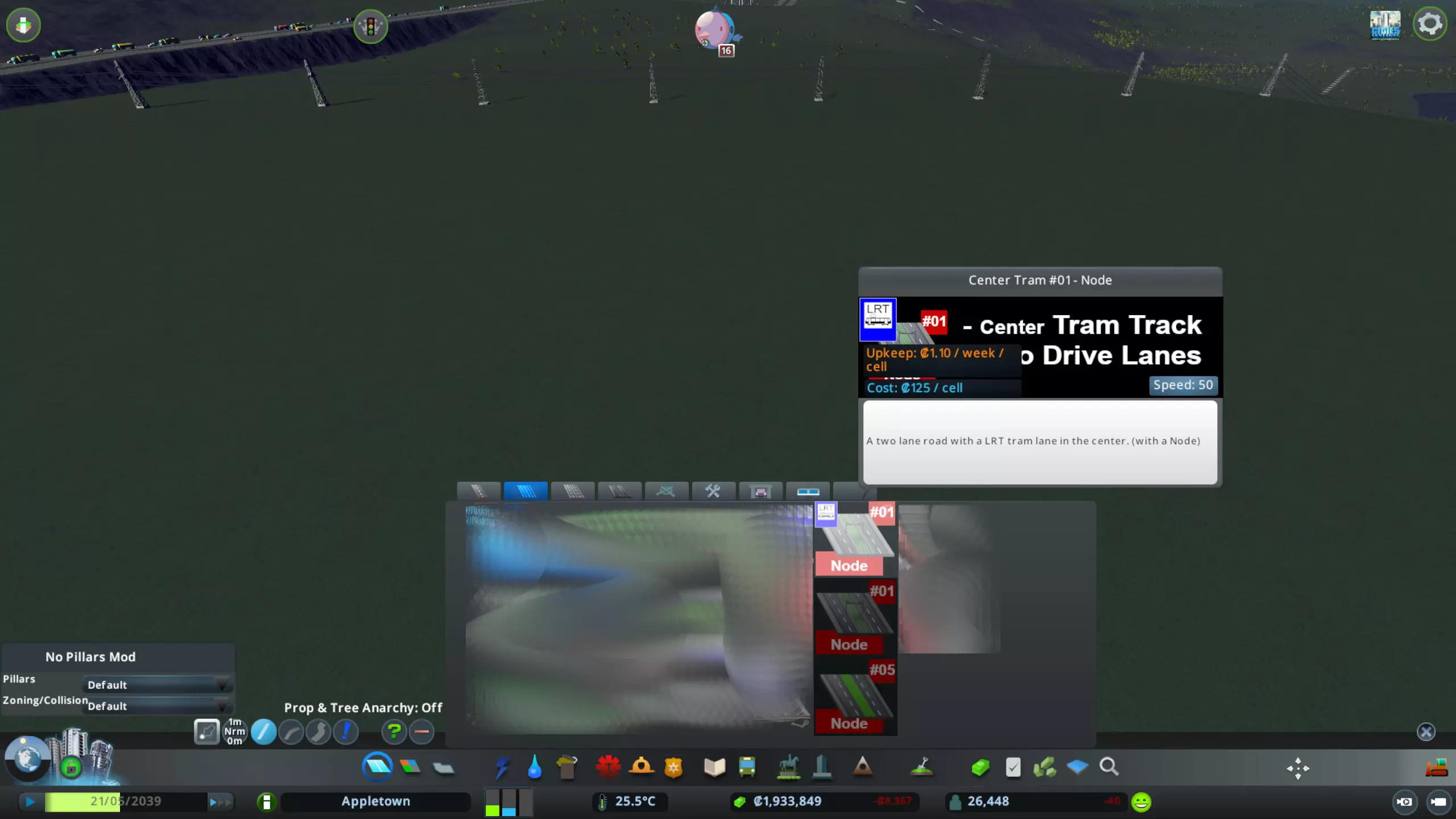
请注意,为了让模组正常运行,你可能需要在其余内容前添加以下几行文本: "using ICities; using ColossalFramework;" 有些用户发现即使没有这些代码行,模组也能正常工作,但也有用户反馈,如果不在开头插入这些行,模组根本无法运行。 将文件重命名为【SkylinesMod】(如果尚未如此命名),保存后退出。你可以将其保留为.txt文件,模组仍能正常工作。 设置游戏 最后一个重要步骤是打开【城市:天际线】并导航至模组菜单。确保coolvid69的模组(现在应该能正常显示)被设置为【关闭】。不这样做在大多数情况下会阻止你获得成就。现在你的屏幕应该显示成这样:
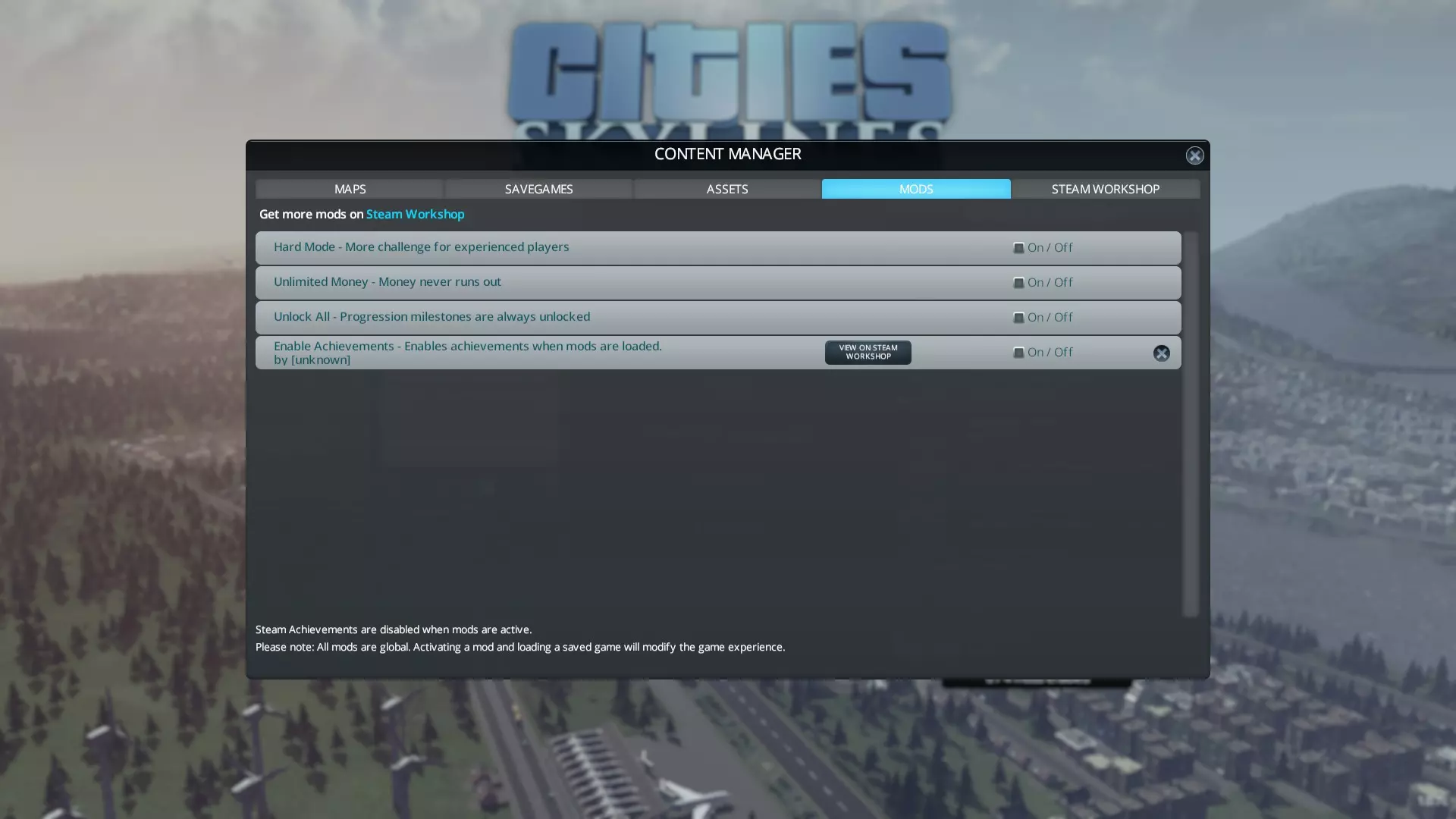
When selecting a saved game that has mods enabled, the achievement icon will remain gray until you earn another achievement in that saved game. Do not be alarmed if the icon is still gray, as this is does not mean that the mod isn't working. Additionally, some achievements which require a set number of special buildings may not be earned if you already have the required number of buildings in your world. For example, if an achievement requires that you have five police stations in your city and you have already built six, you will not be able to earn that achievement for that city, even if you destroy the extra police station. Please keep this in mind. If you're running Windows 7 Pro 64-bit... Several users running Windows 7 64-bit have reported that they still cannot earn achievements after doing all of the above. Fortunately, user SmokeDog has provided a fix in the comments that should get you up and running. For convenience, I've decided to include it here, as it seems to be a reoccurring problem. PLEASE NOTE THAT THIS FIX MAY ALSO WORK FOR USERS ENCOUNTERING ERRORS ON OTHER VERSIONS OF WINDOWS. 引用自 SmokeDog:I am on Windows 7 Pro 64-bit. For me, none of the mods I have installed were stored in steamapps/common or %LOCALAPPDATA%. I found all the files were stored in "Steam/steamapps/workshop/content/xxxxxx/yyyyyy" . So, once I had found this folder with SkylinesMod.dll, I created a Source directory, and inside I created the SkylinesMod.txt file as per the above guide, with the code pasted in. I saved this, and started up C:S. For me, this mod would only then work if I had the "Enable Achievements" mod switched ON in the content manager. I first tried with it switched off, knowing I didn't have the City Planner achievement, created a small district and applied a policy to it, nothing happened. I exited back to the main menu, switched ON the mod from the content manager, then tried the same thing with a district, and I got the achievement. Thanks for the guide, and I hope this info about my experience helps someone else.[/quote] 引用自 SmokeDog:To clarify my last post: "Steam steamapps common Cities_Skylines Files Mods" did not contain any custom mods I have installed, only the default ones - HardMode, UnlimitedMoney, and UnlockAll, as well as NewMod which seems to be the template files for making a new mod. I also checked in %LOCALAPPDATA% Colossal Order Cities_Skylines Addons Mods, and there was nothing in there either. Hence why I had to find the files in steamapps/workshop/content. Ecktos, who has gotten the mod to work using SmokeDog's method, further clarifies the solution: 引用自 Ecktos:Worked perfectly for me, using the workaround by SmokeDog on Win7 pro, I have set it out below in an easy to follow step by step guide so it should be very easy for anyone to follow. Step 1, Click the Windows button and type SkylinesMod.dll into the search box, once windows has located SkylinesMod.dll right click on it and select the option Open file location and a new window will open. Step 2. Inside this file create a new folder and name it Source Step 3. Open the newly created Source folder and right click, mouse over the New option and select Text document once the new text document has been created name it SkylinesMod and press return to confirm the new name. Step 4. Copy the text from https://gist.github.com/anonymous/c524671571c3879381b2 then open the SkylinesMod text document and paste the copied text into it, click File in the top left corner of the SkylinesMod text document and click the option Save. The files are now set up correctly and the mod will run as expected, but remember you must enable the mod in the Content Manager for it to work. The Achievement tab will remain inactive until a new achievement is attained at which point the tab will activate and will allow you to view the new achievement and any previous achievements you have obtained. Thanks for taking the time to work out how to make this mod work, and thanks to SmokeDog for the Win7 workaround, awesome job! If the mod still does not work after this, please let me know in the comments. Again, special thanks to SmokeDog for finding a fix to this issue, and to Ecktos for giving us step-by-step instructions! Congratulations! If you've correctly followed the steps above, you should now be able to earn achievements while playing in your modded cities! Thanks for reading, and if you found this guide helpful, please leave a thumbs up! As I mentioned above, if you are still having trouble getting the mod to work, please let me know in the comments below.