换一换
换一换 


这是《鞭子的寻的高级导弹脚本》(WHAM)及其火控脚本《发射导弹程序》(LAMP)的完整指南。本指南将涵盖我无法在创意工坊页面上容纳的所有内容。描述

这是《鞭子的寻的高级导弹脚本》(WHAM)及其火控脚本《发射导弹程序》(LAMP)的完整指南。本指南将涵盖我未能在创意工坊页面上容纳的所有内容。 本指南仍在制作中,随着我想起一些内置功能,我会继续补充内容,哈哈。 脚本链接
https://steamcommunity.com/sharedfiles/filedetails/?id=2108743626 https://steamcommunity.com/sharedfiles/filedetails/?id=2108744940 -- 新增功能 --
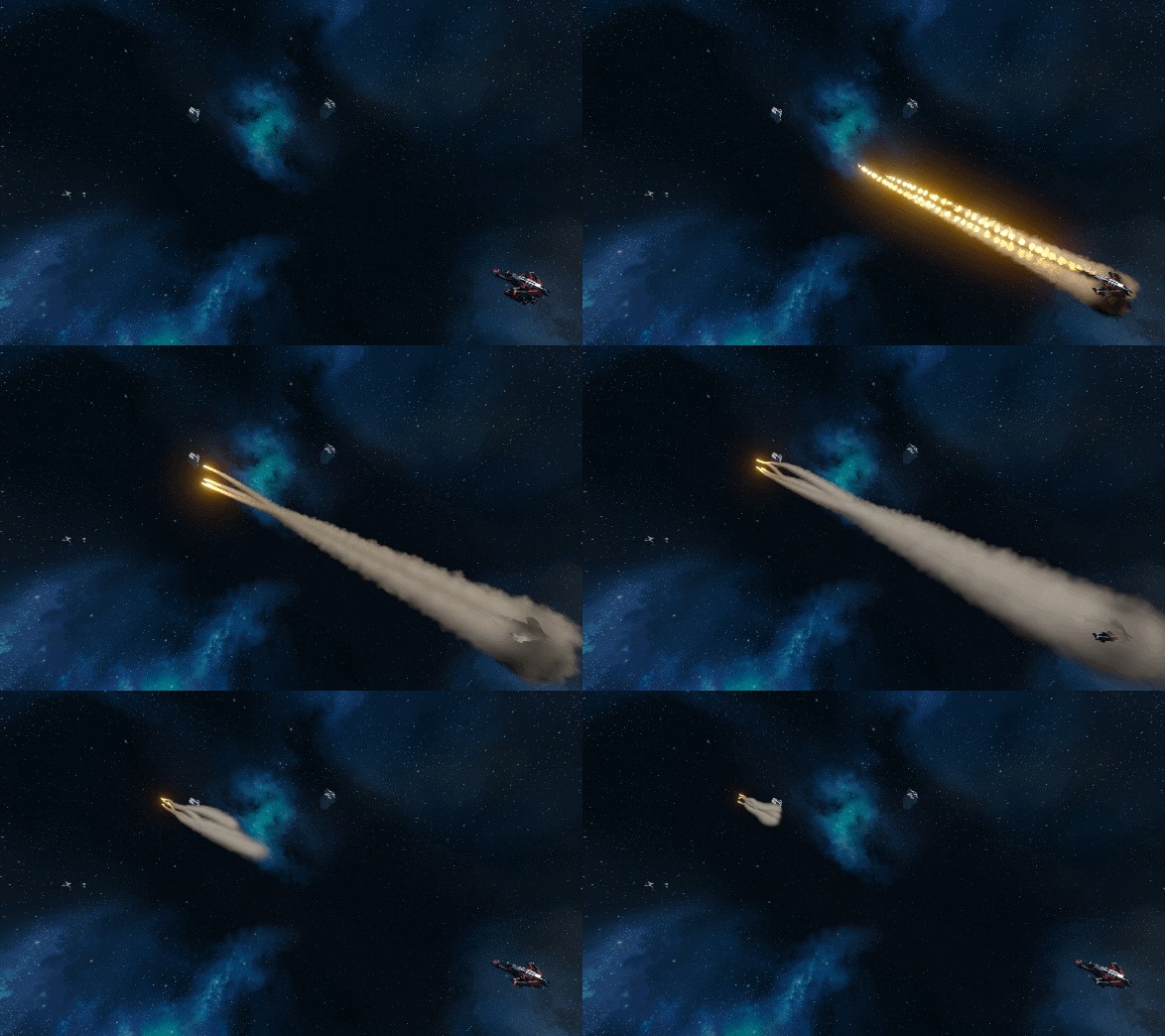
WHAM导弹现在可配置为随机飞行路径,使其更难被击落! 使用最新版本的WHAM和LAMP,你可以在WHAM的自定义数据部分配置“规避参数”和“随机飞行路径参数”,让导弹在规避模式激活时采用随机飞行路径。 你可以在LAMP中使用“evasion_on”“evasion_off”或“evasion_switch”参数来激活规避模式。 LAMP
描述:LAMP 是我的寻的导弹脚本 WHAM 的火控程序,它允许你使用玩家自制武器(PMW)向目标开火。你可能会问:“为什么叫 LAMP?” 嗯,就像灯一样,这个脚本为导弹照亮目标!(*叹气*) 此脚本还通过网格间通信 API(IGC)与 WHAM 导弹进行通信,而非利用漏洞。因此,可以在导弹飞行途中向其发送指令以改变行为。 如果导弹禁用了隐身功能,它们还会通过我的炮塔雷达脚本显示在屏幕上。此外,任何你正在用摄像机射线主动瞄准的目标也会显示在友方雷达上!LAMP具备3种制导锁定模式: 摄像头制导——利用摄像头射线进行目标追踪(俗称激光雷达) 炮塔制导——使用AI炮塔和自定义炮塔控制器的瞄准数据 驾束制导——导弹会跟随你的瞄准方向,很像陶式导弹 注:本脚本支持摄像头射线锁定,最大范围为5公里。炮塔锁定范围仅受所组炮塔自身最大射程限制。 制导功能:在任意一种制导锁定模式下,发射前必须先锁定目标。如果发射的导弹配备了摄像头,导弹将尝试自行锁定目标(主动制导)。这意味着你可以发射后不管,导弹会自行追踪目标。如果导弹上没有任何摄像头,它们将只会飞向你当前正在锁定的目标(半主动制导)。有关设置带摄像头导弹的更多详细信息,请参阅WHAM说明。 - LAMP设置说明
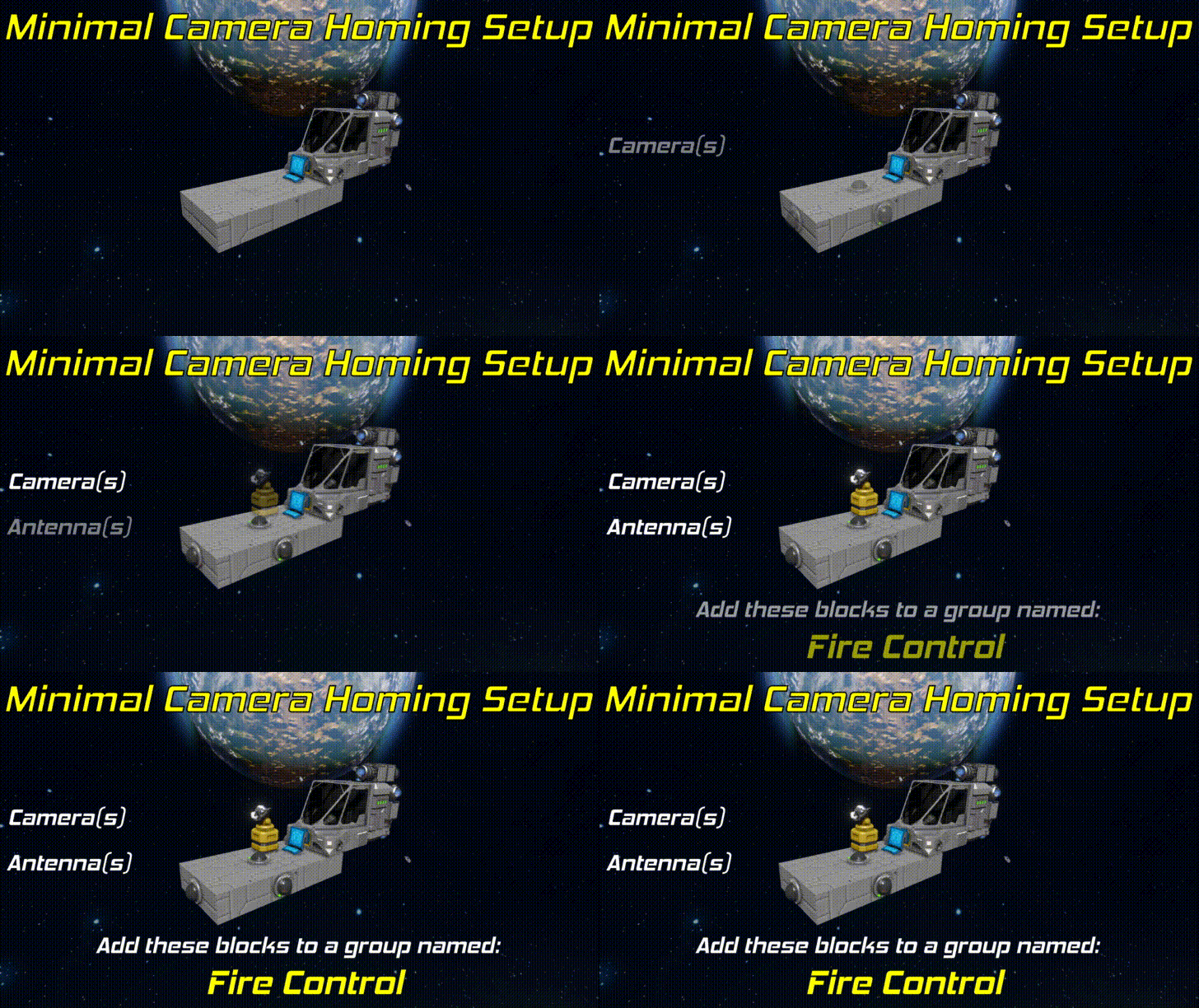
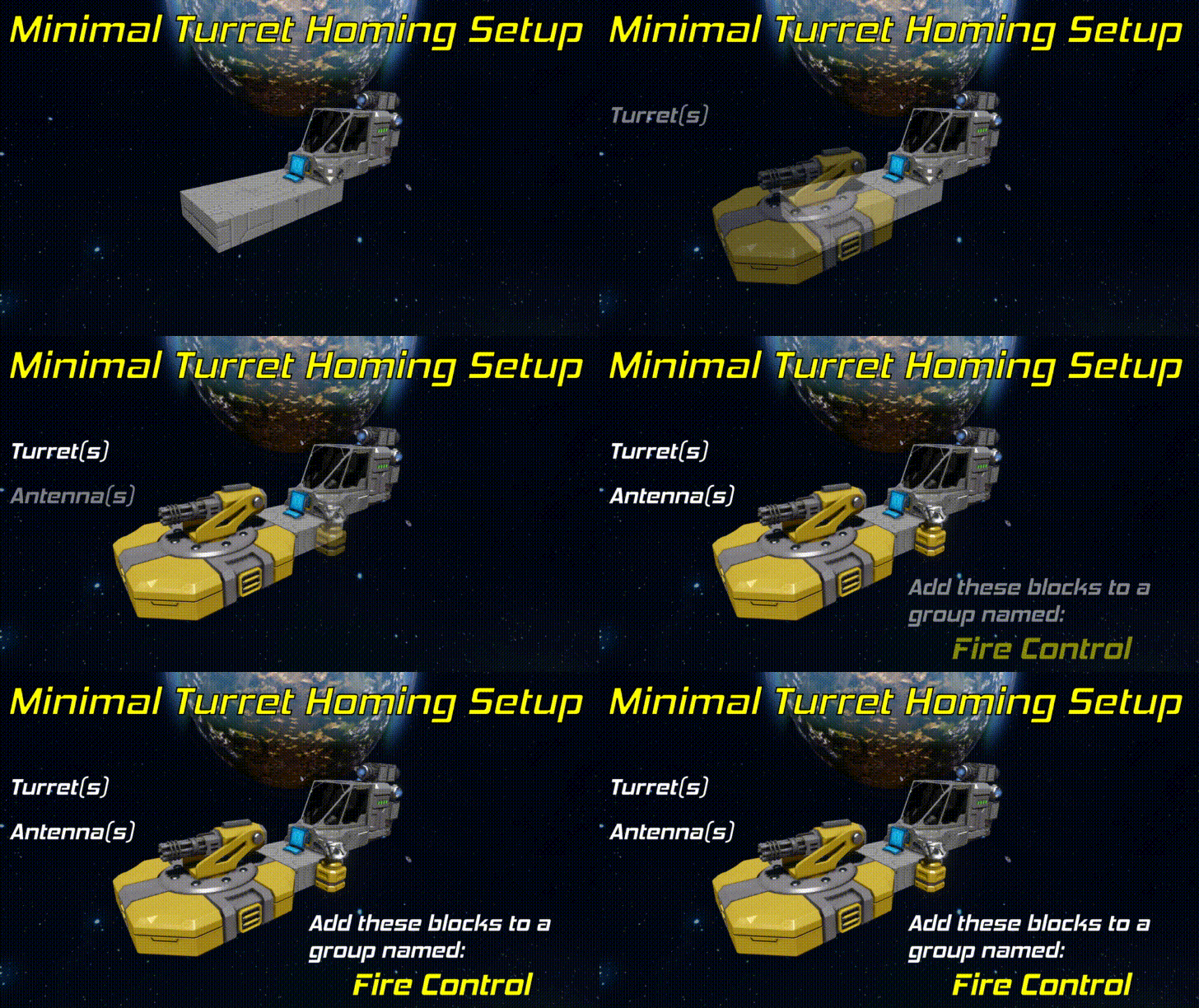
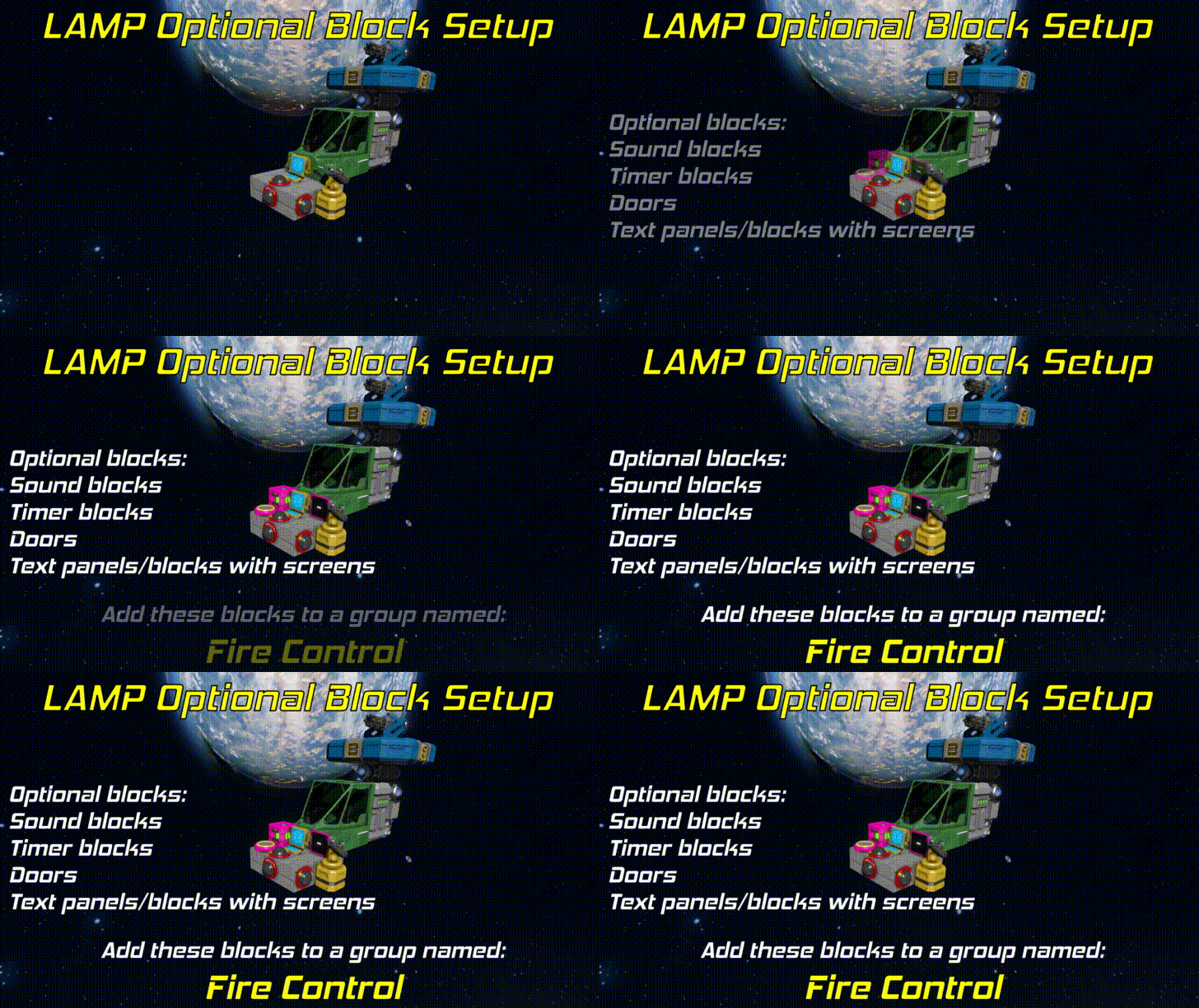
设置步骤:将此脚本放入开火舰船的可编程方块中。 在开火舰船上放置所有必需和可选方块。 将所有必需和可选方块编组,命名为:Fire Control(区分大小写)。 在舰船上安装已配置WHAM的玩家自制导弹。 使用所需参数运行此火控脚本。详见下方“参数”部分。 必需方块:脚本会根据在“Fire Control”组中找到的必需方块,自动启用特定制导模式。 ... 对于摄像头制导:摄像头 天线
...用于炮塔自动瞄准:炮塔或自定义炮塔控制器 天线
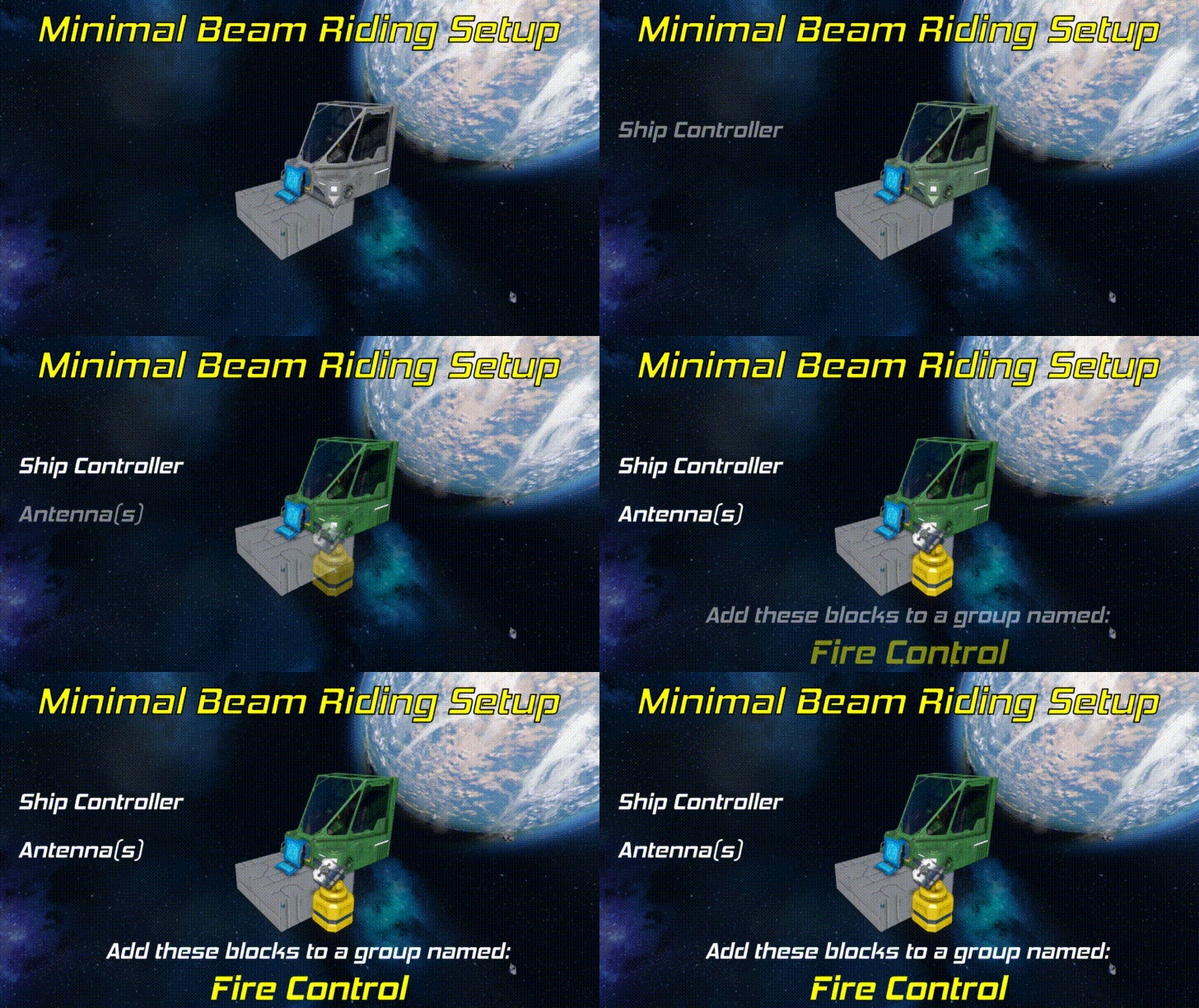
用于视线波束制导:天线 摄像头或舰船控制器
可选方块:组内任何带有“Reference”名称标签的终端方块。此方块的前向向量将用于初始目标扫描方向。 声音方块:用于状态音效。 文本面板/带LCD显示屏的方块(如驾驶舱):用于状态屏幕。对于带有多个LCD显示屏的方块,请查看其自定义数据以配置状态屏幕应显示在哪个屏幕上。 门:用于导弹发射井门。将其添加到组后,请查看门的自定义数据以获取配置选项。 计时器:用于在特定导弹发射时(或任何导弹发射时)触发。将其添加到组后,请查看计时器的自定义数据以获取配置选项。
LAMP 参数
通用:以下参数适用于任何制导模式。 参数说明 fire(发射):发射导弹。 限制条件:在制导模式下,必须已锁定目标。 可选参数: fire --count <数字>:指定发射导弹的数量。 fire --range <起始值> <结束值>:将可发射的导弹限制在指定范围内。 这些可选参数可以组合使用: fire --count 4 --range 1 8:将发射1至8号(含1和8)范围内的4枚导弹。 remote_fire(远程发射):向所有配置为允许远程发射的WHAM导弹发送远程发射请求。详情请参见“高级:远程发射导弹”部分。 限制条件:在制导模式下,必须已锁定目标。 alpha(全弹发射):发射所有导弹。限制:在制导模式下,必须锁定目标。 kill 激活主动天线范围内所有活动导弹的飞行终止系统。导弹上的所有模块将关闭,导弹上的任何弹头将引爆。 evasion_switch 切换导弹规避模式的开启/关闭。 evasion_on 开启导弹规避模式。 evasion_off 关闭导弹规避模式。 stealth_switch 切换导弹广播的开启/关闭。 stealth_on 关闭导弹自身的广播功能。 stealth_off 开启导弹自身的广播功能。 autofire_switch 切换自动开火的开启/关闭。 autofire_on 开启自动开火。 autofire_off 关闭自动开火。retask 强制所有激活的导弹切换至当前制导模式。若在已稳定锁定目标的寻的模式下运行此命令,还会强制所有激活的导弹锁定你当前的目标。 disable_fire 禁止脚本发射任何导弹,直至运行“enable_fire”命令。如果你想在通过投射器重新装填导弹时锁定火控系统,此命令非常有用。 enable_fire 允许脚本发射导弹。默认情况下,除非你已运行“disable_fire”命令,否则无需运行此命令。 模式切换 这些参数可用于切换制导模式。 参数 描述 mode_switch 在可用制导模式间循环切换(摄像头 > 炮塔 > 驾束制导)。mode_camera 切换至镜头制导模式(若允许)。 mode_turret 切换至炮塔制导模式(若允许)。 mode_beamride 切换至波束制导模式(若允许)。 镜头制导以下参数仅与镜头制导相关。 参数 描述 lock_on 开始搜索锁定。将自动切换至镜头制导模式。 lock_off 清除所有激活的锁定并停止搜索锁定。 lock_switch 在搜索锁定与清除锁定之间切换。 precise_switch 在制导模式的中心瞄准与偏移瞄准之间切换。 topdown_switch 切换至类似“标枪”的俯视攻击模式!(仅在行星上可用)。 已弃用参数以下是已弃用/过时但仍可使用的参数。参数说明 spiral_switch 与evasion_switch相同!切换导弹规避模式的开启/关闭。 spiral_on 与evasion_on相同!开启导弹规避模式。 spiral_off 与evasion_off相同!关闭导弹规避模式。 - LAMP 自定义数据
General ConfigThe below is a list of Custom Data configurable parameters that modify how LAMP behaves. They can be configured in the Custom Data of the programmable block that LAMP is loaded into. Key Valid Values Description Fire control group name text This is the group name that the script will look for that should contain all of the blocks that LAMP will use Missile group name tag text The base group name of WHAM configured missiles. Optional reference block name tag text Name of the optional reference block that will be used as the direction reference for initial raycast scanning in camera homing mode. Preferred guidance mode CAMERA, TURRET, or BEAMRIDE This specifies the default guidance mode that the script will initialize into. Enable auto-fire true or false If enabled, missiles will automatically be fired once you establish a target lock in camera homing or turret homing modes Auto-fire interval (s) number If autofire is enabled, a missile will be fired each specified number of seconds. Auto-fire remote missiles true or false If true, and if autofire will trigger remote fire requests to shoot missiles on other grids. This can be useful for remote designation platforms. Auto-fire missile limit per target integer or none Specifies the maximum number of missiles that autofire will shoot at each target. If value is set to none or a negative integer, there will be no limit on the number of missiles autofire will dispatch per target. Antenna range - Idle (m) number This is the range that antennas within the Fire Control group will be set to when LAMP is not actively designating a target. Antenna range - Active (m) number This is the range antennas withing the Fire Control group will be set to when LAMP is actively designating a target. Use dynamic active antenna range true or false If true, instead of setting antennas within the Fire Control group to the range specified by the setting: Antenna range - Active (m), the antenna range will instead be automatically scaled to distanceToTheTarget - 100 meters. This will make it harder for the enemy you are actively painting to see your antenna broadcasts. Minimum allowed lock on range (m) number This is the minimum distance that a target must be away from you to establish a safe lock. This is primarily to prevent you from locking onto your own ship or sub-grids on your ship.Randomized raycast scan spread (m)numberRandomized spread applied to initial camera mode lock-on search scans. Large values for this will reduce the precision of precision mode targeting, but makes it easier to lock on to targets in laggy environments.Fire orderNUMBER, ANGLE, or DISTANCESpecifies the desired fire order of missiles. Mode behavior: NUMBER: Missiles fire from smallest missile number to largest ANGLE: Missiles fire from smallest angle to target to largest DISTANCE: Missiles fire from smallest distance to target to largest Status Screen ConfigThe below table lists all of the configurable parameters that relate to the appearance of the LAMP status screens. These parameters live in the Custom Data of the LAMP programmable block. Key Valid Values Description Title bar background color color: R,G,B Color of the title bar background Title text color color: R,G,B Color of the title bar text color Background color color: R,G,B Color of the script background Primary text color color: R,G,B Color of the primary text. Primary text are the labels that sit above the status text. Secondary text color color: R,G,B Color of the secondary text. Secondary text are the status text that is displayed below the labels. Status bar background color color: R,G,B Background color of the status bar Selected guidance outline color color: R,G,B Changes the color on the outline box that surrounds the active guidance mode Allowed guidance text color color: R,G,B Changes the color that allowed guidance modes are colored on the status screen. Disallowed guidance text color color: R,G,B Changes the color that disallowed guidance modes are colored on the status screen. Silo Door ConfigIf doors are added to the Fire Control group, you can configure them to function as silo doors for particular missiles. The following configurable values will show up in their custom data. Key Valid Values Description Missile number number greater than 0 This door will be opened when this specified missile is fired. Trigger on any fire true or false This specifies if this timer should be triggered ANY time a missile is fired. Text Surface ConfigThe table below is for the configurable parameters that specify which surface to draw a status screen on for blocks with draw-able surfaces (like cockpits or console blocks) that are added to the Fire Control group. Key Valid Values Description Show on screen X true or false Whether or not the status screen should be drawn on a particular screen. "X" will be replaced with a number ranging from 0 to 5. The screens are numbered in the order in which they are displayed in the terminal with 0 being the first. WHAM
WHAM 是一款高级制导导弹脚本,支持多种功能。它具有高度可配置性,为用户提供了从发射阶段到制导算法中使用的导航常数等多方面的自定义选项。其主要制导算法基于现实世界的比例导航控制律(ProNav),具备相当强大的拦截能力。当与我的火控脚本 LAMP 配合使用时,导弹可以采用制导或驾束制导模式发射。该脚本还利用了较新的天线通信 API,而非某些脚本(包括我以前的脚本)所使用的漏洞。这使得发射舰与飞行中的导弹之间能够实现更可靠的通信,且减少了 hack 或作弊的性质。注意:本脚本支持相机射线投射指定,最大范围为5km。 - WHAM 设置说明
若没有LAMP*,WHAM将无法运行,因此建议您先在发射舰上设置好LAMP。 *(对于有能力的脚本编写者,任何模拟LAMP IGC协议的脚本都可与WHAM配合使用) 设置步骤:使用所需的必要模块和想要的可选模块创建导弹。(参见以下部分) 将所有导弹模块编组,命名为“Missile #”。其中#可以是任意数字。 例如:Missile 1、Missile 22 名称区分大小写!将导弹挂载到发射舰上以完成设置。如果未将其挂载到发射舰,您仍可运行设置,但会在发射验证步骤失败。 使用参数“setup”运行代码。这将使用您刚创建的编组中的导弹编号来自动配置导弹。如果尚未在发射舰上设置LAMP,尝试获取火控天线时设置将失败。在发射舰上设置好LAMP后,此错误应会消失。 所需模块 导弹组至少需要以下模块: 一个加载了此脚本的可编程方块 一个天线 一个陀螺仪 一个反应堆/电池 一个遥控器 一个用于推进导弹的主推进器
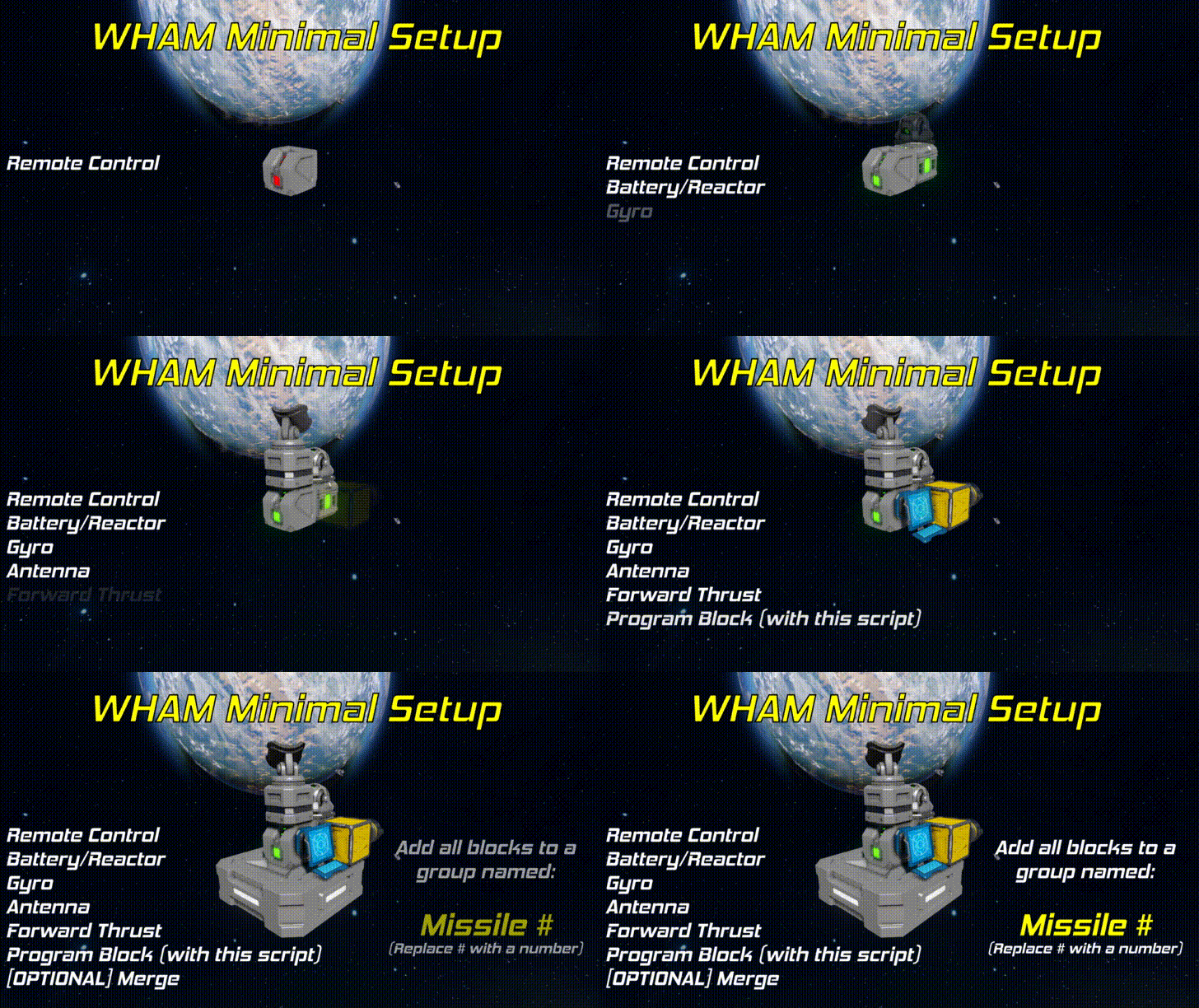
可选模块 以下模块为可选,非必需。若希望脚本对其进行控制,只需放置模块并将其添加到导弹组即可。 摄像头(支持主动寻的和弹头绊线引爆) 合并块(强烈建议用于分离) 转子(用于分离) 铰链(用于分离) 连接器(用于分离) 侧向推进器 人工质量块 传感器 - 用于弹头自动引爆。无需设置传感器动作。 弹头 计时器 - 当导弹与发射舰分离时触发。侧向推力 以“分离”命名的推力(将用于PB自定义数据中可配置的分离持续时间) 燃料箱 - 导弹发射时燃料箱将设置为停止储备 创建多枚导弹 每枚要发射的导弹都需要一个唯一的导弹编号。这是火控脚本LAMP识别应发射哪枚导弹的方式。 完成单枚导弹的上述设置后,只需将组名更改为新的导弹编号并以“setup”作为参数运行。代码将自动修正以往设置运行中的所有命名并配置导弹。 - WHAM发射级
WHAM在发射时将经历3个主要发射阶段: 断开延迟 分离持续时间 主点火延迟 每个阶段的持续时间都与前一阶段相关。这意味着主点火延迟是分离持续时间结束后,主点火应延迟的时间。 如果在推进器名称中添加名称标签“Detach”,它将在断开延迟结束时被设置为完全覆盖状态,并在分离持续时间结束后恢复为常规状态。 此外,制导延迟可用于延迟导弹制导系统的激活。其计时独立于上述阶段。也就是说,制导延迟和断开延迟同时开始并独立倒计时。 - WHAM自定义数据(第1部分)
The below is a list of Custom Data configurable parameters that modify how WHAM behaves. They can be configured in the Custom Data of the programmable block that WHAM is loaded into. NamesThis section covers most of configurable parameters related to missile naming. Key Valid ValuesDescriptionAuto-configure missile nametrue/falseIf the script should automatically configure the missile name based on what missile group contains the WHAM programMissile name tagtextThe base name tag of the missileMissile numberintegerThe unique missile number assigned to this WHAM program. Note: This value is automatically set if Auto-configure missile name is trueFire control group nametextThe name of the fire control group used by LAMP on the firing shipDetach thruster name tagtextName tag of any thrusters that should be set to max override during the detach duration DelaysThese variables control the launch staging timings used during missile launch. Key Valid ValuesDescriptionGuidance delay (s)numberDuration (in seconds) that guidance activation will be delayed. This is measured from the moment that the fire command is received.Stage 1: Disconnect delay (s)numberDelay (in seconds) that the missile will not disconnect from the firing ship. This is measured from the moment that the fire command is received.Stage 2: Detach duration (s)numberDuration (in seconds) after the disconnect delay that the missile will fire any detach thrusters or enable any artificial mass blocks.Stage 3: Main ignition delay (s)numberDuration (in seconds) after the detach duration that the missile will delay the main thruster ignition. GyrosThese parameters change how the angular control PID used for the gyros responds to errors in pointing. If you are not familiar with PID controllers, you might not want to fiddle with this. Key Valid ValuesDescriptionProportional gainnumberProportional gain for the gyroscope angular control PID. Proportional gain essentially controls the "speed" of the response. Higher values will make the missile steer faster, but can also cause it to overshoot and oscillate.Integral gainnumberIntegral gain for the gyroscope angular control PID. Integral gain helps account for constant error offsets. In gyroscopic angular control, this is not often necessary.Derivative gainnumberDerivative gain for the gyroscope angular control PID. Derivative gain is like "dampening." It will slow down the response of the PID and make it overshoot less, but values that are too high can make the system sluggish to respond to inputs and, in extreme cases, can cause the system to become unstable. Homing ParametersThese parameters modify how the guidance algorithm responds. In general, if you are not familiar with how proportional navigation works, you probably shouldn't touch this. Key Valid ValuesDescriptionNavigation constantnumberThe constant used in the missile guidance algorithm to scale the lateral acceleration component derived from target relative velocity and relative positionAcceleration constantnumberThe constant used in the missile guidance algorithm to scale the lateral acceleration component derived from target accelerationMax aim dispersion (m)numberMaximum randomized spherical dispersion from the target position in meters. Set this to something non-zero to make missile impact locations spread out. Set to 0 to disable.Topdown attack height (m)numberHeight above the target that the missile will fly over the target in topdown attack mode. Beam Riding ParametersThese parameters change how the missile behaves in Beam Riding mode. Key Valid ValuesDescriptionHit offset up (m)numberThe distance to offset the impact point of the missile up in meters. Negative values will offset the impact point down.Hit offset left (m)numberThe distance to offset the impact point of the missile left in meters. Negative values will offset the impact point right. Evasion ParametersThis section configures how the missile will fly in random paths when LAMP commands "Evasion" mode to activate. Key Valid ValuesDescriptionDirection change interval (sec)numberHow frequently (in seconds) that the missile picks a random direction to fly in.Max acceleration rationumberRatio (from 0 to 1) that determines what proportion of the missile's max thrust should be allocated to make it fly randomly off course. Larger values make the missile fly much more wildly off course which makes them harder to shoot down, but it also makes it harder for the missile to hit the target. - WHAM Custom Data (Part 2)
射线投射/传感器 这些参数会改变相机射线投射或传感器在近炸引爆/制导中的使用方式。 键 有效值 描述 使用相机进行制导 true/false 决定导弹上的相机是否用于主动制导。若设为false,导弹将以半主动模式制导,且相机仅用于近炸引爆。 绊线范围(米) 数字 导弹尝试引爆时与目标的距离(以米为单位)。它将使用相机射线投射、传感器或状态传播来根据此范围判断是否引爆。 最小目标尺寸(米) 数字 可触发近炸引爆的最小目标尺寸(以米为单位)。可使用此参数确保小于该尺寸的物体将被忽略。这对于忽略目标附近的小型碎片很有用。最小弹头解除保险距离(米)数值:允许导弹引爆的与发射舰之间的最小距离(以米为单位)。忽略友方单位:是/否:近炸引信是否应忽略探测到的友方舰船。忽略行星:是/否:近炸引信是否应忽略行星体素。引爆时忽略目标ID:是/否:如果为是,任何物体进入其引爆范围时导弹都会引爆。如果为否,则仅当锁定的目标物体在范围内时才引爆。 杂项:这些是不一定适合其他类别的杂项参数。 键 有效值描述:旋转速率(RPM)数值:导弹绕其中心轴的旋转速率(以RPM为单位)。这与螺旋运动不同;它类似于陀螺旋转运动。允许远程发射 是/否 此导弹是否允许远程发射。天线名称模式 无意义、空白、自定义、导弹名称或导弹状态 选择导弹天线的名称模式。导弹需配备天线 是/否 导弹是否需要配备天线才能成功完成设置。如果启用远程发射,此项将强制设为“是”。警告:将此项设为“否”会导致可靠性下降,并会使导弹无法接收来自发射舰的中途修正或指令。- WHAM 计时器自定义数据
当你为WHAM的导弹组添加计时器时,计时器自定义数据将填充以下配置。 WHAM - 阶段触发 键 有效值说明 按发射阶段触发 启动、分离、漂移、飞行(或“无”以禁用) 当导弹进入指定发射阶段时,此计时器将被触发。 WHAM - 距离触发 键 有效值说明 按距离触发(米) 数字(或“无”以禁用) 与此计时器将被触发时的目标距离(以米为单位)。 高级:雷达互操作性
WHAM/LAMP 具备与我的炮塔雷达交互并显示导弹锁定目标的功能。 https://steamcommunity.com/sharedfiles/filedetails/?id=1707280190
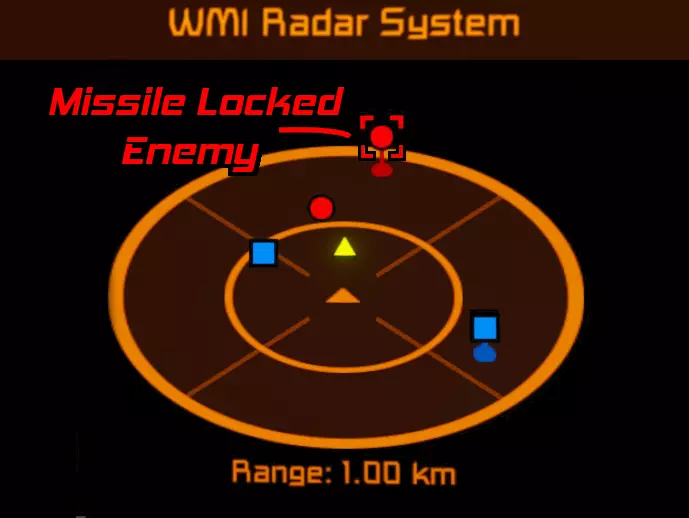
任何配备了炮塔型雷达(33.1.5版本或更高)的舰船,若处于配备LAMP的舰船或正在广播(关闭隐身模式)的WHAM导弹的广播范围内,将显示通过摄像头或炮塔制导模式锁定的目标。被锁定的目标会被一个瞄准框包围(如右侧图片所示)。瞄准框的颜色反映目标的关系;在默认配色方案中:蓝色为友方,黄色为中立,红色为敌方。 注意:如果想要增加雷达的作用范围,可以使用范围参数,或在雷达可编程方块的自定义数据中配置手动范围覆盖。这不会神奇地增加你的炮塔的探测范围,但会增加你通过其他来源(如:WHAM、LAMP、其他雷达)联网绘制目标的范围。 高级功能:远程发射导弹
配置好的WHAM导弹可以通过LAMP从不同舰船发射,但需要进行一些配置才能实现。 WHAM - 配置:打开WHAM可编程方块的自定义数据。在[其他]部分找到“允许远程发射”设置。将其设为true,完成后应显示为:Allow remote firing=true。点击确定保存更改。使用参数“setup”运行WHAM可编程方块。现在导弹将监听友方舰船通过LAMP发送的远程发射请求。 LAMP - 远程发射:要使用LAMP远程发射导弹,只需运行参数“remote_fire”。当发送remote_fire请求时,会发生以下序列:LAMP会向其范围内的所有导弹广播远程发射请求。此最大射程由LAMP程序自定义数据中的“天线射程 - 激活(米)”设置定义。任何“允许远程发射”设为true的WHAM导弹,都会向请求者发送包含导弹ID和位置的远程发射响应消息。LAMP会接收这些消息并进行选择:在“摄像头制导”或“炮塔制导”模式下,选择距离目标最近的导弹;在“波束制导”模式下,选择距离舰船最近的导弹。随后,LAMP会向所选导弹发送远程发射指令,触发该WHAM导弹的发射序列。远程发射导弹时,常规发射导弹的限制仍然适用。也就是说,在制导模式下请求远程发射时,必须保持锁定目标。LAMP - 自动远程发射 LAMP 可配置为在建立制导锁定时自动远程发射导弹。要执行此操作,请在 LAMP 程序的“自定义数据”中将“自动发射远程导弹”设为“开启”。 插件:导弹状态屏幕
如果你想显示单个导弹的状态,我有一个单独的脚本,旨在与WHAM/LAMP配合使用。这对WHAM/LAMP的运行并非必需,但可能会非常有用。 https://steamcommunity.com/sharedfiles/filedetails/?id=2287673468 实用注意事项和提示
LAMP:开火船上的摄像头越多,锁定就越强。由于摄像头存在射线投射冷却时间,更多的摄像头能让脚本缩短扫描间隔。 我建议每1公里扫描范围配备1个摄像头。摄像头数量不足的话,在远距离时锁定会非常弱。使用状态屏幕!它能提供火控脚本状态的清晰简洁摘要。 搜索锁定目标时,代码会按以下优先级顺序相对于相关方块向前扫描: 你正在主动控制的摄像头 “火控”组中指定的参考方块 你当前正在控制的舰船控制器。 请将朝前的摄像头尽可能靠近放置。当你启动锁定搜索扫描时,摄像头会直接向前扫描。如果你的前置摄像头分布过宽,可能会导致你跨坐在目标上。侧面和后置摄像头可以随意分布,因为它们不用于初始锁定搜索。摄像头射线扫描呈金字塔形,视角为90度。在飞船的六个面上都安装摄像头,以保持全角度锁定。如果你添加了声音模块,在制导模式下,你会根据锁定状态听到不同的声音。每两秒发出一次双哔声表示正在搜索锁定;每秒发出一次单哔声表示已成功锁定目标;警告警报声表示目标锁定正在丢失。如果你连续听到多次警告声,很可能即将失去目标锁定。只要你能站在上面,射线就能命中它。这意味着你无法穿透窗户进行射线投射! 听着,帮自己个忙,用一个蓝图制作多枚导弹吧!只需创建一个挂载了多枚导弹的导弹架,然后直接将带有导弹的导弹架制作成蓝图,而不是为每枚导弹单独制作蓝图! 为了实现最有效的目标拦截,你的导弹需要具备高加速度。加速度越高越好。 如果导弹配备了摄像头: 导弹将锁定发射舰所标记的目标,并开始自主追踪该目标。这意味着你可以实现发射后不管的导弹操作。 在所有模式下,摄像头都将用作弹头的触发装置。导弹上的摄像头数量越多,锁定效果越强。这是因为摄像头存在射线投射冷却时间。更多摄像头能让脚本交错进行扫描,从而缩短扫描间隔。如果可以,请将摄像头安装在前方和所有侧面,这样能获得更好的主动追踪效果。摄像头射线以90度视锥角呈金字塔形扫描,因此为了获得更好的视野(进而实现更好的锁定),建议在前方和侧面安装摄像头。(背面通常不会朝向敌人,所以不太重要)。使用脚本替换方块可以轻松一次性更新所有WHAM脚本!https://steamcommunity.com/sharedfiles/filedetails/?id=2871104776 帮助与问题
请将错误报告、帮助请求及其他一般问题提交至相应脚本的“帮助与问题”论坛。 关于WHAM: >> 点击此处! << 关于LAMP: >> 点击此处! << 示例舰船
以下是一些使用WHAM和LAMP的舰船示例列表。 https://steamcommunity.com/sharedfiles/filedetails/?id=3207356939 https://steamcommunity.com/sharedfiles/filedetails/?id=2108857776 https://steamcommunity.com/sharedfiles/filedetails/?id=2109113277 https://steamcommunity.com/sharedfiles/filedetails/?id=2110163220 https://steamcommunity.com/sharedfiles/filedetails/?id=2109719458 https://steamcommunity.com/sharedfiles/filedetails/?id=2150164628 https://steamcommunity.com/sharedfiles/filedetails/?id=2025612585 https://steamcommunity.com/sharedfiles/filedetails/?id=2110241521 https://steamcommunity.com/sharedfiles/filedetails/?id=2151832204 https://steamcommunity.com/sharedfiles/filedetails/?id=2233420912 https://steamcommunity.com/sharedfiles/filedetails/?id=2113168306 鸣谢
我要感谢这些优秀的朋友: jonnytaco Lord Commissar 5URG3 Rose Minotaur ToedPeregrine4 jphuffman55 Marchelo Marcelo 他们帮助我测试这些脚本,提供创意,给予鼓励,还经常充当我的活靶子!