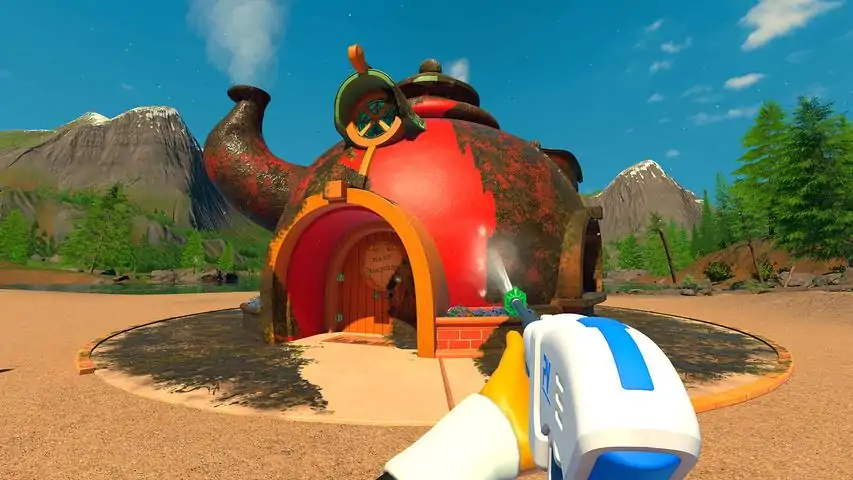
冲就完事模拟器2


我们已发布《PowerWash Simulator 2》试玩版的更新,以处理部分反馈并为您提供更优质的游戏体验。 本次更新内容包括: - 在视频选项卡中新增目标帧率选项(默认设置为无限制+垂直同步开启) - 略微调整相机以避免帧率卡顿(可能有助于缓解晕动症) - 新闻文章文本修改 - 修复新闻文章缓存逻辑错误 - 优化改进 我们还在游戏内商店中添加了新物品供您使用强力清洗点数购买,该物品为“乡村搁架”! 感谢您至今提供的所有反馈,期待大家在10月23日正式版上线时加入游戏!如果您在游玩《神力科莎:清洁模拟2》试玩版时遇到任何问题,请访问我们的支持门户,我们将帮助您解决问题以便继续清洁工作 ⤵️ https://futurlab.freshdesk.com/support/home 点击此链接了解《神力科莎:清洁模拟2》的所有最新消息并游玩试玩版 ⤵️
game_id2968420


This is a guide (and script) to add keybinding via AutoHotkey until the devs actually add it. How To I was inspired to do this because of a) someone in the forum mentioned losing the use of their dominant hand and thus needing keybindings. The idea is originally from: https://steamcommunity.com/sharedfiles/filedetails/?id=447835974 The following code is an ahk-script. All it does is rebind keys when the active window is powerwash.exe. #Requires AutoHotkey v2.0 #SingleInstance ;This ensures that the remapping only happens in PW2 #HotIf WinActive('ahk_exe PowerWash Simulator 2.exe') /* IMPORTANT: The syntax is: ChangeMe::LeaveMeAlone - so you change the left key and leave the other alone. I have not done any presets, instead, if using this as is, you'd have the normal keybind. So for example: If you want to press k to move left, you'd have "k::a" as the keybind for "Left". If you want to have a key act like scrolling the mouse wheel down, you'd have "b::WheelDown" (assuming you want to bind it to "b"). For a list of available keybinds and their names, see: https://www.autohotkey.com/docs/v2/KeyList.htm Note: If you change a keybind, the original key still does the same, unless you also use it for a new keybind. So, changing "a::a" to "j::a" would make both j and a move left, unless you use a somewhere else. Limitations: This cannot change the displayed keys ingame. You have to remember your keybindings. This does not do is offer a rebind for looking around by moving the mouse because that's not a keybind. */ /*Mouse bindings*/ ; Left click LButton::LButton ; Right click RButton::RButton ; Wheel click Mbutton::MButton ; Scroll Wheel down (towards you) WheelDown::WheelDown ; Scroll Wheel up (away from you) WheelUp::WheelUp /*Movement*/ ; Up w::w ; Left a::a ; Down s::s ; Right d::d ; Sprint LShift::LShift ; Toggle Stance LCtrl::LCtrl ; Jump Space::Space /*Washer*/ ; Washers 1::1 ; Nozzles 2::2 ; Extensions 3::3 ; Rotate Nozzle/Refill Soap r::r ; Toggle free aim mode c::c /*Menus/Misc*/ ; Open/Close game menu Esc::Esc ; Open task list Tab::Tab ; Dirt Highlight q::q ; Interact e::e To run this, download and install Auto Hotkey 2 (official download: https://www.autohotkey.com/download/ahk-v2.exe). AHK is at its base a text replacement program, but it is capable of A LOT - changing keybinds is only a weak example. This method is usable for pretty much all games with small adjustments, but this specific script has all the keys used by PW2. Copy this and paste it into a text editor. Save with the ending ".ahk" and double click the file to start the script. You'll have a small green H in your notification area, because it runs in the background immediately. To edit, just open the file in a text editor. If the script is running, you have to reload it by either starting it via the file again or by right-clicking the taskbar symbol and selecting "Reload script". Instructions for changing the keybindings are in the script itself, but basically: Change the thing on the left of "::" to what you want to press and PW2 believes you've pressed the key the devs assigned. For a list of available keybinds and their names, see: https://www.autohotkey.com/docs/v2/KeyList.htm This does not change the displayed keys ingame (duh) nor replace the mouse movements for looking around. Hope this helps!

清洁无法移动的电梯下方地毯(修复前指南) 文字指南: 当前剧院关卡后方有一个无法移动的电梯,导致下方地毯难以清洁。在修复此问题前,你需要按以下方法清洁其下方区域: 1. 彻底清洁地毯上所有可见部分,确保全面无遗漏。 2. 趴下(或使用最低蹲姿)。 3. 为肥皂分配器配备超长延长杆。 4. 对准电梯边缘开始喷洒肥皂,在瞄准模式下向电梯下方左右移动喷洒。 5. 切换至白色喷嘴进行冲洗,左右移动操作,即可完成清洁。 我使用的是Prime Vista Pro。通常在到达此关卡时,你应该有足够的资金购买该设备。 视频指南: 我已录制在自由模式下新关卡的操作过程,并加速了大部分全面清洁的画面。跳至1分35秒查看电梯下方的最终区域。


各位清洁师们! 我们已发布《神力科莎:清洁模拟2》的更新补丁。 本次补丁修复内容包括: - 多人联机连接问题优化 我们正在开发其他更新和修复内容,很快就会推出。但我们希望能尽快将此修复带给大家,让你们能继续一起清洁!当这些内容准备就绪时,我们会通知所有人。


各位清洁大师们! 我们原计划今天发布发售日期预告片,但遗憾的是,目前所有平台的版本尚未完全开发完成(未达到“进厂压盘”阶段)。 不过为了让大家在等待期间有所消遣,现在可以在Steam上游玩《神力科莎:清洁模拟2》的试玩版! 这个单人试玩版包含以下内容: 2个关卡(搬家货车和公共设施)以及基地 初始清洁设备(Prime Vista 1500和Urban X U1) 全新的泡沫肥皂 漩涡地板清洁器(可解锁) 可解锁家具 可抚摸的猫咪 超多“叮”的提示音 无限重玩价值(前提是你不介意反复清洁这2个关卡) 快来体验试玩版,尽情享受清洁的乐趣吧⤵️
game_id2968420
各位清洁大师们!《神力科莎:清洁模拟2》将亮相2025年东京游戏展!我们会在现场提供可试玩的 demo!如果您将出席展会,可以前往我们的展台体验一些新的污渍覆盖关卡。您可以在以下位置找到我们:11-C05展厅。想要获取《神力科莎:清洁模拟2》的所有新闻和更新,请立即将游戏加入愿望单!
game_id2968420
各位清洁大师们,我们正在为《PowerWash Simulator 2》制作首个补丁,力求尽快发布。对于那些在联机游玩时遇到困难的玩家,我们深表歉意。 此次更新内容包括: - 多项多人联机连接性改进 - 修复剧院任务中剪叉式升降机卡住的问题 - 修复Steam Deck分辨率问题 - 移除高压清洗点数上限通知并提高点数上限 - 修复PS5商店为空的问题 - 修复Switch 2存档数据丢失问题 我们还希望在此次补丁中加入按键重绑定功能。开发团队目前正在进行测试,一旦确定上线日期,我们会立即通知大家。 如果您在游玩《PowerWash Simulator 2》时遇到任何问题,请通过我们的支持门户联系我们,以便我们帮助您解决问题,重新投入清洁工作。访问 com/support/home 以获取《神力科莎:清洁模拟 2》的所有最新消息。
game_id2968420