换一换
换一换 


新手友好指南:关于起飞和减少坠机 简介 大家好!希望本指南对大家有所帮助。如果你是新手,建议阅读本指南。如果你想了解更多关于飞机的知识,也推荐阅读本指南。 感谢u/disgustipated的宝贵反馈,正因如此,本指南涵盖了发动机仪表和配平的内容。 仪表设备
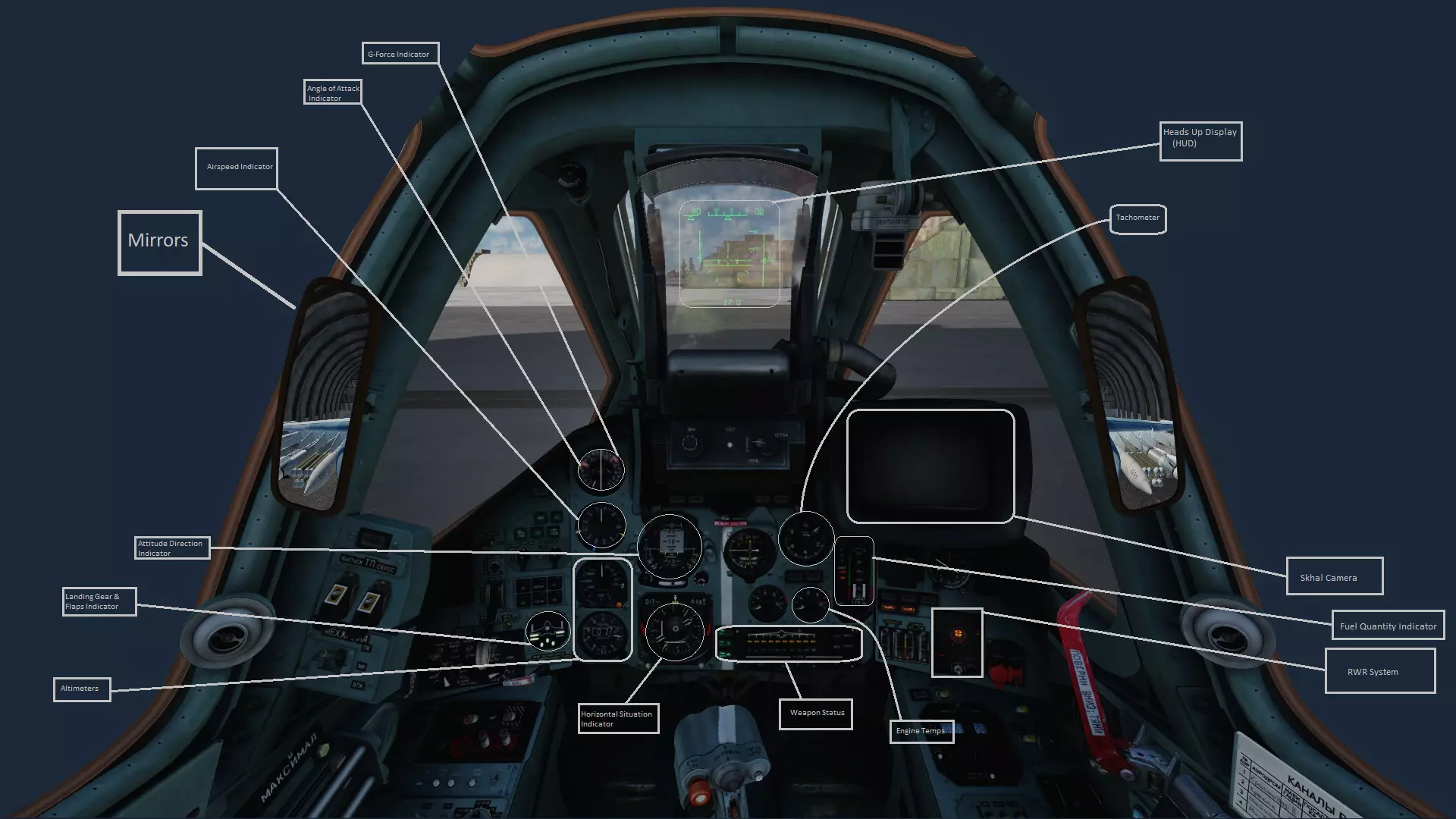
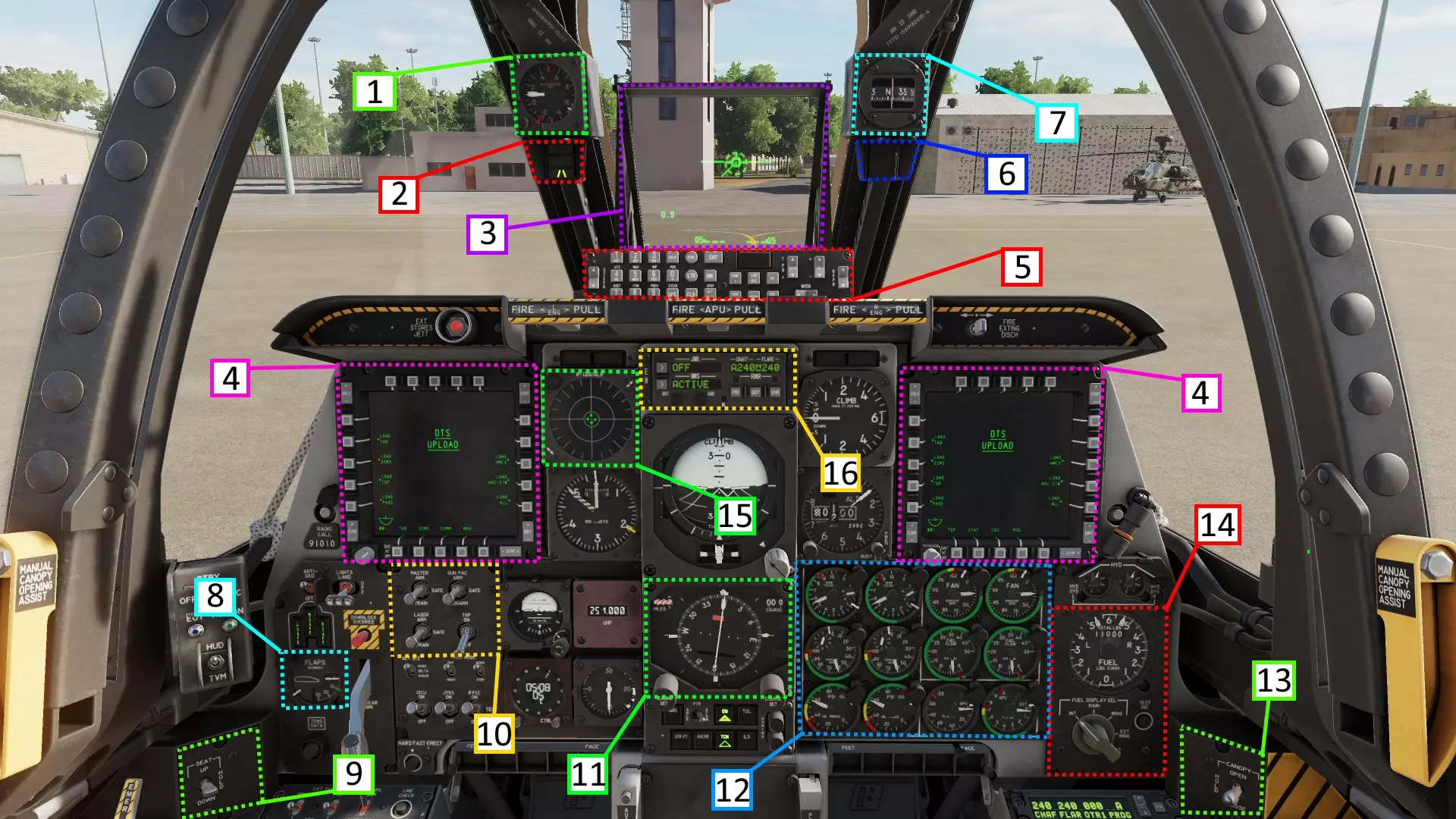
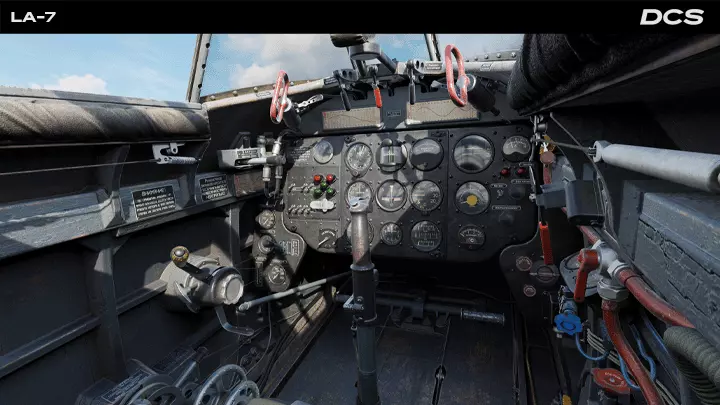
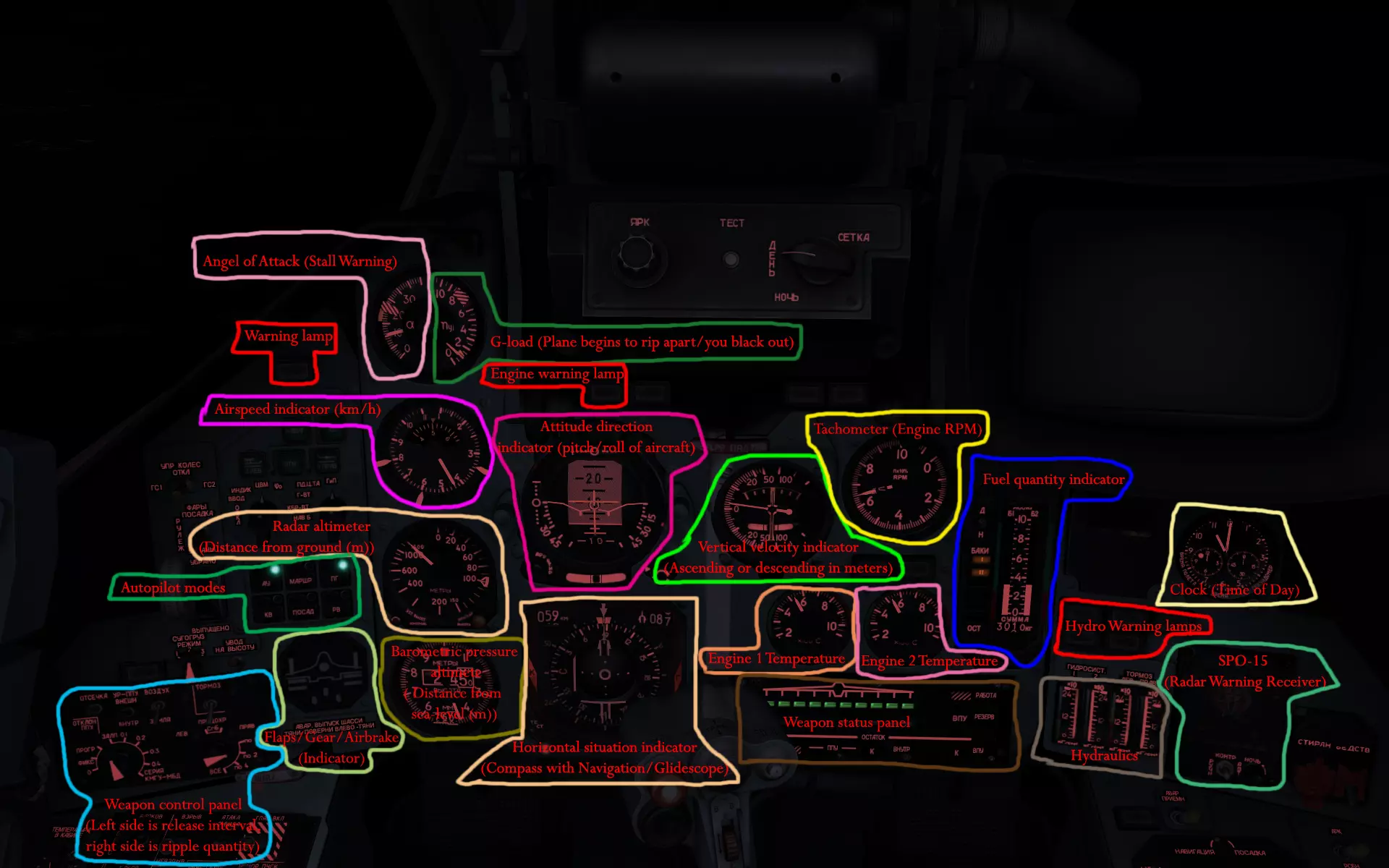
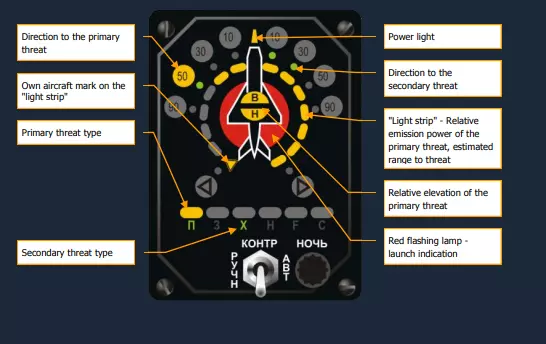
高度表:用于测量高度。 襟翼和起落架指示器:水平条显示襟翼是否放下,圆圈显示起落架是否放下,垂直条显示减速板状态。 姿态指引指示器:显示航向、横滚和俯仰角度。 空速表:显示飞行速度。 迎角指示器和过载指示器:指示器左侧显示迎角(单位:度),右侧显示过载值。 平视显示器(HUD):显示航向、横滚、俯仰角度以及所选武器。 斯科尔相机(Skhal Camera):用于引导空对地武器系统。 燃油量指示器:左侧垂直条显示燃油状态,右侧垂直条显示供油油箱状态。 雷达告警接收机系统(RWR System)
Weapon Systems Indicator Shows the type, quantity and readiness of the currently selected weapon and the remaining gun ammunition are shown. if there's a Yellow bar, that means there is a weapons system on the hardpoint. if there is a green bar, that means the weapon is ready to be fired. in the upper right corner of the Weapons Systems Indicator, it shows what weapon system is selected. Б for bombs, УР for missiles, НРС for rockets, ВПУ for the built-in 30 mm cannon The remaining cannon rounds are shown in the lower right of the panel К for full, 1/2 for one-half, 1/4 for one-quarter. Horizontal Situation Indicator Shows Heading, and Distance to Waypoint and Heading to Waypoint (Waypoints are set before the mission, so don't worry to much). Tachometer Measures Engine RPM Engine Temperature Measures Engine Temperature Startup Hit Right Shift + L to Turn on the Electrical Systems. If your aircraft doesn’t have weapons on the pylons, Hit Backslash (/) and Select Ground Crew, then Rearm & Repair. Select a Loadout Of your choice (Your Cockpit should be open or you should have the radio on, otherwise you won’t be able to communicate with the ground crew). Next, Close the Cockpit with Left Control + C. Request Startup from the ATC via Backlash -> ATC -> 1 -> Request Startup. Then, power up your engines with Right Shift + Home. Using the F2 View or your instrumentation, Wait for the RPM to Go above 33. If you don’t do this, and accelerate before 33% RPM, you could get an Engine Fire. If this happens, shut down your engines using RShift + End, and wait for your engines to cool. When your Ready, Request Taxi to the Runway and Accelerate using Page Up (If you need to Decelerate, use the Pagedown key). Don’t floor it, look at the throttle lever in the bottom left of the cockpit, get it to about halfway. While you Taxi, use the M Key to set up the Mirrors. Use the F10 Key to view the Map, use it to check for nearby landmarks and players you may see after taking off. Use the X and Z Keys to Steer you while on the ground. Make sure not to turn hard when taxing over 10Km/h. Use the W key to break just before you turn onto the runway. Takeoff Request Takeoff from the ATC via Backlash -> ATC -> 1 -> Request Takeoff. Once the ATC has given you Permission to Takeoff, Turn onto the Runway. Hit F to lower your flaps. Line up with the runway using the Compass bearings at the top of the HUD. Once you’re done lining up, accelerate to the Maximum that your throttle can go. Wait until you are around Three Quarters Of the way Down the Runway. Use the Down Arrow to pull up. Don’t pull up to much, only go for a 25-30 Degree angle. If you don’t take off, raise the angle. Once you’ve gone to an altitude you are happy with, level Out with the up arrow. If you want to, use the left or right arrow to turn. Then, engage the Autopilot Autopilot Hit Alt + 1 to keep your current heading and angle. Alt + 2 = Altitude Hold (Barometer)and Roll hold Alt + 3 = Transition to level flight, use it if you stall or if you don’t want to fly the aircraft. Alt + 4 = Altitude Hold (Barometer) Alt + 5 = Altitude Hold (Radio) Alt + 6 = Follows Waypoints. It’ll only work on missions with waypoints, so you probably don’t need to worry about it. Air to Air Weapons Systems Press 6 to switch to Air to Air mode. the SU-25T can use the R-73 and R-60 Missles for air-to-air combat. you can also use the Cannon. Air-to-Air Missles The SU-25T has Two Air to Air missles, the R-60 and R-73. The R-60 is worse than the R-73. The HUD will show what missle you have selected, by either having a “73” or a “60”. To Engage a target, place the Targeting Icon onto the target by manuvering your aircraft. Once you hear the locked sound, hold down space to fire the weapon. Cannon While in Air-to-Air Mode, Press C to use the Cannon. a funnel will appear on the HUD - it represents the shell’s flight trajectory vs. target wingspan. By pressing the RAlt-[ and RAlt-], you can change the Wingspan of the target aircraft. Maneuver your aircraft to place the target inside the funnel so that the target’s wingtips touch the funnel edges. then hold down space to fire. Air to Ground There are 4 Types Of Air-to-Ground weapons on the SU-25T, Unguided Bombs, Guided Bombs, Unguided Rockets and Guided Rockets. Unguided Bombs can be used when you select them via the Weapon Select Key (D). Line up the aiming marker on what you want to bomb, and press Space to release the Bombs. For Guided Bombs, Use the Sakhal camera by pressing “O” to activate it. Move it around with the [;], [,], [.], [/] keys. Once you have found your target, hit Enter to lock your camera on it. You can Zoom in or out with the - and = keys. Once you have locked in your camera, hit Right Shift + O to designate it. Use D to select the guided bomb, and fly your Aircraft so the Vertical Guiding line is lined up with the Tail on the HUD Aircraft Icon. When you are over the drop zone the bombs will drop automatically. After they drop, disable the laser designator (Right Shift + O) so it doesn’t overheat. For Unguided Rockets/the Gun, While in Air to Ground mode, select an Unguided Rocket with your weapon select key “D” (Or C for Cannons). Line up your targeting icon with your target and Press Space to Fire. For Guided Missles, Use the Sakhal camera by pressing “O” to activate it. Move it around with the [;], [,], [.], [/] keys. Once you have found your target, hit Enter to lock your camera on it. You can Zoom in or out with the - and = keys. Once you have locked in your camera, hit Right Shift + O to designate it. The range to the target is shown on the HUD. When at maximum launch range, hold Space to Fire the Missles. Landing Line up with the Runway using the Compass Icon on your HUD. When flying under 400 Km/h, you can deploy your Gear. Hit Shift + F to Activate Landing Flaps. As you approach the runway, gradually slow to 270 Km/h Use your Throttle to keep on the glidescope (glidescope being the approach path to the runway). When you are about 5 Meters over the Runway, Flare by pulling up your nose so you have a soft landing. The Flare is Completed when you are traveling at about 240-220 km/h. Once you actually touch down, Set your Engines to Idle and press P to deploy the Drouge Chute. Landing is difficult, so don’t worry if you make a mistake. Surviving a Missle Launch/ Being Shot at Eventually, you'll get a missle launched at you. if this happens, watch your RWR and Spam Flares and Chaff. if you're at altitude, Dive down to try to break radar contact and to get more speed so you can run away. Don't Fly Directly away from the missle, as this will mean your engine would be directly pointed at the missle, meaning the missle would get a better lock. You should keep the missle off the wings (on the side of the aircraft). Apart from that, just spam flares. If you're being shot at, you should Dive towards the ground, so you break line of sight with the thing that's shooting at you. if you are damaged, Return to Base. if you aren't, kill the thing that shot at you. Trimming Trimming is Tailoring the Aircraft to make it stay level. you can use Rctrl and . to trim the nose up, Rctrl and / to trim the right wing down, Rctrl and ; to trim the nose Down, Rctrl and , to trim the left wing down. i'd Reccomend Britchot's Method to trimming while flying. 1. Manuver the Aircraft so it's Level 2. Trim 1-3 "clicks" in the opposite to wherever the aircraft's leaning 3. Release the controls and figure out whichever way it's leaning 4. Repeat 1-3 as necessary. Remeber to Re-Trim the aircraft after you Use Weapons. How to (Eventually) Fly Competently i'd reccomend checking out this guide for weapons systems and other useful stuff. try flying around alot, in MP or SP. if you want to buy a module, i'd reccomend getting a Flaming Cliffs aircraft, or the Flaming Cliffs Bundle. If you're looking for a Wingman, or to be involved with the community more, or you simple need to ask a Question, I'd Reccomend the Developer's Forums[forums.eagle.ru], or r/Hoggit on Reddit, or the DCS Discord[discordapp.com], or the Hoggit Discord[discord.gg] SEAD SEAD (Supression Of Enemy Air Defences) is all about taking out those Pesky SAMs (Surface to Air Missle) In the SU-25T, you have two missles that you can use in SEAD. The Kh-25MPU and Kh-58. These Missles Track the Signals Of a SAM, but to detect these Signals you need a L-081 "Fantasmagoria" Pod. You Can’t target Every SAM Though. The Short Range Mobile AAA usually Can’t be targeted, as they use a frequency higher than your Pod Can Detect. To Find a SAM, Hit 7 to get into Air to Ground mode. Then Hit I to enable Radar Detection. The SAM should be Picked up on your RWR. Turn so Your nose is lined up with the SAM. Switch to the Missle you’d like to Use. The SAM should be marked with a Diamond on your HUD. Use the [,], [.], [/], [;] keys to line the Circle up with the Diamond. Once this is Done, Hit Enter to Lock. On the Left Side Of the HUD, you’ll see a Bar. At the Top of the bar is a Black Box, this indicates your Maximim Range. There is also an Arrow., this indicates how far you are from the Target. If the Arrow is Below the Black Box, you are in Range. When you are in Range, and have the “NP”, Hold space to Fire. Once you’ve fired, wait until the Missle hits the SAM, then pull away. The reason you want to do this is you will get a Visual Confirmation on whether on not the SAM has launched at you, and you see wether or not you need to re-engage the SAM.