换一换
换一换 


As a construction simulation game, Cities: Skylines gameplay is usually time-spending and requires plenty of commands from players. Get those simply done with mouse clicks will be a catastrophe. However, the default setting provides few shortcuts which are hard to deal with complicated controls, and few players comes up with an easy-using shortcut layout. Here is my personal recommended shortcut layout for Windows CSL players that covers almost all main controls and even some popular mods without any conflicts. Some of them suggest their functions so it could be easy to memorize. For your reference. Function Keys F1 Tool Mode: Lines F2 Tool Mode: Curves F3 Tool Mode: Symmetrical Curve F4 Tool Mode: Up/Downgrade F5 Snapping Mode: Grid F6 Snapping Mode: Guidelines F7 Debug Output Panel (default) F8 mod: Sun Shaft F9 Camera Mode: Cinematic (default) F10 mod: Dynamic Resolution F11 Camera Mode: Free F12 Screenshot (Game build-in screenshot will work with Steam simultaneously in this way.) Shift+F12 High Resolution Screenshot (default) Space & Number Keys Space Simulation Speed: Pause 1 Simulation Speed: 1x 2 Simulation Speed: 2x 3 Simulation Speed: 4x 4 Zoning: Low Density Residential 5 Zoning: High Density Residential 6 Zoning: Low Density Commercial 7 Zoning: High Density Commercial 8 Zoning: Industrial 9 Zoning: Office 0 Zoning: Null Arrow Keys Up Elevation Up Down Elevation Down Left mod: Network Anarchy: Previous Mode Right mod: Network Anarchy: Next Mode View Control W Forward S Backward A Leftward D Rightward Other view controls shall be finished by Middle Mouse Button (default) in this layout. Game Panel V unlocking (achieVements) R Roads X areas & districts (region) Y map tiles (default) Z Zoning Q water (aQua) E Electricity G Garbage & industry H Healthcare F Fire department P Police department C Culture department T Transport O decOration (parks) U Unique buildings M Monuments L Landscaping J economy K policy B Bulldozer (default) N uNderground bulldozer (default) I Info view list Info View Panel Shift+W Wind Shift+S Snow Shift+D Density Shift+V land Value Shift+R Road maintenance Shift+X district Shift+Y happYness Shift+Z levels Shift+Q water (aQua) Shift+E Electricity Shift+G Garbage Shift+H Health Shift+F Fire safety Shift+P Police Shift+C Culture Shift+T public Transport Shift+O Outside connections Shift+U Unique buildings Shift+M Monuments Shift+L natural resources info Shift+K mod: traffic congestion report: speed-based mode Shift+J mod: traffic congestion report: amount-based mode Shift+N Noise Shift+I Industrial pollution (Up to now, Shift+A & Shift+B remain unused.) Game Control Ctrl+S quick Save Ctrl+O quick lOad Ctrl+Shift+F asset search For mods by algernon: Alt+A mod: Prop Control: Anarchy Alt+Shift+A mod: Prop Control: Snapping Alt+S mod: Tree Control: Anarchy Alt+Shift+S mod: Tree Control: Snapping Alt+F mod: Tree Control: Forestry resources lock Alt+Q mod: Visibility Control: Sceenshot mode Alt+W mod: Visibility Control: vanilla mode Alt+E mod: Visibility Control: LOD mode Alt+C mod: ACME Alt+R mod: ACME: Reset rotation Ctrl+?+X mod: ACME: Rotate in X axis Ctrl+?+Y mod: ACME: Rotate in Y axis Ctrl+D mod: Repaint Ctrl+E mod: Enlighten Your Mouse For mods by Quboid: Numpad 0 mod: Network Anarchy: Reset elevation Ctrl+1 mod: Network Anarchy: Anarchy Ctrl+2 mod: Network Anarchy: Bending Ctrl+3 mod: Network Anarchy: Snapping Ctrl+4 mod: Network Anarchy: Collision Ctrl+M mod: Move it Ctrl+C mod: Move it: Copy (It is compatible with Picker as both Quboid's works) Ctrl+V mod: Move it: Paste Ctrl+B mod: Move it: Bulldoze Ctrl+H mod: Move it: Align height to selection Ctrl+Shift+H mod: Move it: Align height to terrain Ctrl+C mod: Picker (It is compatible with Move it as both Quboid's works) For mods by sway: Ctrl+Q mod: Yet Another Toolbar: Quick menu Ctrl+A mod: Yet Another Toolbar: Show more Ctrl+Shift+A mod: Yet Another Toolbar: Hide Ctrl+F mod: Find it For mods by macsergey: Ctrl+T mod: network multiTool Ctrl+N mod: Node controller renewal Ctrl+L mod: intersection marking tool For mods by Krzychu1245: Ctrl+P mod: tm: Pe Ctrl+Shift+N mod: broken Node detector For mods by other authors: Ctrl+R mod: Dynamic Resolution Ctrl+Shift+C mod: Compass Ctrl+G mod: Game Anarchy Ctrl+Shift+M mod: Game Anarchy: Increase money Ctrl+Z mod: Undo it: Undo Ctrl+Shift+Z mod: Undo it: Redo Ctrl+Alt+Z mod: Undo it: Peek undo / redo Want to learn more about those mods? See my guide to find out which types of mod they are and subscribe in a click. https://steamcommunity.com/sharedfiles/filedetails/?id=3204872664
Windows玩家快捷键布局

2026-02-18 01:00:21
转载

AI智能总结导读
《城市:天际线》作为耗时的建造模拟游戏,默认快捷键难以满足复杂操作需求,本文分享适配Windows玩家的自定义快捷键布局,覆盖游戏主操作及多款热门模组且无冲突,包含功能键、组合键等,易记忆,可提升操作效率。

评论
共0条评论

可解锁成就的模组
使用模组时解锁成就指南 如何使用模组和模组工具来启用成就 成就与模组 基础知识:使用任何模组后,将无法解锁成就。 即使在加载时禁用所有模组,若加载了曾使用过任何…
2026-04-02 14:320赞 · 0评论

有用的信息
在本指南中,我将为大家提供关于《城市:天际线》的一些实用信息,帮助大家更好地游玩这款属于自己的城市建造游戏。 如何将交通量降至最低 交通问题是这款游戏的最大难题…
2026-03-31 04:042赞 · 0评论
《城市:天际线》1.21.1-f7版本更新内容
大家好! 今天我们发布了一个小型补丁,修复内容如下:《城市:天际线》更新内容 1. 全平台 - 修复了竞赛和游行活动的成本,使其与用户界面中显示的内容一致 - …
2026-03-17 15:040赞 · 0评论

给有抱负的市长们的基础模组指南
本指南列出了精选的模组,简要说明了它们的功能以及你需要它们的原因。旨在为追求流畅游戏体验的玩家提供一个良好的起点。所有模组均与《城市:天际线》的【降雪】DLC兼…
2026-03-17 00:060赞 · 0评论

《城市:天际线》1.21.1-f4 比赛日更新补丁 - 模组状态与补丁说明
《城市:天际线》更新内容 3月10日欧洲中部时间上午10点,《城市:天际线》的最新补丁将正式上线。此次更新包含全新的扩展包,同时还有面向所有游戏拥有者的免费补丁…
2026-03-09 16:590赞 · 0评论

为了更清洁的城市 下水道bug 无模组
大家好,朋友们,我在游戏中发现了一个可以为我们所用的漏洞。 如你们所知,管道中流动的水要么排入大海,要么如果有DLC的话就排入土地,而借助这个漏洞或错误,既不会…
2026-03-08 21:070赞 · 0评论
Steam《城市天际线》限免畅玩+一款免转付❗️Epic喜加三❗️轻肉鸽动作+战略管理+第一人称射击
本周免费赛博鸡蛋来啦!
2026-03-06 06:133赞 · 0评论

(2023年)如何在《城市:天际线》中创建真实城市地图
指南中介绍了如何在《城市:天际线》中创建真实城市的道路网。2022年,由于世界上存在恐俄情绪,许多网站在俄罗斯停止运行! 第一部分 必要的模组 从Steam创意…
2026-03-03 15:070赞 · 0评论
订阅价格下调!
将您的城市建设提升到新高度,畅享《城市:天际线》的所有内容。订阅扩展包服务后,只要您的订阅处于有效期内,即可立即获取所有已发布的DLC,以及未来新增的每一个扩展…
2026-03-02 09:090赞 · 0评论

修复交通拥堵
对于那些对交通拥堵感到困扰的玩家,本指南提供了逐步解决交通流量问题的方法。它提炼了其他指南中隐藏的精华知识,为你节省时间和精力。 你可以随意阅读任何感兴趣的部分…
2026-02-23 16:310赞 · 0评论
暂无更多
最新更新
- 《城市:天际线》1.21.1-f9版本更新内容 — 《城市:天际线》修复公告 1.本次为大家带来一个非常小的更新,主要修复了过去一周收到的漏洞反馈。我们认为这将是最后一次更新! 2.此次更新非常轻微,不会影响模组…
- 创建流畅的高速公路出口 - 指南 — 在本指南中,我将介绍如何建造顺畅的高速公路出口。内容将基于完全笔直且平坦的高速公路,为你展示一些基础知识。你可以运用这些基础知识,根据自己地图中的复杂情况进行调…
- 可解锁成就的模组 — 使用模组时解锁成就指南 如何使用模组和模组工具来启用成就 成就与模组 基础知识:使用任何模组后,将无法解锁成就。 即使在加载时禁用所有模组,若加载了曾使用过任何…
- 厌倦堵车了吗?解决方案就在这里 — 《城市:天际线》解决交通拥堵问题的顶级指南 优化道路网络 道路等级: 高速公路——城市的主要交通干线,用于区域间的快速通行。 大型道路(4-6车道)——城市内的…
- 重建真实城市——综合指南 — 本指南面向希望不只是游玩游戏,而是用游戏重建自己“真实”城市的高级玩家。内容涵盖获取必要数据、准备地图、创建自定义建筑(资产)以及填充城市地图内容等主题。我还会…
- 有用的信息 — 在本指南中,我将为大家提供关于《城市:天际线》的一些实用信息,帮助大家更好地游玩这款属于自己的城市建造游戏。 如何将交通量降至最低 交通问题是这款游戏的最大难题…
- 韩国背景资产指南 KOR — 我正在收集所有以韩国为背景的资产。 更新记录 Ver 2.0 1. 对合集进行细分 - 按区域划分建筑、按用途划分车辆 2. 更换新的代表性图片 3. 按语言分…
- SketchUp资产创建指南 — 一种简单但有效的资产建模和纹理处理方法,全部在SketchUp中完成! 简介 你想创建自己的资产,但却发现3DSMax或Blender太难操作?本指南正是为你准…
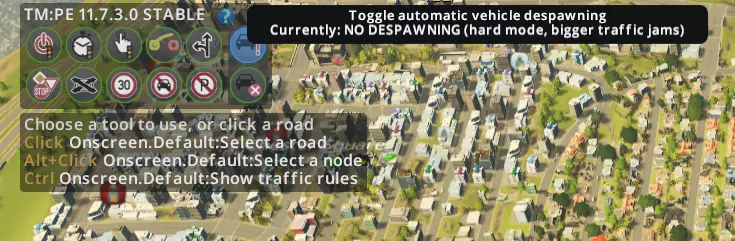
- TM:PE - 交通流量调控管理 — 本指南介绍如何使用【交通管理:总统版】(TM:PE)和新的股票交易所进行刷钱操作。 步骤1:确保已禁用自动消失功能,并且有大量交通拥堵导致你的股票下跌。
- 《城市:天际线》最佳模组 — 移动它 这个模组允许选择、移动和对齐各种物体。 交通管理器:总统版(稳定版) 改善车道和停车空间的利用率。调整交叉路口、道路和铁轨!这是经过测试的稳定版本,功能…